Nginx
Nginx study notes
Updated
Syntax Rules
A configuration file consists of directives and directive blocks. Each directive ends with
;; directives and parameters are separated by{}.Multiple configuration files can be combined with the
includestatement, improving maintainability.Use
#for single-line comments and$to reference variables.Time units:
ms: millisecondss: secondsm: minutesh: hoursd: daysw: weeksM: months, fixed at one month = 30 daysy: years, fixed at one year = 365 days
Size units:
- no unit: bytes
k/K: 1024 bytesm/M: 1024 * 1024 bytesg/G: 1024 * 1024 * 1024 bytes
There are four kinds of directive blocks:
- http: root configuration
- upstream: configure upstream server information
- server: specify site information
- location: configure paths, resource matching, etc.
Common Nginx Configurations
Log Configuration
http {
  # configure the log output format, named main
  log_format main '$remote_addr - $remote_user [$time_local] "$request" '
                  '$status $body_bytes_sent "$http_referer" '
                  '"$http_user_agent" "$http_x_forwarded_for"';

  # configure where access logs are stored, using the main format
  access_log /var/log/nginx/access.log main;

  # configure where error logs are stored
  error_log /var/log/nginx/error.log;
}
gzip
http {
  # enable gzip
  gzip on;

  # declare that files smaller than 1KB skip gzip
  gzip_min_length 1k;

  # gzip compression level
  gzip_comp_level 2;

  # which MIME types to gzip-compress
  gzip_types text/plain text/css application/xml text/javascript image/jpeg image/png;
}
Autoindex
http {
  # enable autoindex support; when a directory is accessed directly, all files in it are shown, styled by Nginx
  autoindex on;
}
Access Rate Limiting
http {
  # limit transfer speed to a maximum of 1k/s
  # prevents large resources from saturating bandwidth and affecting connections for other normal business requests
  set $limit_rate 1k;
}
Connection Pool
# the number of concurrent connections each worker supports, including client connections and upstream connections
worker_connections 512;
Load Balancing
First configure the serving Nginx instances to only accept requests from the gateway, blocking direct external access:
http {
  server {
    # only accept requests from the local machine; for a cluster, configure the cluster's internal address, e.g. 192.168.0.1:8080
    listen 127.0.0.1:8080;
  }
}
The gateway Nginx configuration:
http {
  # name the serving cluster local
  upstream local {
    # serving device 1 configured earlier
    server 127.0.0.1:8080;

    # serving device 2 configured earlier
    server 127.0.0.1:8081;

    # serving device 3 configured earlier
    server 127.0.0.1:8082;
  }

  # define a cache configuration
  # /tmp/nginx_cache   root directory of cache files
  # levels=1:2   generate two levels of subdirectories, e.g. if `hash(key)` is `d41d8cd98f00b204e9800998ecf8427e`
  #     it is stored in the directory `/d/41/d41d8cd98f00b204e9800998ecf8427e`
  # keys_zone=test_cache:10m   define the name of the shared memory zone and its key capacity; 1M holds about 8000 keys
  # max_size=10g   set the total cache capacity limit; excess is evicted with LRU
  # inactive=60m   cache entries expire after 1 hour; anything not accessed for 1 hour expires
  # use_temp_path=off   control whether temporary paths are used to store cache files
  proxy_cache_path /tmp/nginx_cache levels=1:2 keys_zone=test_cache:10m max_size=10g inactive=60m use_temp_path=off;

  server {

    # configure the site's domain name
    server_name nginx.he110.site;
    # listen for messages from any IP
    listen 80;

    location / {
      # set the Host header to the client's information instead of the reverse proxy's
      proxy_set_header Host $host;
      proxy_set_header X-Real-IP $remote_addr;
      proxy_set_header X-Forwarded-For $proxy_add_x_forwarded_for;

      # cache reverse proxy results to improve performance
      # this cache is like the browser's strong cache — it does not expire before its time
      # test_cache is the name of the shared memory zone configured earlier
      proxy_cache test_cache;

      # cache key configuration; cache request results by host + uri + args
      proxy_cache_key $host$uri$is_args$args;

      # for requests with these status codes, set the cache time to 1 day
      proxy_cache_valid 200 304 302 1d;

      # forward all requests to the cluster configured earlier
      proxy_pass http://local;
    }
  }
}
Nginx Commands
Common Commands
- Query the running Nginx:
ps -ef | grep nginx - Hot-deploy upgrade of Nginx:
kill -USR2 ${Nginx process pid}— automatically transitions smoothly; old and new Nginx work together, with traffic gradually switching to the new Nginx - Stop the old Nginx:
kill -WINCH ${Nginx process pid}— the old Nginx closes itsworkers, but the process keeps running and no longer receives traffic, making it easy to roll back to the old Nginx - Log rotation:
mv /var/log/nginx /var/log/nginx-bak && nginx -s reopen— just move the logs away and reopen; logs are rotated, andcrontabcan be used to automatically back up Nginx logs
Directive Conflicts
Conditions for a Directive to Take Effect
The condition for an Nginx directive to take effect:
The directive can take effect in that configuration block. For example, the log_format directive only takes effect in the http block, not in server or location.
If a directive takes effect and the same directive is used with different values, that is a directive conflict.
Directives are divided into two types:
- Value directives: store configuration values, e.g.
root,access_log,gzip - Action directives: specify Nginx behavior, e.g.
rewrite,proxy_pass
Value directives can be merged; action directives cannot.
Typically, directives that can take effect in phases such as server_rewrite, rewrite, content are action directives.
Value Directive Inheritance
Value directive inheritance rules:
- Defined in the child block: use the child block's configuration directly
- Not defined in the child block: use the parent block's value; if the parent block does not define it, use the default value
See the following example:
server {
  listen 8080;
  root /home/he110/nginx/html;
  access_log logs/he110.access.log main;

  location /test {
    # the child block's root overrides the parent block's root
    root /home/he110/nginx/test;
    # the child block's access_log overrides the parent block's access_log
    access_log logs/access.test.log main;
  }

  location /dlib {
    # use the child block's alias configuration directly
    alias dlib/;

    # cannot be defined in a location; will not take effect
    listen 4396;
  }

  location / {
    # inherits the parent block's root and access_log
  }
}
Third-party Nginx Modules
For third-party Nginx modules, it is not easy to tell whether a directive is a value directive or an action directive. Consider the following:
- In which block the directive takes effect. Once a directive takes effect, its value is determined and cannot be overridden.
- In which blocks the directive is allowed to appear. If it can appear in multiple blocks, the finer-grained block has the deciding effect.
- If it takes effect in a
serverblock, merging happens viamerge_srv_conf; the source code shows whether and how merging occurs. - If it takes effect in a
locationblock, merging happens viamerge_loc_conf; the source code shows whether and how merging occurs.
The listen Directive
- Purpose: configure the addresses and ports Nginx listens on
- Default:
listen *:80 | *:8000; - Context:
server
# listen on a socket — the better-performing option
listen unix:/var/run/nginx.sock;

# listen on local port 8080
listen 127.0.0.1:8080;

# listen for local requests
listen 127.0.0.1;

# listen on IPv4 port 8080
listen 8080;

# listen on IPv4 + IPv6 port 8080
listen *:8080;

# older Nginx needed bind to override *, achieving a separate listen
# newer versions of Nginx no longer need this
listen localhost:8080 bind;

# listen only on IPv6 port 8080
listen [::]:8080 ipv6only=on;

# listen on local IPv6
listen [::1];
The server_name Directive
server_name- Purpose: determines which configuration block a request should go to; supports multiple domain names, wildcard domains, regular expressions, etc.
- Default:
server_name _; - Context:
server
server_name_in_redirect- Purpose: whether to rewrite the response to the primary domain name when returning
- Default:
server_name_in_redirect off; - Context:
http,server,location
The matching order of server_name:
- Exact match, e.g.
www.he110.site - Wildcard domain with
*at the front, e.g.*.he110.site - Wildcard domain with
*at the end, e.g.wap.*.he110.site - Regular expressions matched in the order server blocks are defined
- The first default server matched in order
- The first server without a configured server_name is the default server
- A server configured with
listen 80 default_server;is also a default server
# configure a single domain
server_name www.he110.site;

# configure multiple domains; the first domain is the primary domain
server_name m.he110.site wap.he110.site;
# when returning the response, rewrite it to the primary domain
# e.g. when a user requests wap.he110.site, the url in the response header is automatically rewritten to m.he110.site
server_name_in_redirect on;

# configure wildcard domains; supports *.domain or the form with * omitted
server_name www.he110.site wap.*.he110.site .m.he110.site;

# configure a regular expression; the ~ prefix indicates regex matching, and it can be mixed with normal domains
server_name www.he110.site ~www\d+\.he110\.site$;

# matches all requests without a Host header
server_name "";

# matches all requests not captured by any server
server_name _;
Nginx Inter-process Communication
Basic Synchronization Tools
- Signals: early Nginx passed messages based on signals
- Shared memory: now replaced by shared memory communication
- Locks: ensure atomicity of process operations through locks; modules using shared memory include the following
- ngx_http_lua_api
- rbtree (red-black tree)
- ngx_http_limit_conn_module
- ngx_stream_limit_conn_module: flow control module
- ngx_stream_limit_req_module: flow control module
- http cache: HTTP caching
- ngx_http_file_cache
- ngx_http_proxy_cache
- ngx_http_scgi_cache
- ngx_http_uwsgi_cache
- ngx_http_fastcgi_cache
- ssl: TLS/SSL
- ngx_http_ssl_module
- ngx_mail_ssl_module
- ngx_stream_ssl_module
- Singly linked list:
- ngx_http_upstream_zone_module
- ngx_stream_upstream_zone_module
- Slab memory manager
- Locks: ensure atomicity of process operations through locks; modules using shared memory include the following
Nginx Signals
| Signal | Effect | |
|---|---|---|
master process |
CHLD |
A child process sends this signal to the parent to indicate a child failure; the worker needs to be restarted |
master process |
TERM |
Immediately stop the Nginx process; corresponds to nginx -s stop |
master process |
INT |
Immediately stop the Nginx process; corresponds to nginx -s stop |
master process |
QUIT |
Stop accepting new requests; stop the Nginx process after all current requests finish; corresponds to nginx -s quit |
master process |
HUP |
Reload the configuration file; corresponds to nginx -s reload |
master process |
USR1 |
Reopen log files, used for log file rotation; corresponds to nginx -s reopen |
master process |
USR2 |
Used for hot deployment; two Nginx instances transition smoothly — the old process stops receiving traffic but does not exit; no corresponding command |
master process |
WINCH |
Used for hot deployment; stops all worker child processes of the old Nginx while the Nginx master process does not exit; no corresponding command |
worker process |
TERM |
Immediately stop the worker process; normally managed centrally by the Nginx master process, not used individually |
worker process |
INT |
Immediately stop the worker process; normally managed centrally by the Nginx master process, not used individually |
worker process |
QUIT |
Stop accepting new requests; stop the worker process after all current requests finish; normally managed centrally by the Nginx master process, not used individually |
worker process |
USR1 |
Reopen log files, used for log file rotation; normally managed centrally by the Nginx master process, not used individually |
worker process |
WINCH |
Used for hot deployment; stops worker child processes; normally managed centrally by the Nginx master process, not used individually |
OpenResty Shared Memory Code Example
http {
  # declare 10M of shared memory
  lua_shared_dict dogs 10m;

  server {
    location /set {
      content_by_lua_block {
        # get the shared memory
        local dogs = ngx.shared.dogs
        # store Jim = 8 into the shared memory
        dogs:set('Jim', 8)
        # send 'stopped' to the user
        ngx.say('stopped')
      }
    }

    location /get {
      content_by_lua_block {
        # get the shared memory
        local dogs = ngx.shared.dogs
        # return the Jim stored in the shared memory
        ngx.say(dogs:get('Jim'))
      }
    }
  }
}
Slab Memory Management
- Memory is cut into free pages of a fixed size, generally 4kb, linked together with a linked list
- Each page is divided into different types of slots by memory size, e.g. 32 bytes, 64 bytes, 128 bytes, etc.
- Each page has three states: full, partial, empty
- When allocating, partial pages are preferred; slots are arranged in order
- Objects are stored classified by fixed size to avoid external fragmentation; reusing free objects reduces internal fragmentation caused by frequent releases
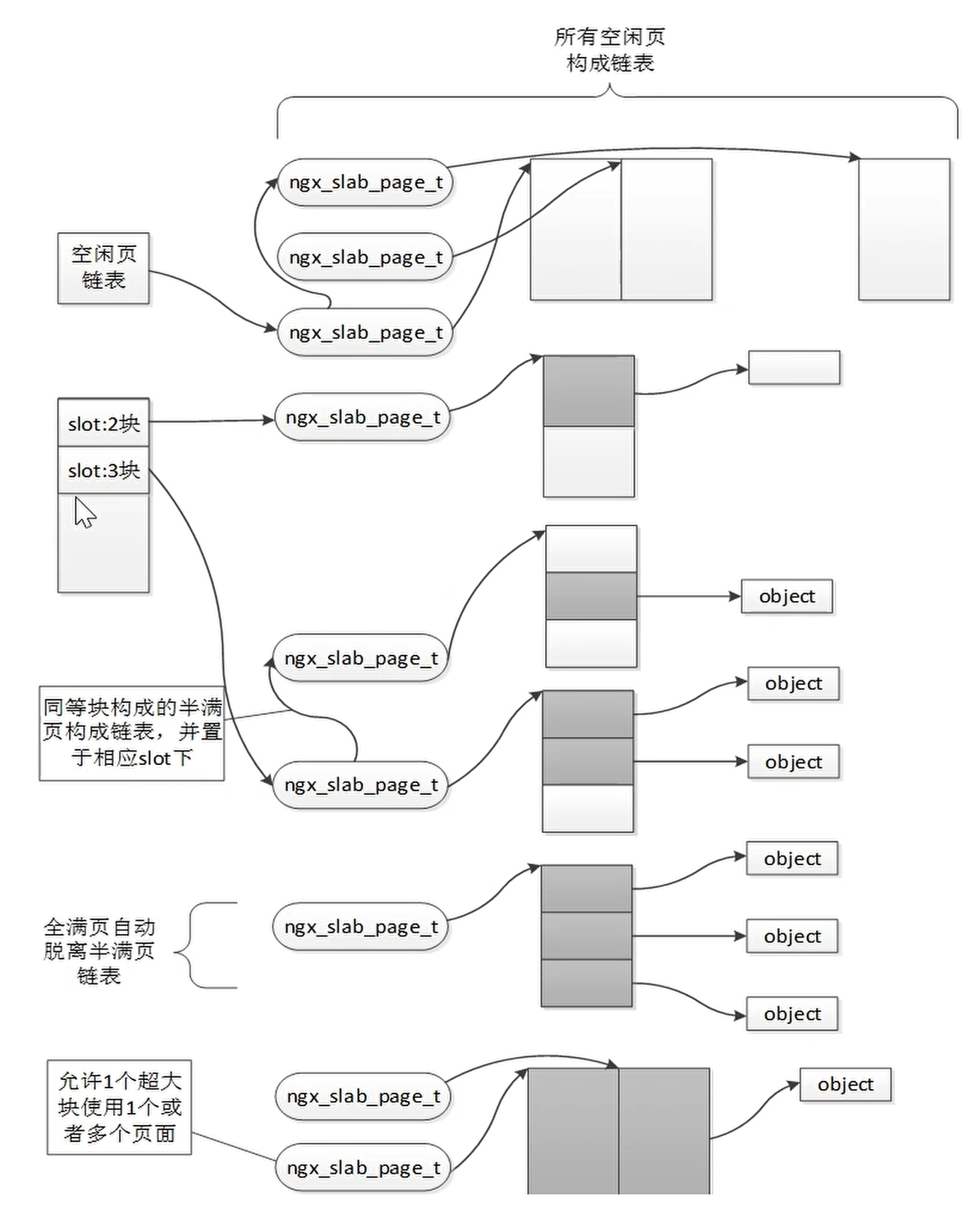
This memory management is called bestfit, with the following characteristics:
- Suitable for small objects
- Avoids fragmentation
- Avoids repeated initialization
You can use ngx_slab_stat to view the usage of different slots.
http {
  server {
    listen 80;

    location = /slab_stat {
      slab_stat;
    }
  }
}
TLS/SSL
Based on Nginx's main use cases, algorithms can be specifically optimized and selected — including replacing algorithms, adjusting encryption strength, using session caching, etc. — to improve communication performance.
- For small file transfers, the performance bottleneck is asymmetric encryption, i.e. the handshake phase
- For large file transfers, the performance bottleneck is symmetric encryption, i.e. the data transfer phase
The complete communication process:
---
title: TLS communication flow
---
sequenceDiagram
  participant Client
  participant Server as Nginx

  Note over Client,Server: === Handshake phase ===
  Client->>Server: Client Hello<br>Inform the server of supported TLS versions, cipher suite list, Client Random

  Server->>Client: Server Hello<br>Select TLS version and cipher suite, return Server Random
  Server->>Client: Server Certificate<br>Send the certificate chain (including the public key)
  Server->>Client: Server Key Exchange (optional)<br>If using ECDHE/DHE, send the ephemeral public key
  Server->>Client: Server Hello Done

  Note over Client,Server: === Certificate verification and key exchange ===
  Client ->> Client: Verify certificate validity (CA chain, validity period, revocation status, etc.)
  Client->>Server: Client Key Exchange<br>Generate PreMasterSecret, encrypt it with the server's public key, and send it
  Client->>Server: ChangeCipherSpec<br>Notify the switch to encrypted communication
  Client->>Server: Finished<br>Encrypted verification of handshake integrity

  Server->>Client: ChangeCipherSpec
  Server->>Client: Finished

  Note over Client,Server: === Encrypted communication phase ===
  Note over Client,Server: Both sides generate the session key<br>based on ClientRandom + ServerRandom + PreMasterSecret
  Client->>Server: Application Data (Encrypted)
  Server->>Client: Application Data (Encrypted)
---
title: TLS communication with cache hit
---
sequenceDiagram
  participant Client
  participant Server

  Note over Client,Server: === Handshake phase ===
  Client->>Server: Client Hello<br>Inform the server of supported TLS versions, cipher suite list, Client Random

  Server->>Client: Server Hello<br>Confirm session reuse, return Server Random

  Note over Client,Server: === Certificate verification and key exchange ===
  Server->>Client: ChangeCipherSpec
  Server->>Client: Finished<br>Encrypted verification using the cached key

  Note over Client,Server: === Encrypted communication phase ===
  Note over Client,Server: Reuse the key from the previous communication
  Client->>Server: Application Data (Encrypted)
  Server->>Client: Application Data (Encrypted)
Nginx TLS certificate configuration:
http {
  # HTTPS uses port 443
  listen 443 ssl;
  # configure the certificate's public key
  ssl_certificate /etc/letsencrypt/live/me.he110.site/fullchain.pem;
  # configure the certificate's private key
  ssl_certificate_key /etc/letsencrypt/live/me.he110.site/private.pem;

  # how much space the session cache can hold at most; 1MB corresponds to about 4000 sessions
  ssl_session_cache shared:le_nginx_SSL:1m;
  # set the session cache validity to 1 day — that is, if the cache has not overflowed, reconnecting within 1 day does not require a handshake
  ssl_session_timeout 1440m;

  # supported TLS protocol versions
  ssl_protocols TLSv1 TLSv1.1 TLSv1.2 TLSv1.3;

  # ssl_ciphers decides which cipher suites are used to communicate with the client
  ssl_prefer_server_ciphers on;

  # declare supported cipher suites; earlier ones are generally used first unless the client does not support them
  ssl_ciphers "ECDHE-ECDSA-CHACHA20-POLY1305:ECDHE-RSA-CHACHA20-POLY1305:ECDHE-ECDSA-AES128-GCM-SHA256:ECDHE-RSA-AES128-GCM-SHA256:ECDHE-ECDSA-AES256-GCM-SHA384:ECDHE-RSA-AES256-GCM-SHA384:DHE-RSA-AES128-GCM-SHA256:DHE-RSA-AES256-GCM-SHA384:ECDHE-ECDSA-AES128-SHA256:ECDHE-RSA-AES128-SHA256:ECDHE-ECDSA-AES128-SHA:ECDHE-RSA-AES256-SHA384:ECDHE-RSA-AES128-SHA:ECDHE-ECDSA-AES256-SHA384:ECDHE-ECDSA-AES256-SHA:ECDHE-RSA-AES256-SHA:DHE-RSA-AES128-SHA256:DHE-RSA-AES128-SHA:DHE-RSA-AES256-SHA256:DHE-RSA-AES256-SHA:ECDHE-ECDSA-DES-CBC3-SHA:ECDHE-RSA-DES-CBC3-SHA:EDH-RSA-DES-CBC3-SHA:AES128-GCM-SHA256:AES256-GCM-SHA384:AES128-SHA256:AES256-SHA256:AES128-SHA:AES256-SHA:DES-CBC3-SHA:!DSS";

  # parameters for asymmetric encryption, determining encryption strength
  ssl_dhparam /etc/letsencrypt/live/me.he110.site/dhparam.pem;
}
Nginx Architecture
Nginx itself is a multi-process architecture, with the master process managing worker processes, cache processes, and cache-loader processes.
Multi-process well protects against a shared memory anomaly crashing the entire service; to ensure high availability, Nginx adopts a multi-process architecture.
All Nginx functionality is handled by worker processes. To fully utilize CPU resources, the number of workers is generally set equal to the number of CPU cores, with each worker process bound to a corresponding CPU.
When reloading Nginx via nginx -s reload or kill -SIGHUP ${Nginx PID}, the existing worker processes are essentially killed and new worker processes are created.
When an individual child process is closed via kill -SIGTERM ${Nginx worker PID}, the child process notifies the Nginx master process, which recreates a new worker process.
Memory Pool Allocation
Establishing a Connection
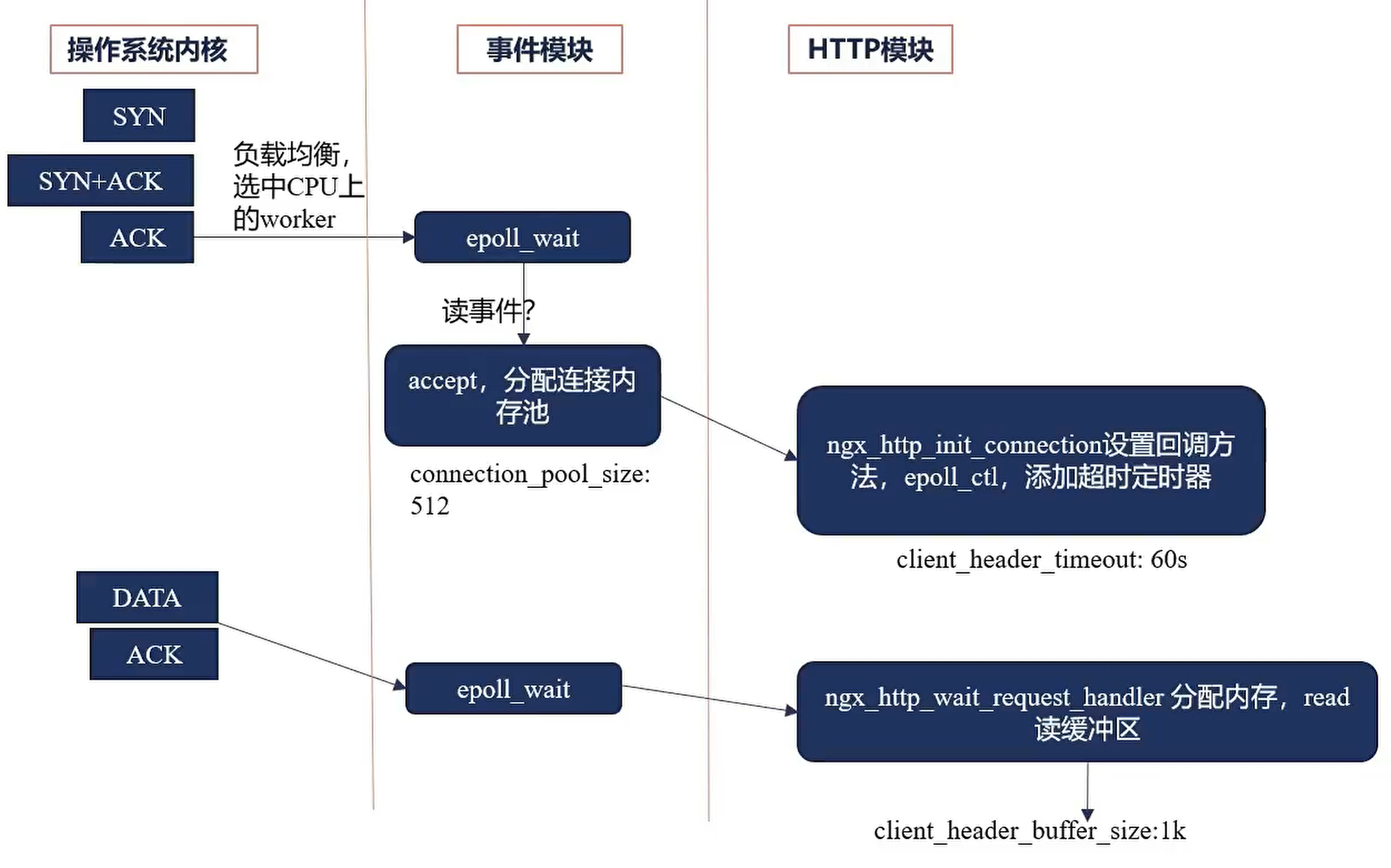
After a connection is established, Nginx selects a worker to handle the connection according to the load balancing strategy. The worker allocates a memory pool for the connection, which is reclaimed only when the connection disconnects.
After the client sends a request, a buffer is pre-allocated for the request to read the request's DATA. The space is allocated from the connection memory pool; if the connection memory pool is insufficient, it is expanded.
The buffer is mainly used to read the request data sent by the user.
# the space allocated for the connection memory pool by default
connection_pool_size 512;

# connection timeout, 60s by default; if a request is not finished within 60s, the connection is marked as timed out and closed
# this timeout covers: receiving the request, parsing the request URI, parsing headers; adjust the timeout according to business conditions
client_header_timeout 60s;

# after receiving a request, read the request data into user space; the space pre-allocated for reading data
client_header_buffer_size 1k;
Receiving the URI
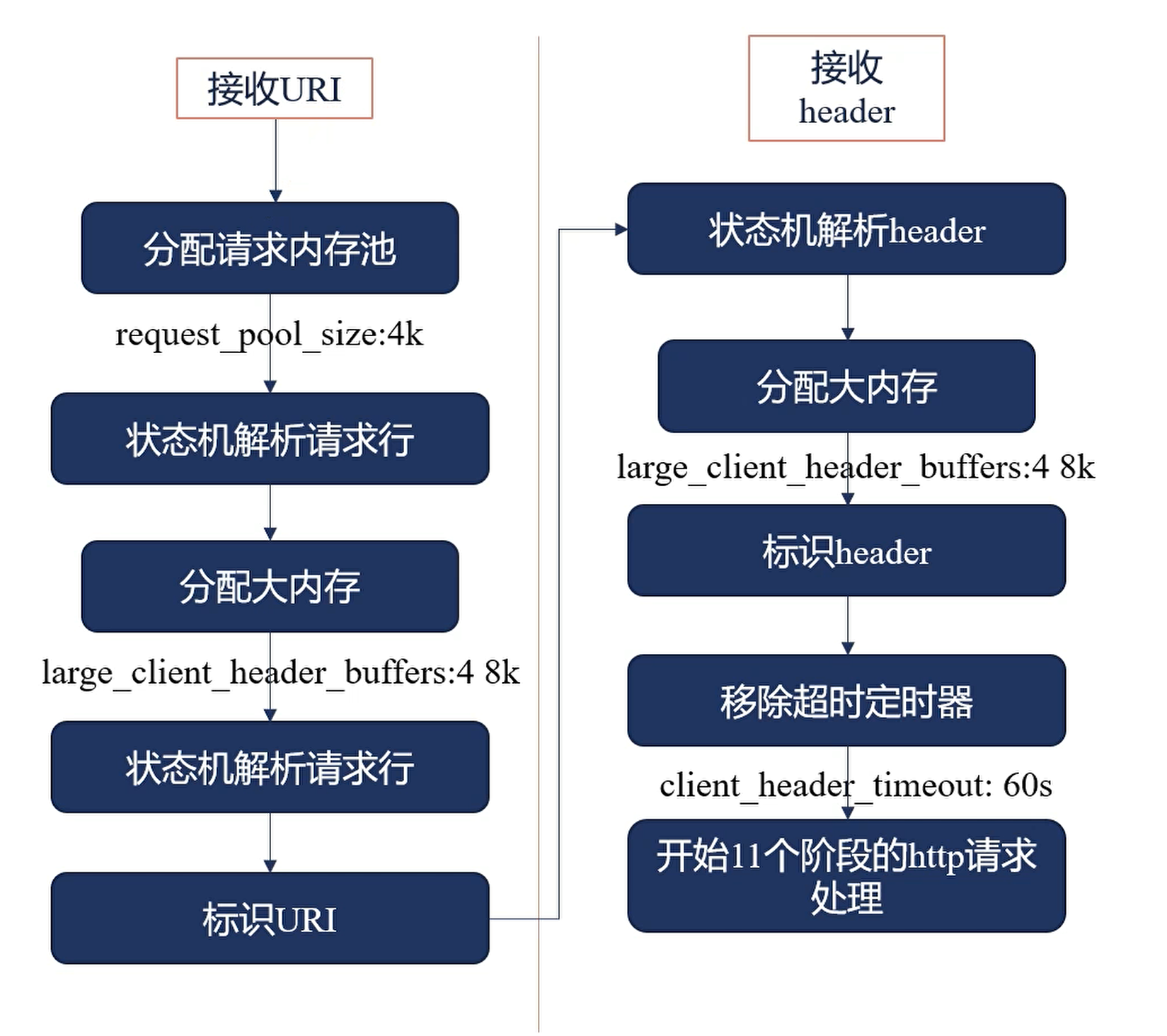
After reading the request's data, a request memory pool is pre-allocated for the request to store the parsed request context, reclaimed immediately when the request ends.
Parsing of the request data begins, stored into the request memory pool.
If the request memory pool is insufficient, it is expanded.
After processing completes, the address of the memory block storing the URI is updated into the pointer, marking the URI.
Parsing of headers begins, stored into the reused request memory pool; after parsing completes, the header is marked.
After everything is processed, the client_header_timeout timer is removed.
# the memory pool size pre-allocated for each request
request_pool_size 4k;

# set the maximum space of the request memory pool
# this does not directly allocate 8k; instead, 8k is allocated each time, expanded by 8k when insufficient — 4 blocks of 8k in total
# both the URL and headers use this space
large_client_header_buffers 4 8k;
Nginx Workflow
QUIT
QUIT can only handle HTTP requests; for websocket, TCP, UDP, and other communication it cannot tell whether communication has ended — it can only wait for the timer to time out.
---
title: worker QUIT flow
---
graph TB
  A[set the worker_shutdown_timeout timer] --> B[close listening handles]
  B --> C[close idle connections]
  C --> D[wait in a loop for all connections to close; forced close on timeout]
  D --> E[exit the process]
reload
---
title: Nginx reload flow
---
graph TB
  A[send the HUP signal to the master process] --> B[the master process validates the configuration syntax]
  B --> C[the master process opens the new listening ports]
  C --> D[the master process starts new worker child processes with the new configuration]
  D --> E[the master process sends the QUIT signal to the old workers]
  E --> F[old workers close their listening handles and end after finishing current connections]
Because new workers are started before old workers are stopped, Nginx does not stop serving; but an old worker may take a long time to finish, occupying resources the whole time.
In newer versions, Nginx introduced a timeout mechanism that forcibly closes old worker processes after the timeout.
Hot Upgrade
---
title: Nginx hot upgrade flow
---
graph TB
  A[replace the old Nginx binary with the new Nginx binary] --> B[send USR2 to the master process]
  B --> C[the master process renames the PID file, adding the .oldbin suffix]
  C --> D[the master process starts a new master process using the new Nginx file]
  D --> E[send the QUIT signal to the old master process, shutting it down]
  E --> F[rollback: send HUP to the old master process, and QUIT to the new master process]
Request Processing
---
title: Nginx request processing flow
---
graph TD
  POST_READ["POST_READ phase
  (get the real client IP)"] --> SERVER_REWRITE["SERVER_REWRITE phase
  (server-level URI rewrite)"]
  SERVER_REWRITE --> FIND_CONFIG["FIND_CONFIG phase
  (match the location block)"]
  FIND_CONFIG --> REWRITE["REWRITE phase
  (location-level URI rewrite)"]
  REWRITE -->|rewrite triggered| FIND_CONFIG
  REWRITE --> POST_REWRITE{POST_REWRITE check}
  POST_REWRITE -->|not rewritten| PREACCESS["PREACCESS phase
  (concurrency/QPS limits)"]
  POST_REWRITE -->|rewritten| FIND_CONFIG

  subgraph Authorization
    PREACCESS --> ACCESS["ACCESS phase
    (auth_basic/access control)"]
    ACCESS --> POST_ACCESS{POST_ACCESS check}
    POST_ACCESS -->|verification failed| LOG
    POST_ACCESS -->|verification passed| PRECONTENT["PRECONTENT phase
    (try_files/mirror requests)"]
  end

  PRECONTENT --> CONTENT["CONTENT phase
  (generate response content)"]
  CONTENT --> LOG["LOG phase
  (record access logs)"]

  classDef phase fill:#f0f8ff,stroke:#4682b4,stroke-width:2px;
  class POST_READ,REWRITE,PREACCESS,ACCESS,CONTENT,LOG phase;
| Processing phase | Responsible modules |
|---|---|
POST READ |
realip |
SERVER REWRITE |
rewrite |
FIND CONFIG |
|
REWRITE |
rewrite |
POST REWRITE |
|
PREACCESS |
limit_conn, limit_req |
ACCESS |
auth_basic, access, auth_request |
POST ACCESS |
|
PRECONTENT |
try_files |
CONTENT |
index, autoindex, concat |
LOG |
access_log |
The processing order of the modules involved:
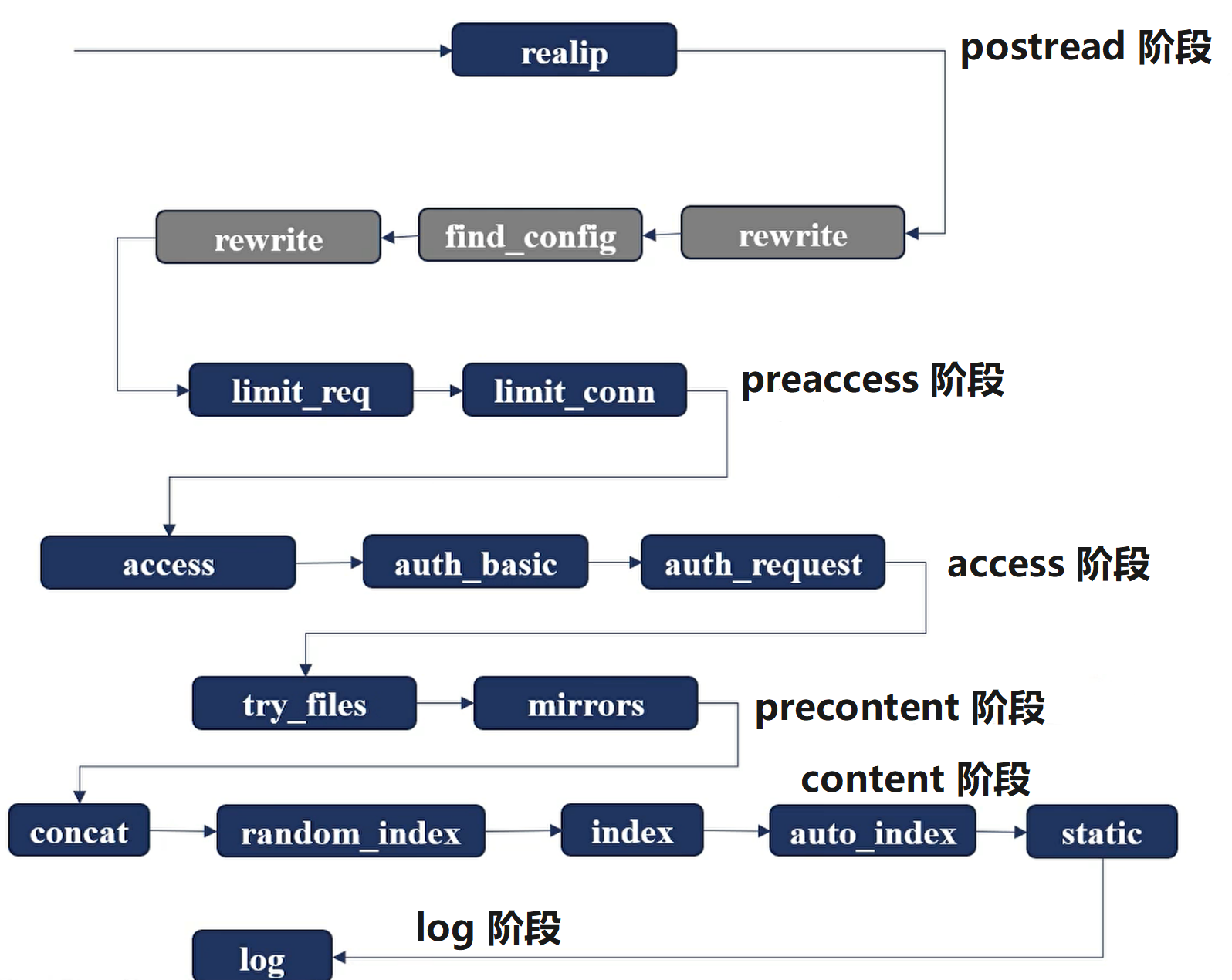
All modules are defined in the ngx_module_names array.
Modules in different phases execute in phase order.
Modules within the same phase execute in sequence.
An earlier module can control the flow — for example, skipping all remaining modules in the current phase and entering the next phase.
Nginx Request Processing Phases
The postread Phase
The ngx_http_realip_module Module
During network transmission, the source IP and destination IP are modified by network devices such as switches and routers — firewalls can modify them too. So the real IP address of the requesting client cannot be obtained from the source IP or destination IP; only the address of the previous-hop device is available.
In the HTTP protocol, there are two request headers, X-Forwarded-For and X-Real-IP:
X-Forwarded-For: the complete transmission chain; the IP of every sender in the chain is recorded into this field by the receiverX-Real-IP: carries the user's IP
The realip module obtains the user's real address, records it into variables, and passes it to other modules, so the realip module executes with higher priority than even Nginx's rewrite module.
The realip module can be enabled when compiling Nginx via --with-http_realip_module.
realip generates two variables:
realip_remote_addr: the user's real IPrealip_remote_port: the user's real port
realip provides three directives:
set_real_ip_from:- Basic form:
set_real_ip_from ${address} / ${CIDR} / ${unix} - Purpose: configure which sources of packets get their real IP replaced
- Default: none
- Context:
http,server,location
- Basic form:
real_ip_header:- Basic form:
real_ip_header ${field} / X-Real-IP / X-Forwarded-For / ${proxy_protocol} - Purpose: configure from which field the real IP is taken
- Default:
real_ip_header X-Real-IP; - Context:
http,server,location
- Basic form:
real_ip_recursive:- Basic form:
real_ip_recursive on / off; - Purpose: the real IP may yield multiple fields; when the closest IP is a loopback address, i.e. the local machine's IP, whether to discard that address and keep looking for a new one
- Default:
real_ip_recursive off; - Context:
http,server,location
- Basic form:
The server_rewrite Phase
The rewrite Module
The return Directive
return is a directive provided by the rewrite module; once used, it immediately terminates the request processing flow and returns a response to the client.
The basic form of the return directive is return [code] msg; when code is omitted, the 302 status code is used by default.
- Purpose: respond to the request immediately, skipping all subsequent phases
- Default: none
- Context:
server,location,if
The error_page Directive
- Purpose: forward the request to the specified resource
- Default: none
- Context:
http,server,location,ifinlocation
# capture the 404 status code and redirect to 404.html (keeping the original 404 status code)
# returns a custom 404 page when the user accesses a nonexistent resource, with the HTTP status code still 404
# make sure the /404.html file exists, with the path relative to the directory set by the root directive
error_page 404 /404.html;

# capture internal server errors (500 / 502 / 503 / 504) and uniformly jump to 50x.html
# applies to scenarios like upstream crashes and gateway timeouts; the path to 50x.html must be configured in the corresponding location
error_page 500 502 503 504 /50x.html;

# forcibly rewrite the 404 status code to 200 and return an empty image (often used to hide sensitive error information)
# when no status code follows the equals sign, 200 is used by default
# applies when the frontend needs to show a normal page while the backend resource is actually missing
error_page 404 =200 /empty.gif;

# dynamically handle 404 errors (PHP requires fastcgi_intercept_errors on)
# the equals sign makes PHP's header() status code modification take effect; if PHP returns 404, switch to 410 to avoid conflicts
error_page 404 = /404.php;

# advanced redirect configuration (reverse proxy via a named location)
# @fallback is an internal redirect marker, not directly accessible from outside
# when the original request does not exist, traffic is forwarded to the backend server cluster for disaster recovery
location / {
  error_page 404 = @fallback;
}

# named location block (internal jumps only)
# advanced operations like logging and custom response headers can be configured here
location @fallback {
  proxy_pass http://backend;
}

# redirect directly to an external domain (302 temporary redirect by default)
# applies to jumping to a unified interception page when permission verification fails
error_page 403 http://example.com/forbidden.html;

# permanently redirect 404 requests to a new domain (301 status code explicitly specified)
# browsers cache this redirect and access the new address directly afterwards
error_page 404 =301 http://example.com/forbidden.html;
Configuring rewrite and error_page Together
When both are configured, since both are action directives controlling Nginx's response, they are not merged. For example:
server {
  server_name return.he110.site;
  listen 8080;

  root /app/html;

  # defined as statement 1
  error_page 404 /404.html;

  # defined as statement 2
  return 403;

  location / {
    # defined as statement 3
    return 404 "nothing!";
  }
}
If both are enabled, the statement execution order is:
- Statement 2
- Statement 3
- Statement 1
Only one of the three statements can be executed — by priority, the first to execute returns first, and the rest are ignored.
The rewrite Directive
- Basic syntax:
rewrite ${regex} ${replacement} [flag], whereflagtakes the following values:last: matchlocationwith the new URI; commands defined afterlastare skippedbreak: stop executing the current script's directives, equivalent to thebreakdirective; commands defined afterbreakare skippedredirect: return a 302 redirectpermanent: return a 301 redirect
- Purpose: replace the URL the user accesses with a new URL
- Default: none
- Context:
server,location,if
server {
  root html/;

  location /first {
    # replace first with second, forwarding to location /second to continue parsing
    rewrite /first(.*) /second$1 last;
    # rewrite has already forwarded away, so return is not executed
    return 200 'first!';
  }

  location /second {
    # change second to third, and read the local /second/xx file to return
    rewrite /second(.*) /third$1 break;
    # break has already stopped location processing, so return is not executed
    return 200 'second!';
  }

  location /third {
    # execute return
    return 200 'third!';
  }
}
server {
  location /redirectl {
    # returns the 301 status code, because permanent is defined
    rewrite /redirectl(.*) $1 permanent;
  }

  location /redirect2 {
    # returns the 302 status code, because redirect is defined
    rewrite /redirect2(.*) $1 redirect;
  }

  location /redirect3 {
    # since an http request is returned and no status code is specified, 302 is automatically filled in
    rewrite /redirect3(.*) http://rewrite.he110.site$l;
  }

  location /redirect4 {
    # returns the 301 status code, because permanent is defined
    rewrite /redirect4(.*) http://rewrite.he110.site$1 permanent;
  }
}
The if Directive
- Basic syntax:
if (condition) {}, whereconditiontakes the following values:- Check whether a variable is empty or has value 0
- Use
=/!=to match a variable against a string - Use a regex to match a variable, with a prefix required
~/!~prefix means case-sensitive~*/!~*prefix means case-insensitive
- Check whether a file exists:
-f/!-f - Check whether a directory exists:
-d/!-d - Check whether a file / directory / symlink exists:
-e/!-e - Check whether it is an executable file:
-x/!-x
- Purpose: determine whether the commands inside
{}execute according tocondition - Default: none
- Context:
server,location
# regex match
if ($http_user_agent ~ MSIE) {
  rewrite ^(.*)$ /msie/$1 break;
}

# regex match, case-insensitive
if ($http_cookie ~* "id=([^;]+)(?:;|$)") {
  set $id $1;
}

# string match
if ($request_method = POST) {
  return 405;
}

# variable match
if ($slow){
  limit_rate 10k;
}

if ($invalid_referer) {
  return 403;
}
The find_config Module
- location
- Basic syntax:
location [= / ~ / ~* / ^~] uri {}uri: configure a uri prefix= uri: exact match of the uri^~ uri: prefix match; after matching, no further regex matching is performed~ uri: regular expression match, strictly case-sensitive~* uri: regular expression match, case-insensitive
location @name {}: jump to an internal processing flow; this location cannot be accessed directly via a uri — it is only entered by jumps from other commands
- Default: none
- Context:
server,location
- Basic syntax:
- merge_slashes
- Purpose: when enabled,
//is merged into/ - Basic syntax:
merge_slashes on / off - Default:
merge_slashes on; - Context:
http,server
- Purpose: when enabled,
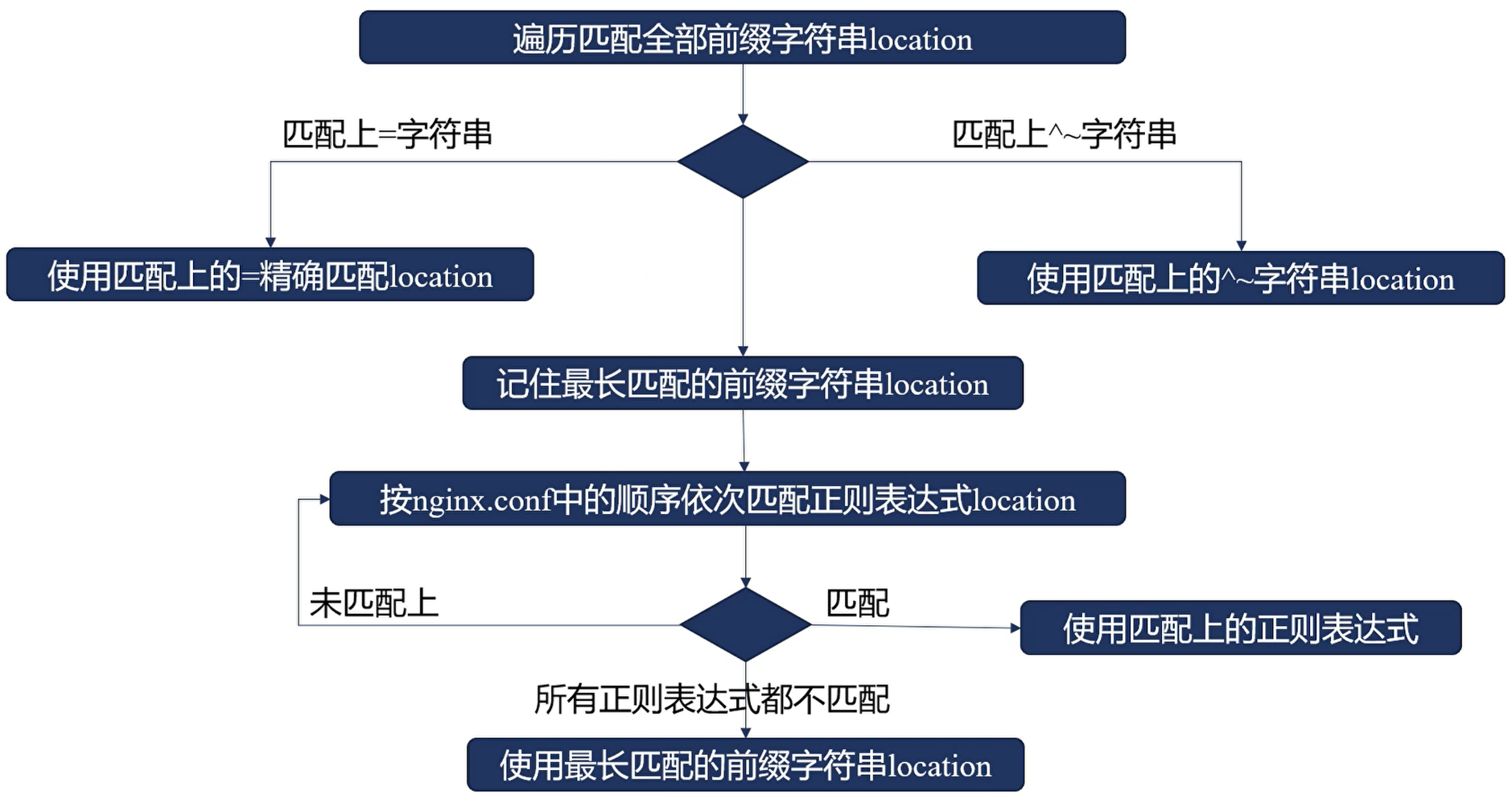
The overall location matching order:
- Exact match (
= uri) - Regex match with no further regex matching afterwards (
^~ uri) - Sorted by longest matching prefix — the longest matching prefix matches first
server {
  merge_slashes off;

  location ~ /Test1/$ {
    return 200 'first regular expressions match!';
  }

  location ~* /Test1/(w+)$ {
    return 200 'longest regular expressions match!';
  }

  location ^~ /Test1/ {
    return 200 'stop regular expressions match!';
  }

  location /Test1/Test2 {
    return 200 'longest prefix string match!';
  }

  location /Test1 {
    return 200 'prefix string match!';
  }

  location = /Test1 {
    return 200 'exact match!';
  }
}
Sending the following requests:
/Test1: hits= /Test1— exact match has the highest priority, even though it is defined last/Test1/: hits^~ /Test1/— matching follows longest prefix match, so it doesn't hit the exact match; instead it hits the regex, where^~has higher priority/Test1/Test2: hits~* /Test1/(w+)$— a regex matched and it is the longest prefix, so it hits first/Test1/Test2/: hits/Test1/Test2— the regex didn't match, so the longest prefix matched/test1/Test2: hits~* /Test1/(w+)$— a regex matched; only one match, no dispute
The preaccess Phase
The ngx_http_limit_conn_module Module
This module limits the number of connections processed per second.
It takes effect in the NGX_HTTP_PREACCESS_PHASE phase and is compiled into nginx by default.
It takes effect across all worker processes via shared memory.
Connections are classified by key, and rate limiting applies to requests of the same class.
The classification key generally relies on the realip module — rate limiting is only meaningful against real IPs.
- limit_conn_zone
- Purpose: define shared memory (including declaring its size) and the key
- Basic syntax:
limit_conn_zone ${key} zone=${name:size};${key}: the rate-limiting target, generally the user's real IP${name}: shared memory name${size}: shared memory size
- Default: none
- Context:
http
- limit_conn
- Purpose: limit the number of concurrent connections
- Basic syntax:
limit_conn ${zone} ${number}; - Default: none
- Context:
http,server,location
- limit_conn_log_level
- Purpose: the log level when rate limiting is triggered
- Basic syntax:
limit_conn_log_level info / notice / warn / error; - Default:
limit_conn_log_level error; - Context:
http,server,location
- limit_conn_status
- Purpose: the error code returned to the client when rate limiting is triggered
- Basic syntax:
limit_conn_status code; - Default:
limit_conn_status 503; - Context:
http,server,location
Example:
# use the binary form of the user's IP address as the key
# define a shared memory zone named addr, 10M in size
limit_conn_zone $binary_remote_addr zone=addr:10m;

server {
  root html/;
  error_log logs/limit_conn.log info;

  location / {
    # return the 500 error code when rate limited
    limit_conn_status 500;

    # log at warn level when rate limited, avoiding frequent IO
    limit_conn_log_level warn;

    # record with the addr memory zone, processing only 1 request at a time; excess is rate limited, returning limit_conn_status
    limit_conn addr 1;

    # limit responses to 50 bytes per second, extending request response time to facilitate testing rate-limiting scenarios
    limit_rate 50;
  }
}
The ngx_http_limit_req_module Module
This module limits the number of requests processed per second.
It takes effect in the NGX_HTTP_PREACCESS_PHASE phase and is compiled into nginx by default.
It takes effect across all worker processes via shared memory.
The rate-limiting algorithm is the leaky bucket algorithm: when burst traffic arrives, if the buffer is full an error is returned; if not, requests are stored in the buffer, waiting for worker processes to consume them.
- limit_req_zone
- Purpose: define shared memory (including declaring its size) and the key
- Basic syntax:
limit_req_zone ${key} zone=${name:size} rate=${rate};${key}: the rate-limiting target, generally the user's real IP${name}: shared memory name${size}: shared memory size${rate}: request processing rate, in requests per second (r/s) or requests per minute (r/m)
- Default: none
- Context:
http
- limit_req
- Purpose: limit the number of concurrent requests
- Basic syntax:
limit_req ${zone} [burst=${number}] [nodelay];burst: configures how many requests the request buffer can holdnodelay: if declared asnodelay, requests withinburstare also processed immediately instead of being delayed
- Default:
burstdefaults to 0 - Context:
http,server,location
- limit_req_log_level
- Purpose: the log level when rate limiting is triggered
- Basic syntax:
limit_req_log_level info / notice / warn / error; - Default:
limit_req_log_level error; - Context:
http,server,location
- limit_req_status
- Purpose: the error code returned to the client when rate limiting is triggered
- Basic syntax:
limit_req_status code; - Default:
limit_req_status 503; - Context:
http,server,location
Example:
# use the binary form of the user's IP address as the key
# define a shared memory zone named addr, 10M in size
limit_req_zone $binary_remote_addr zone=addr:10m rate=2r/m;

server {
  root html/;
  error_log logs/limit_req.log info;

  location / {
    # return the 500 error code when rate limited
    limit_req_status 500;

    # log at warn level when rate limited, avoiding frequent IO
    limit_req_log_level warn;

    # record with the addr memory zone, processing only 3 requests at a time; excess is rate limited, returning limit_req_status
    limit_req zone=addr burst=3 nodelay;
  }
}
Configuring limit_conn and limit_req Together
You can use the following configuration so that triggering limit_conn returns 500 and triggering limit_req returns 503:
limit_conn_zone $binary_remote_addr zone=addr:10m;
limit_req_zone $binary_remote_addr zone=req:10m rate=2r/m;

server {
  root html/;
  error_log logs/limit_conn.log info;

  location / {
    limit_conn_status 500;
    limit_conn_log_level warn;
    limit_rate 50;
    limit_conn addr 1;

    limit_req zone=req;
  }
}
The result is 503, because http_limit_req_module is called before http_limit_conn_module, so it finishes returning first.
The access Phase
The ngx_http_access_module Module
This module restricts access from specific IPs — for example, IP banning.
It takes effect in the NGX_HTTP_ACCESS_PHASE phase and is compiled into nginx by default.
- allow
- Purpose: user addresses allowed to access
- Basic syntax:
allow ${address} / ${CIDR} / ${unix} / all; - Default: none
- Context:
http,server,location,limit_except
- deny
- Purpose: user addresses forbidden from accessing
- Basic syntax:
deny ${address} / ${CIDR} / ${unix} / all; - Default: none
- Context:
http,server,location,limit_except
For example:
location / {
  # a single IP is supported
  deny 192.168.0.1;

  # subnet masks are supported
  allow 192.168.1.0/24;

  # IPv6 is supported
  allow 2001:0db8::/24;

  # deny and allow execute in order; the match-all must be placed last, otherwise subsequent commands never take effect
  deny all;
}
The ngx_http_auth_basic_module Module
This module is based on the HTTP Basic Authentication protocol, verifying user identity with a plaintext account and password; it needs to be used together with https.
It takes effect in the NGX_HTTP_ACCESS_PHASE phase, is compiled into nginx by default, and can be disabled via --without-http_auth_basic_module.
- auth_basic
- Purpose: configure whether to enable HTTP Basic Authentication
- Basic syntax:
auth_basic ${string} / off;${string}: the prompt text shown when the user enters the account and password
- Default:
auth_basic off; - Context:
http,server,location,limit_except
- auth_basic_user_file
- Purpose: which file user passwords are stored in
- Basic syntax:
auth_basic_user_file ${file} - Default: none
- Context:
http,server,location,limit_except
Install the database operation tool for storing passwords via httpd-tools.
Add an account with htpasswd -c ${file} -b ${user} ${pass}:
${file}: database file path${user}: username${pass}: password; a duplicate name overwrites the password
The HTTP Basic Authentication protocol is basically unused nowadays, but for deploying internal services or quickly launching a service, combined with https it is still a decent solution.
The ngx_http_auth_request_module Module
After receiving a request, it generates a subrequest and passes it to an upstream service via reverse proxying.
If the upstream service returns a 2xx response code, execution continues.
If the upstream service returns 401 or 403, the response is returned to the client.
It takes effect in the NGX_HTTP_ACCESS_PHASE phase, is not compiled into nginx by default, and requires compiling with --with-http_auth_request_module.
- auth_request
- Purpose: configure the authentication uri, or disable the authentication feature
- Basic syntax:
auth_request ${uri} / off; - Default:
auth_request off; - Context:
http,server,location
- auth_request_set
- Purpose: set variable values during authentication
- Basic syntax:
auth_request_set ${variable} ${value}; - Default: none
- Context:
http,server,location
The satisfy Directive
Within the access phase, if multiple authentication methods are configured, a summarizing policy is needed to decide whether to let the request through — that is the satisfy directive.
- satisfy
- Purpose: configure access authentication rules
- Basic syntax:
satisfy all | any;all: all modules in the access phase must agree to let the request through before the access phase ends and the next phase beginsany: as long as one module in the access phase agrees to let it through, the access phase ends and the next phase begins
- Default:
satisfy all; - Context:
http,server,location
The execution order of the modules is in the ngx_modules.c file:
ngx_http_auth_request_modulengx_http_auth_basic_modulengx_http_access_module
location / {
  # let through if any one matches
  satisfy any;

  # wait for authentication; let through on success, otherwise deny
  auth_basic "test auth_basic";
  auth_basic_user_file examples/auth.pass;

  # access denies directly
  deny all;
}
location / {
  # let through if any one matches
  satisfy any;

  # no authentication needed — let through directly, because a module has already let it through
  auth_basic "test auth_basic";
  auth_basic_user_file examples/auth.pass;

  # access allows directly
  allow all;
}
The precontent Phase
The ngx_http_try_files_module Module
Attempts to access, in order, the files corresponding to multiple urls (specified by the root or alias directive).
When a file exists, its content is returned directly; if none of the files exist, the last URL result or code is returned.
- try_files
- Purpose: configure the list of files to try in order; the last parameter is the fallback when none exist
- Basic syntax:
try_files ${uri1} [... ${uri N}]; - Default: none
- Context:
server,location
server {
  root html/;
  default_type text/plain;

  location /first {
    # first match the static resource shown in maintenance mode
    try_files /system/maintenance.html
      # then match the default home page
      $uri $uri/index.html $uri.html
      # finally fall through to the built-in processing flow
      @lasturl;
  }

  location @lasturl {
    return 200 'lasturl!\n';
  }

  location /second {
    # if no file is found, the last url and its corresponding status code are returned
    # i.e. /second.html is returned with status code 404
    try_files $uri $uri/index.html $uri.html =404;
  }
}
The ngx_http_mirror_module Module
When processing a request, generates a subrequest to access another service; the subrequest's return value is not processed.
- mirror
- Purpose: after nginx receives a request, whether to report it to the specified request
- Basic syntax:
mirror ${uri} / off; - Default:
mirror off; - Context:
http,server,location
- mirror_request_body
- Purpose: whether to carry the request body when reporting
- Basic syntax:
mirror_request_body on / off; - Default:
mirror_request_body on; - Context:
http,server,location
location / {
  # forward to the user logging endpoint, recording user access data
  mirror /log-access;
  mirror_request_body off;
}

location = /log-access {
  # decorate the request headers to indicate the data source, forwarding to the internal logging service
  internal;
  proxy_pass http://127.0.0.1:10020$request_uri;
  proxy_pass_request_body off;
  proxy_set_header Content-Length "";
  proxy_set_header X-Original-URI $request_uri;
}
The content Phase
The ngx_http_concat_module Module
A small file merging module developed by Alibaba, which can merge multiple small files into one response in a single request.
When using it, append ?? after the URI, separate files with multiple ,, and if there are additional parameters, append them at the end with ?.
For example: http://example.com/static/??foo.css,bar/foobaz.js
- concat
- Purpose: whether to enable the file merging feature
- Basic syntax:
concat on / off; - Default:
concat off; - Context:
http,server,location
- concat_types
- Purpose: specify which file types are allowed to be merged
- Basic syntax:
concat_types ${MIME-type} ...; - Default:
concat_types text/css application/x-javascript; - Context:
http,server,location
- concat_unique
- Purpose: whether only files of the same type may be merged
- Basic syntax:
concat_unique on / off; - Default:
concat_unique on; - Context:
http,server,location
- concat_max_files
- Purpose: set the maximum number of files that can be merged in one request
- Basic syntax:
concat_max_files ${number}; - Default:
concat_max_files 10; - Context:
http,server,location
- concat_delimiter
- Purpose: set the delimiter between merged files
- Basic syntax:
concat_delimiter ${string}; - Default:
NONE - Context:
http,server,location
- concat_ignore_file_error
- Purpose: whether to ignore file-not-found errors
- Basic syntax:
concat_ignore_file_error on / off; - Default:
concat_ignore_file_error off; - Context:
http,server,location
The ngx_http_index_module Module
Specifies the index file content returned on access.
- index
- Purpose: configure the default home page file
- Basic syntax:
index ${file 1} [... ${file N}]; - Default:
index index.html; - Context:
http,server,location
The ngx_http_autoindex_module Module
When the URL ends with / and there is no corresponding default home page, attempts to return the directory structure in html, xml, json, jsonp, and other formats.
- autoindex
- Purpose: whether to enable the autoindex feature, automatically generating display content for directory resources
- Basic syntax:
autoindex on / off; - Default:
autoindex off; - Context:
http,server,location
- autoindex_extra_size
- Purpose: whether to show formatted file sizes
- Basic syntax:
autoindex_extra_size on / off; - Default:
autoindex_extra_size on; - Context:
http,server,location
- autoindex_format
- Purpose: the default static resource format returned by autoindex
- Basic syntax:
autoindex_format html / xml / json / jsonp; - Default:
autoindex_format html; - Context:
http,server,location
- autoindex_localtime
- Purpose: whether times in static resources use local time or UTC time
- Basic syntax:
autoindex_localtime on / off; - Default:
autoindex_localtime off; - Context:
http,server,location
The static Module
Handles static resource requests, mapping the uri to a local file path and reading the corresponding file as the uri's response.
- alias
- Purpose: strip the part matched by location, mapping the remainder into the file path
- Basic syntax:
alias ${path}; - Default: none
- Context:
location
- root
- Purpose: map the complete uri into the file path
- Basic syntax:
root ${path}; - Default:
root html; - Context:
http,server,location,ifinsidelocation
- types
- Purpose: configure the mapping between response
Content-Typeand file extensions - Basic syntax:
types { ${mime-type} ${extension}; }; - Default:
types { text/html html; image/gif gif; image/jpeg jpg }; - Context:
http,server,location
- Purpose: configure the mapping between response
- default_type
- Purpose: the default Content-Type returned when the file extension does not match
- Basic syntax:
default_type ${mime-type}; - Default:
default_type text/plain; - Context:
http,server,location
- types_hash_bucket_size
- Purpose: configure the size of each element of the hash table storing types
- Basic syntax:
types_hash_bucket_size ${size}; - Default:
types_hash_bucket_size 64; - Context:
http,server,location
- types_hash_max_size
- Purpose: set the maximum capacity of the hash table storing MIME types
- Basic syntax:
types_hash_max_size ${size}; - Default:
types_hash_max_size 1024; - Context:
http,server,location
- log_not_found
- Purpose: whether to log when a file is not found
- Basic syntax:
log_not_found on / off; - Default:
log_not_found on; - Context:
http,server,location
- absolute_redirect
- Purpose: control whether redirects use an absolute path (including protocol, hostname, and port); when accessing a directory without a trailing
/, Nginx automatically triggers a 301 redirect - Basic syntax:
absolute_redirect on / off; - Default:
absolute_redirect on; - Context:
http,server,location
- Purpose: control whether redirects use an absolute path (including protocol, hostname, and port); when accessing a directory without a trailing
- server_name_in_redirect
- Purpose: control whether redirects use the first domain specified by the server_name directive as the redirect address; when not enabled, the Host field of the request header is used
- Basic syntax:
server_name_in_redirect on / off; - Default:
server_name_in_redirect off; - Context:
http,server,location
- port_in_redirect
- Purpose: control whether the port number is included in the redirect address
- Basic syntax:
port_in_redirect on / off; - Default:
port_in_redirect on; - Context:
http,server,location
The static module also provides the following variables:
request_filename: the full path of the file to be accesseddocument_root: the directory address generated from the uri and the root/alias rulesrealpath_root: maps document_root to the real address, resolving symlinks, etc.
The log Phase
The ngx_http_log_module Module
Records http request information into logs.
- log_format
- Purpose: define the log file format
- Basic syntax:
log_format ${name} [escape=default / json / none] ${string}; - Default:
log_format combined "...";— the default value is too long, just look at the Nginx configuration file - Context:
http
- access_log
- Purpose: define where the log file is stored; if no log format name is configured, the default format, i.e.
combined, is used - Basic syntax:
access_log ${path} [${format} [buffer=${size}] [gzip[=${level}]] [flush=${time}] [if=${condition}]];gzip: whether to enable gzip compression, and the compression level; defaults to 1buffer: the size of the memory buffer; when the buffer is full, log data is written to the disk file at once; buffer defaults to 64KBflush: the interval at which the memory buffer is written to disk; when the specified interval is reached, the buffer content is also written to diskif: log only when the condition is satisfied
access_log off;
- Default:
access_log logs/access.log combined; - Context:
http,server,location,ifinlocation,limit_except
- Purpose: define where the log file is stored; if no log format name is configured, the default format, i.e.
- open_log_file_cache
- Purpose: configure the log writing feature
- Basic syntax:
open_log_file_cache max=${number} [inactive=time] [min_uses=${number}] [valid=${time}];max: the maximum number of file handles in the cache; excess is evicted with LRUinactive: after writing to the log file, how long to keep the file handle open; 10 seconds by defaultmin_uses: within theinactivetime, files used more thanmin_usestimes keep their file handles and are not closed; 1 by defaultvalid: after thevalidinterval, check whether the cached log file still exists; 60 seconds by defaultoff: disable the cache feature
- Default:
open_log_file_cache off; - Context:
http,server,location
Other Modules
The ngx_http_core_module Module
The http core module, handling basic configuration and functionality of the http protocol.
resolver
- Purpose: resolver specifies the DNS server address Nginx uses for domain name resolution. When an upstream server is configured as a domain name, the DNS configured by resolver is used.
- Basic syntax:
resolver ${address} ... [valid=${time}] [ipv6=on/off];${address}: the DNS for domain resolution; multiple DNS servers are supportedvalid=${time}: how long DNS results are cached
- Default: none
- Context:
http,server,location
resolver_timeout
- Purpose: set the DNS resolution timeout
- Basic syntax:
resolver_timeout ${timeout}; - Default:
resolver_timeout 30s; - Context:
http,server,location
keepalive_requests
- Purpose: the maximum number of requests per connection; the connection is closed automatically once exceeded
- Basic syntax:
keepalive_requests ${number}; - Default:
keepalive_requests 100; - Context:
http,server,location
keepalive_timeout
- Purpose: configure how long a keep-alive connection stays idle before closing automatically
- Basic syntax:
keepalive_timeout ${timeout}; - Default:
keepalive_timeout 75s; - Context:
http,server,location
HTTP Filter Modules
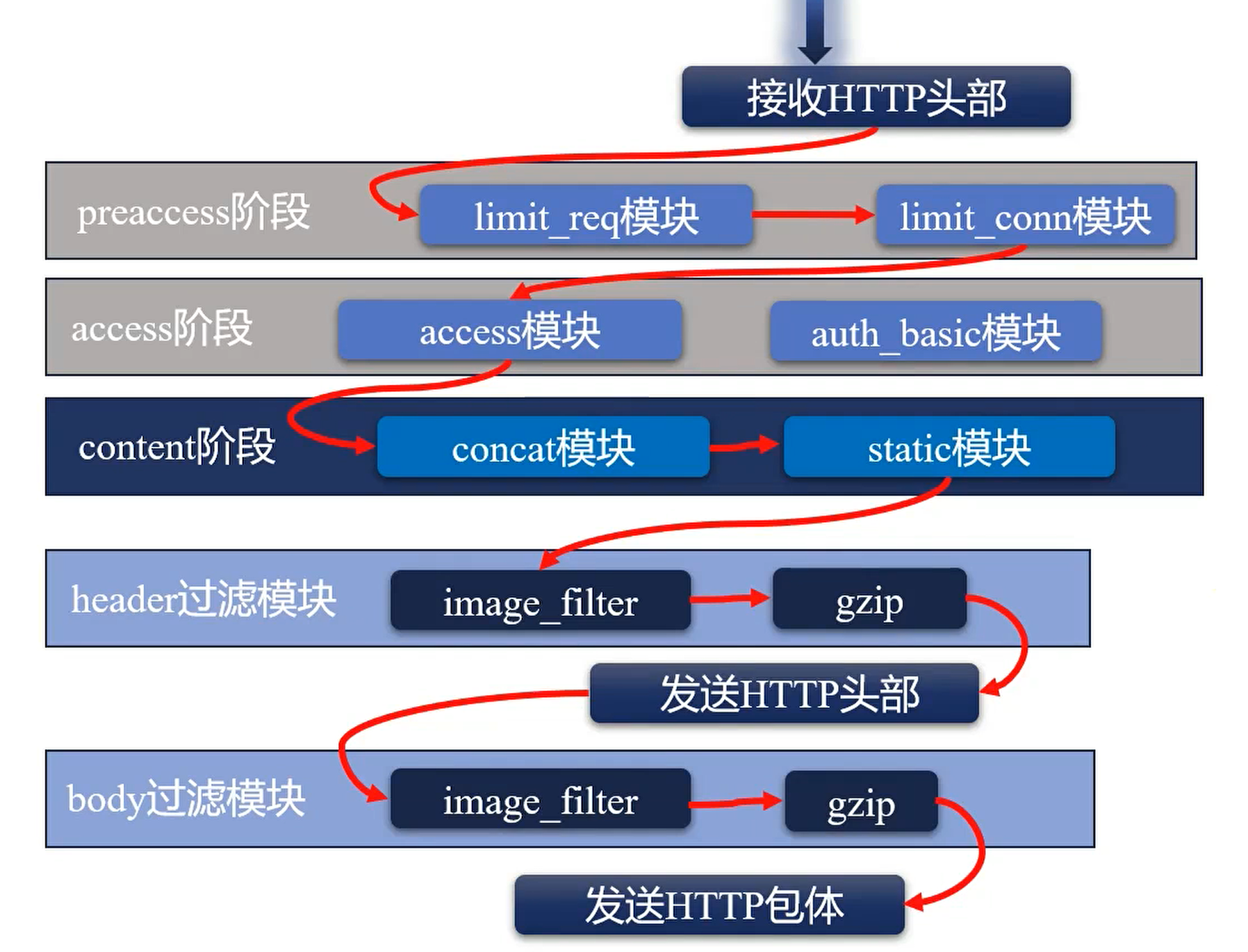
The ngx_http_sub_filter_module Module
Replaces specified strings in the response with new strings.
- sub_filter
- Purpose: declare which string should be replaced with what; replacement is case-insensitive
- Basic syntax:
sub_filter ${string} ${replacement}; - Default: none
- Context:
http,server,location
- sub_filter_last_modified
- Purpose: whether to keep the Last-Modified configuration after replacement; since the file has been modified, Last-Modified is not returned by default
- Basic syntax:
sub_filter_last_modified on / off; - Default:
sub_filter_last_modified off; - Context:
http,server,location
- sub_filter_once
- Purpose: whether to replace only once
- Basic syntax:
sub_filter_once on / off; - Default:
sub_filter_once on; - Context:
http,server,location
- sub_filter_types
- Purpose: which Mime-types to apply replacement to
- Basic syntax:
sub_filter_types ${Mime-type} ...;— supports full matching withsub_filter_types *; - Default:
sub_filter_types text/html; - Context:
http,server,location
The ngx_http_addition_filter_module Module
Before or after the response, initiates a subrequest to obtain new content to add.
- add_before_body
- Purpose: what content to insert before the response body
- Basic syntax:
add_before_body ${uri}; - Default: none
- Context:
http,server,location
- add_after_body
- Purpose: what content to insert after the response body
- Basic syntax:
add_after_body ${uri}; - Default: none
- Context:
http,server,location
- addition_types
- Purpose: the Mime types of files to add
- Basic syntax:
addition_types ${Mime-type} ...; - Default:
addition_types text/html; - Context:
http,server,location
The ngx_http_referer_module Module
Browsers automatically send the Referer field, telling the server which url the client is currently visiting. The ngx_http_referer_module module can reject illegitimate websites from accessing system resources — i.e. hotlink protection.
The module provides the invalid_referer variable: empty when access is allowed, otherwise 1.
- valid_referers
- Purpose: which Referers are legitimate
- Basic syntax:
valid_referers none / blocked / server_names / ${string} ...;none: no Refererblocked: Referer missing its valueserver_names: if the domain matches any server_name configured on this machine, access is allowed${string}: custom Referer; supports strings, regex,*.he110.site,he110.site/*, etc.
- Default: none
- Context:
server,location
- referer_hash_bucket_size
- Purpose: the bucket size of the hash table recording Referers
- Basic syntax:
referer_hash_bucket_size ${size}; - Default:
referer_hash_bucket_size 64; - Context:
server,location
- referer_hash_max_size
- Purpose: the maximum capacity of the hash table recording Referers
- Basic syntax:
referer_hash_max_size ${size}; - Default:
referer_hash_max_size 2048; - Context:
server,location
The ngx_http_secure_link_module Module
Referer can be modified on the client when manually issuing requests, so hotlink protection based on Referer is not reliable. Nginx provides the secure_link module, which accomplishes more reliable hotlink protection.
The secure_link workflow: the server or Nginx generates an encrypted secure link url and returns it to the client. The client accesses Nginx with the secure link url, and Nginx uses the secure_link variable to determine whether verification passes.
secure_link hashes the URI, user information (such as source IP), timestamp, secret key, etc., producing a secure URL. The original content corresponding to this URL is held only by the encrypting server and Nginx; decryption verifies whether the visitor's identity matches, and access is denied if not.
secure_link
- Purpose: configure from which parameters the Hash value and expiration time are taken
- Basic syntax:
secure_link ${hash},${expires}; - Default: none
- Context:
http,server,location
secure_link_md5
- Purpose: define the rule for generating the hash value, generally including the timestamp and secret key
- Basic syntax:
secure_link_md5 "${parameters to encrypt}"; - Default: none
- Context:
http,server,location
secure_link_secret
- Purpose: simple secure link generation, without expiration checking
- Basic syntax:
secure_link_secret ${secret_key}; - Default: none
- Context:
location
$secure_link: records the secure_link verification result"": verification failed0: URL expired1: passed
$secure_link_expires: the timestamp value recorded in the hash
The ngx_http_map_module Module
Maps new variables from existing variables, similar to a switch statement.
- map
- Purpose: define variable mapping rules, mapping
${string}into the$variablevariable - Basic syntax:
map ${string} ${$variable} { }; - Default: none
- Context:
http
- Purpose: define variable mapping rules, mapping
- map_hash_bucket_size
- Purpose: the bucket size of the hash table recording Maps
- Basic syntax:
map_hash_bucket_size ${size}; - Default:
map_hash_bucket_size 32|64|128; - Context:
http
- map_hash_max_size
- Purpose: the maximum capacity of the hash table recording Maps
- Basic syntax:
map_hash_max_size ${size}; - Default:
map_hash_max_size 2048; - Context:
http
map $http_host $name {
  hostnames;

  # like the default statement in a case
  default 0;

  # if the $http_host variable matches the expression on the left, $name is set to the value on the right
  # the matching rules can refer to the matching order of server_name
  ~map\.test\w+\.org.cn 1;
  *.example.org.cn 2;
  map.example.tech 3;
  map.example.* 4;
}

map $http_user_agent $mobile {
  default 0;
  "~Opera Mini" 1;
}
The ngx_http_split_clients_module Module
Like map, it can create new variables based on existing variables; mainly used for traffic splitting — i.e. AB testing and canary releases.
The specific behavior: based on an existing string, variable, or variable + string, a 32-bit integer Hash number is generated using the MurmurHash2 algorithm. Taking the maximum 32-bit integer as 2 ^ 32 - 1, the Hash is divided by the maximum to obtain a percentage value.
The case rules declare different percentage ranges; whichever interval the computed percentage falls into determines the value the new variable is set to, and * means matching all remaining ranges — i.e. default.
- split_clients
- Purpose: split users into groups, mainly for AB testing, canary experiences, etc.; the sum of all percentage values must not exceed 100%
- Basic syntax:
split_clients ${string} ${$variable} { }; - Default: none
- Context:
http
# hash by the username parameter of the request header
split_clients "${http_username}" $variant {
  # interval [0, 0.5%]
  0.5% A;
  # interval [0.5%, 1%]
  0.5% B;
  # interval [1%, 10%]
  9% C;
  # interval [10%, 30%]
  20% D;
  # interval [30%, 100%]
  * E;
}
The ngx_http_geo_module Module
The geo module computes new variables based on the client's IP address and port.
- geo
- Purpose: use IP + mask to determine IP ranges, using different variables for different IP ranges
- Basic syntax:
geo [${address}] $variable {}${address}: if omitted,$remote_addrprovided by the realip module is used as the IP address by default. If network segments overlap, the longest match is chosen.
- Default: none
- Context:
http
geo $country {
  # configure the default value
  default CN;

  # skip trusted addresses in remote_addr
  # specify trusted addresses
  proxy 1.1.1.1;
  # enable recursive lookup; remote_addr then skips trusted addresses when parsing X-Forwarded-For
  proxy_recursive on;

  127.0.0.0/24 US;
  127.0.0.1/32 RU;
  10.0.0.1/32 RU;
  192.168.0.1/32 UK;
}
The ngx_http_geoip_module Module
Based on the MaxMind database, maps client IP addresses to concrete geographic locations; requires installing MaxMind first.
geoip_country
- Purpose: configure the path of the MaxMind country database file
- Basic syntax:
geoip_country ${file}; - Default: none
- Context:
http
geoip_proxy
- Purpose: provide trusted addresses
- Basic syntax:
geoip_proxy ${address} / ${CIDR}; - Default: none
- Context:
http
geoip_city
- Purpose: configure the path of the MaxMind city database file
- Basic syntax:
geoip_city ${file}; - Default: none
- Context:
http
$geoip_country_code: two-letter country code, e.g. CN, US$geoip_country_code3: three-letter country code, e.g. CHN, USA$geoip_country_name: country name, e.g. "China", "United States"
Besides the three variables above, geoip_city also supports:
$geoip_latitude: latitude$geoip_longitude: longitude$geoip_city_continent_code: which continent, e.g. AS, EU$geoip_region: code of the state or province$geoip_region_name: name of the state or province, e.g. Zhejiang$geoip_city: city name$geoip_postal_code: postal code$geoip_area_code: telephone area code, US only$geoip_dma_code: DMA code, US only
Nginx Variables
Module Variables
In preconfiguration, modules define module variables for use by themselves or other modules.
Essentially, a defined module variable is just a set of rules for obtaining a value; when a request arrives, the variable value is resolved according to the rules and passed to the various modules.
Several characteristics of variables follow from this:
- Lazy evaluation: a variable itself is just a set of rules for obtaining data; it is not evaluated until the variable is used.
- Ever-changing: during the processing of a request, every module that uses the variable obtains the value in its own way, so the value may change at any time.
To improve performance, Nginx provides a Hash table for caching variable values:
variables_hash_bucket_size ${size};: configures the size of each value in the variable cache hash table; 64 bytes by default; only usable in thehttpmodule.variables_hash_max_size ${size};: configures the capacity of the variable cache hash table; 1024 by default; only usable in thehttpmodule.
Variables Provided by the http Framework
HTTP Request-related Variables
arg_parameter name: the value of a specific parameter in the URLargs: all URL parameters, i.e. the whole query stringquery_string: exactly the same as the args variableis_args: returned if the request URL has parameters, otherwise emptycontent_length: the value of the Content-Length header indicating the body length in the HTTP requestcontent_type: the value of the Content-Type header indicating the request body typeuri: the request URI (unlike the URL, does not include the parameters after?)document_uri: exactly the same as urirequest_uri: the request URL (including the URI and the complete parameters)scheme: the protocol name, e.g. HTTP or HTTPSrequest_method: the request method, e.g. GET or POSTrequest_length: the size of all request content, including the request line, headers, body, etc.remote_user: the username passed in by the HTTP Basic Authentication protocolrequest_body_file: the file temporarily storing the request body. Very small bodies are not stored in a file; configuringclient_body_in_file_onlyforces all bodies into files, with control over deletion.request_body: the body of the request; this variable is only effective when reverse proxying and the body is configured to be buffered in memoryrequest: the raw url request, including method and protocol version, e.g.GET /?a=1&b=22 HTTP/1.1Host:- Obtained from the request line
- If there is a Host request header, its value replaces the request line's value
- If neither has a value, the matched server_name is used
http_${header}: get the value of a specific request header; the following headers are exceptions, additionally processed by Nginx and not raw values:http_hosthttp_user_agenthttp_refererhttp_viahttp_x_forwarded_forhttp_cookie
TCP Connection-related Variables
binary_remote_addr: the client address in integer form — 4 bytes for IPv4, 16 bytes for IPv6connection: the incrementing connection serial numberconnection_requests: the number of requests made on the current connection; meaningful for keepalive connectionsremote_addr: the client address, in string formremote_port: the client portproxy_protocol_addr: if the proxy_protocol protocol is used, returns the address from the protocol, otherwise emptyproxy_protocol_port: if the proxy_protocol protocol is used, returns the port from the protocol, otherwise emptyserver_addr: the server addressserver_port: the server portTCP_INFO: tcp kernel-layer parameters, including$tcpinfo_rtt,$tcpinfo_rttvar,$tcpinfo_snd_cwnd,$tcpinfo_rcv_spaceserver_protocol: the server protocol, e.g. HTTP/1.1
Variables Generated While Nginx Processes a Request
request_time: the elapsed time of request processing so far, in seconds, with decimals precise to millisecondsserver_name: the server_name value that matched the requesthttps: if TLS/SSL is enabled, returns on, otherwise emptyrequest_completion: if the request finished processing, returns OK, otherwise emptyrequest_id: the request identifier id output in hexadecimal; the id is 16 bytes long and randomly generatedrequest_filename: the full path of the file to be accesseddocument_root: the folder path generated from the URI and theroot/aliasrulesrealpath_root:document_rootwith symlinks etc. resolved to the real pathlimit_rate: the speed limit when responding to the client, in bytes per second. Can be modified via thesetdirective to take effect on the request
Variables Related to Sending the HTTP Response
body_bytes_sent: the length of the response body, specially processedbytes_sent: the length of the entire http response, including headersstatus: the return code of the http responsesent_trailer_${name}: return the value from the response trailer contentsent_http_${header}: the value of a specific header in the response; the following fields are specially processedsent_http_content_typesent_http_content_lengthsent_http_locationsent_http_last_modifiedsent_http_connectionsent_http_keep_alivesent_http_transfer_encodingsent_http_cache_controlsent_http_link
Nginx System Variables
time_local: the current time in local time format, e.g. 18/Apr/2025:17:26:31+0800time_iso8601: the current time in ISO8601 format, e.g. 2025-04-18T17:26:31+08:00nginx_version: the Nginx version numberpid: the process id of the owning worker processpipe: returnspif a pipe was used, otherwise.hostname: the hostname of the server, consistent with the output of the hostname commandmsec: the time from January 1, 1970 to now, in seconds, precise to milliseconds after the decimal point
Load Balancing
Due to reliability requirements, it is often necessary to redundantly add some servers providing the same service, ensuring that no downtime is needed during device upgrades, maintenance, expansion, etc.
As an application gateway, Nginx has various built-in capabilities needed for load balancing:
- Horizontal scaling: adding redundant servers to reduce the pressure on each server, generally distributing requests based on
Round-Robinorleast-connectedalgorithms.- Use case: generally in the early stage of business expansion, solving problems quickly by increasing server costs to meet business needs
- Pros: simple to operate, good results early on
- Cons: when the data volume grows and a single operation takes a long time, a single server cannot finish processing the request in time
- Vertical scaling: splitting services by function onto different servers or clusters, generally identified and handled by URL — similar to FaaS or Serverless
- Use case: generally in a stable business phase, as a performance-assurance solution during architecture optimization
- Pros: can handle concurrent operations with large data volumes
- Cons: function splitting and invocation are relatively complex, and the underlying layer also involves database sharding design
- Z-axis scaling: mapping accessing users to a specific service or cluster by IP address or other fingerprint information
- Use case: dividing users into groups by fingerprint, generally used for data isolation scenarios, e.g. domestic/international isolation, beta versions
- Pros: moderate difficulty, relieves server pressure and data pressure
- Cons: more of a compromise — data cannot be isolated forever
The three approaches are often combined rather than applied in isolation. For example: split users into groups (z-axis scaling) and forward them to different clusters (horizontal scaling); split general, data-heavy modules into standalone FaaS (vertical scaling); inside the FaaS there is still a cluster (horizontal scaling).
Load balancing relies on reverse proxy technology. Nginx supports layer-7 reverse proxying and layer-4 reverse proxying; choose according to business needs.
upstream
Provides the Round-Robin algorithm.
- upstream
- Purpose: configure a group of upstream servers
- Basic syntax:
upstream ${name} {} - Default: none
- Context:
http
- server
- Purpose: specify which addresses the upstream contains
- Basic syntax:
server ${address} [${parameters}]${address}: includes domain names, IPs, unix sockets, etc. Domain names and IPs default to port 80 if no port is given.${parameters}:backup: mark the current server as a backup; requests are forwarded to it only when non-backup servers are unavailabledown: mark the service as offline and no longer serving
- Default: none
- Context:
upstream
Upstream Keep-alive Connections
The ngx_http_upstream_keepalive_module module can be used to configure keep-alive connections to upstream services, yielding a noticeable performance improvement when handling large numbers of requests.
The following configuration is generally used first to prepare the conditions for keep-alive:
# keep-alive is only supported since http 1.1, so require 1.1
proxy_http_version 1.1;
# manually force keep-alive, avoiding clients sending requests without specifying keep-alive
proxy_set_header Connection "";
- keepalive
- Purpose: the maximum number of idle keep-alive connections to maintain
- Basic syntax:
keepalive ${connections}; - Default: none
- Context:
upstream
- keepalive_requests
- Purpose: the maximum number of requests per connection; the connection is closed automatically once exceeded
- Basic syntax:
keepalive_requests ${number}; - Default:
keepalive_requests 100; - Context:
upstream
- keepalive_timeout
- Purpose: configure how long a keep-alive connection stays idle before closing automatically
- Basic syntax:
keepalive_timeout ${timeout}; - Default:
keepalive_timeout 60s; - Context:
upstream
The Weighted Round-Robin Algorithm
Uses weighted round-robin to access the upstream services specified by the server directives. Simply put, all weights are added together as one cycle, and the weight is how many requests the service handles within that cycle.
When other algorithms fail, they generally fall back to the weighted Round-Robin algorithm.
This algorithm is integrated into Nginx's upstream by default and cannot be removed or changed. It provides the following directives:
weight: the access weight of the service, 1 by defaultmax_conns: the maximum number of concurrent connections per server, acting on a single worker process only. Defaults to 0, meaning no limit.fail_timeout: in seconds, default 10 seconds. Has 2 functions:- Specifies the time window for recording failures.
- After a server is marked as failed, how long the server is disconnected.
max_fails: the maximum number of failures within thefail_timeoutperiod. When the maximum failures are reached, the server is not allowed to be selected again forfail_timeoutseconds.
Hash Algorithms
The IP Hash Algorithm
This algorithm lives in ngx_http_upstream_ip_hash_module.
It uses the client IP address as the Hash algorithm's parameter, mapping different IP addresses to different upstream servers; the weights configured on servers then lose effect — requests are no longer polled by weight.
If the corresponding upstream service has hung, requests are still forwarded to it, because the only selection criterion is the Hash value.
If the service is removed, the Hash algorithm changes, causing users to access a new service — followed by massive cache invalidation, and the upstream service may be directly overwhelmed.
Correspondingly, when horizontal scaling is needed, the Hash algorithm is also modified, causing users to access a new service — followed by massive cache invalidation, and the upstream service may be directly overwhelmed.
For IPv4 addresses, the first 3 bytes are used as the key; for IPv6, the full address is used.
The Hash algorithm's parameter can be modified based on realip, because the address used by the Hash algorithm is the variable provided by realip.
- ip_hash
- Purpose: enable the IP Hash algorithm
- Basic syntax:
ip_hash; - Default: none
- Context:
upstream
The upstream Hash Algorithm
This algorithm lives in ngx_http_upstream_hash_module.
Refer to the IP Hash algorithm, but the parameter is not limited to IP addresses — any variable or string can be used as the Hash parameter.
- hash
- Purpose: enable the Hash algorithm and configure its parameter (
${key}) - Basic syntax:
hash ${key} [consistent];consistent: enable the consistent Hash algorithm
- Default: none
- Context:
upstream
- Purpose: enable the Hash algorithm and configure its parameter (
The Consistent Hash Algorithm
The consistent Hash algorithm can alleviate the aforementioned problem where horizontal scaling changes the Hash algorithm, causing users' target servers to change.
The consistent Hash algorithm sets the Hash value domain fairly large, e.g. the interval [0, 2 ^ 32]. Hashed user parameters fall into this interval, and upstream servers are also hashed.
When a user's Hash and a server's Hash do not match, the search proceeds along the interval in the increasing direction; the first server found serves this user.
When the search passes the interval's maximum, i.e. 2 ^ 32, it restarts from 0, forming a circular interval.
When a server hangs, only the users on that server are affected; the cache invalidates, and all users are handed over to the next server — so a single server's load must not be too high, otherwise a single point may be overwhelmed.
When scaling out, expansion is easy: new users automatically index onto the new server during interval lookup.
The Least Connections Algorithm
This algorithm lives in ngx_http_upstream_least_conn_module.
It finds the server with the fewest current concurrent connections among all upstream servers and forwards the request to it.
If multiple servers are found, they are handled by the weighted Round-Robin algorithm.
- least_conn
- Purpose: enable the least connections algorithm
- Basic syntax:
least_conn; - Default: none
- Context:
upstream
Sharing Load Balancing Information via Shared Memory
The algorithms introduced above only take effect for a single worker; the default load balancing policy is not written into shared memory.
The zone directive provided by ngx_http_upstream_zone_module is needed to put the information into shared memory, taking effect for all worker processes.
- zone
- Purpose: allocate shared memory, storing the load balancing policy data defined by other upstream modules and the runtime status data of each upstream service into shared memory, shared by all Nginx workers
- Basic syntax:
zone ${name} [${size}]; - Default: none
- Context:
upstream
Execution Order of Modules in upstream
- ngx_http_upstream_hash_module
- ngx_http_upstream_ip_hash_module
- ngx_http_upstream_least_conn_module
- ngx_http_upstream_random_module
- ngx_http_upstream_keepalive_module
- ngx_http_upstream_zone_module
Variables Provided by upstream
upstream_addr: the upstream server's IP address, as a readable string, e.g. 127.0.0.1:8012
upstream_connect_time: the time consumed establishing the connection with the upstream service, in seconds, precise to milliseconds
upstream_header_time: the time consumed receiving the http headers of the response from the upstream service, in seconds, precise to milliseconds
upstream_response_time: the time consumed receiving the complete upstream service response, in seconds, precise to milliseconds
upstream_http_${name}: the value of a response header returned by the upstream service
Reverse Proxy
Reverse proxy functionality lives in the ngx_http_proxy_module module. The overall reverse proxy flow:
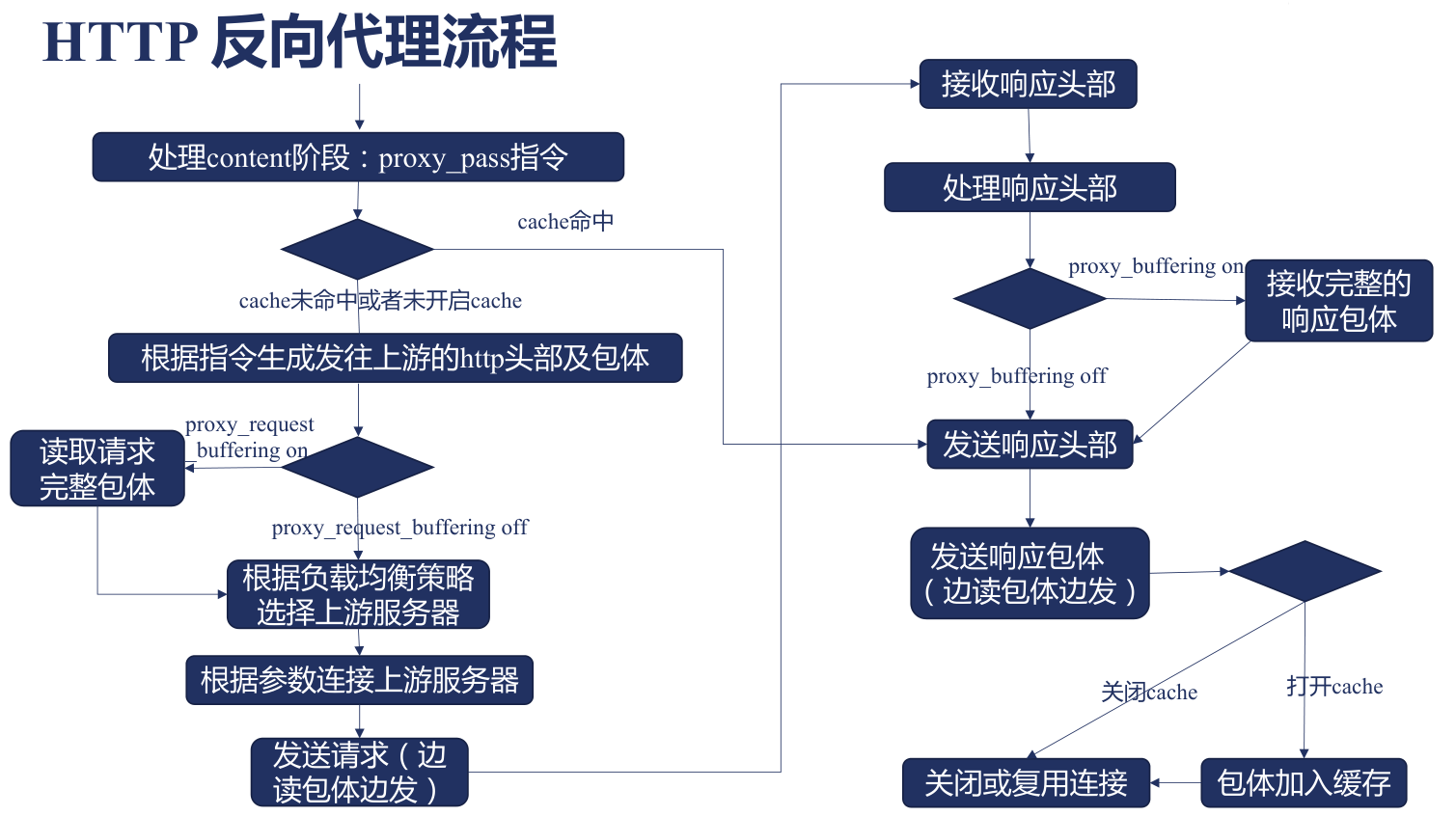
The content Phase
Specifies which content needs to be reverse proxied.
- proxy_pass
- Purpose: enable reverse proxying
- Basic syntax:
proxy_pass ${url}; - Default: none
- Context:
location,ifinlocation,limit_except
${url} must satisfy the following conditions:
- Must start with
http:///https:// - After the protocol comes a domain name, IP, unix socket, upstream name, etc.; a port may follow the domain or IP, defaulting to
80if omitted - Finally an optional uri — i.e. the path and beyond in the browser address — which can carry Nginx parameters to the upstream service, such as request id
- If no uri is carried, the request's URL is sent directly to the upstream service; generally used when location uses regex or
@${name} - If a uri is carried, the matched part of the request's URL is replaced with the uri
- If no uri is carried, the request's URL is sent directly to the upstream service; generally used when location uses regex or
The Phase of Generating http Headers and Body
To modify the request line, use the following commands:
- proxy_method
- Purpose: modify the request method
- Basic syntax:
proxy_method ${method}; - Default: none
- Context:
http,server,location
- proxy_http_version
- Purpose: specify the http version; proxying
http2/http3to upstream servers is not supported - Basic syntax:
proxy_http_version 1.0 / 1.1; - Default: none
- Context:
http,server,location
- Purpose: specify the http version; proxying
To modify request headers, use the following commands:
- proxy_set_header
- Purpose: set a request header, overriding the request header information sent by the user
- Basic syntax:
proxy_set_header ${filed} ${value}; - Default: by default Host and Connection are modified — the Host value is corrected, and keepalive is closed
proxy_set_header Host $proxy_host;: if the$proxy_hostvalue is empty, this command is not added and the Host in the request header is keptproxy_set_header Connection close;
- Context:
http,server,location
- proxy_pass_request_headers
- Purpose: whether to send the request headers from the user to the upstream service
- Basic syntax:
proxy_pass_request_headers on / off; - Default:
proxy_pass_request_headers on; - Context:
http,server,location
To modify the request body, use the following commands:
- proxy_set_body
- Purpose: set the request body value, overriding the request body sent by the user
- Basic syntax:
proxy_set_body ${value}; - Default: none
- Context:
http,server,location
- proxy_pass_request_body
- Purpose: whether to send the request body from the user to the upstream service
- Basic syntax:
proxy_pass_request_body on / off; - Default:
proxy_pass_request_body on; - Context:
http,server,location
The Phase of Reading the Request Body
There are two ways to read the request body:
Stream it, sending to the upstream service as it is read
Read it all at once, then pass it to the upstream service
proxy_request_buffering
- Purpose: whether to receive the user's complete request body before passing it to the upstream service
- Basic syntax:
proxy_request_buffering on / off;on: recommended when users have slow networks, the upstream has poor concurrency handling, or in high-throughput scenariosoff: disable when timely responses are needed and to reduce Nginx disk I/O; disabling also affects theproxy_next_upstreamdirective
- Default:
proxy_request_buffering on; - Context:
http,server,location
Body reading configuration:
- client_body_buffer_size
- Purpose: the buffer block size allocated for receiving the body
- Basic syntax:
client_body_buffer_size ${size};- If the body was already fully received while processing request headers, no extra allocation is needed
- If the remaining body length is smaller than client_body_buffer_size, allocate only what is needed
- If it exceeds, create buffer blocks in units of client_body_buffer_size to read the body
- Default:
client_body_buffer_size 8k|16k; - Context:
http,server,location
- client_body_in_single_buffer
- Purpose: whether to put the entire body into a single buffer; consider the body size; the
$request_bodyvariable is only usable when enabled - Basic syntax:
client_body_in_single_buffer on / off; - Default:
client_body_in_single_buffer off; - Context:
http,server,location
- Purpose: whether to put the entire body into a single buffer; consider the body size; the
- client_max_body_size
- Purpose: limit the maximum body length, checked via the
Content-Lengthfield; a failed check returns the 413 status code - Basic syntax:
client_max_body_size ${size}; - Default:
client_max_body_size 1m; - Context:
http,server,location
- Purpose: limit the maximum body length, checked via the
After the body is read, it is cached to disk via I/O and read back from disk when needed later; the cached files are temporary files, controlled by the following commands:
- client_body_temp_path
- Purpose: configure the temporary file path; the file Hash is split by digits via levels and stored in different subdirectories. Since Linux records file names in directories, placing a large number of files in one directory hurts read/write performance.
- Basic syntax:
client_body_temp_path ${path} [level1 [level2 [level3]]]; - Default:
client_body_temp_path client_body_temp; - Context:
http,server,location
- client_body_in_file_only
- Purpose: whether the body must be placed in a file
- Basic syntax:
client_body_in_file_only on | clean | off;on: must be written to a file and is not deleted after processingclean: must be written to a file and is automatically deleted after processingoff: operate in memory; no file write needed
- Default:
client_body_in_file_only off; - Context:
http,server,location
- client_body_timeout
- Purpose: configure the maximum time for reading the body. If a body cannot be fully read within the specified time, a 408 timeout error is returned
- Basic syntax:
client_body_timeout ${time}; - Default:
client_body_timeout 60s; - Context:
http,server,location
Establishing a Connection with the Upstream Service
- proxy_connect_timeout
- Usage: the timeout for establishing a connection with the upstream server; whenever connection establishment times out, the 502 error code is returned
- Basic syntax:
proxy_connect_timeout ${time}; - Default:
proxy_connect_timeout 60s; - Context:
http,server,location
- proxy_next_upstream
- Usage: switch to another upstream server after failing to establish a connection
- Basic syntax:
proxy_next_upstream ${http_502} | ..; - Default:
proxy_next_upstream error timeout; - Context:
http,server,location
- proxy_socket_keepalive
- Usage: whether to enable TCP keepalive — through the probe packet mechanism, communicating with the upstream service to check liveness when idle, automatically closing the connection when the upstream service closes or hangs
- Basic syntax:
proxy_socket_keepalive on | off; - Default:
proxy_socket_keepalive off; - Context:
http,server,location
- keepalive
- Purpose: the maximum number of idle keep-alive connections to maintain
- Basic syntax:
keepalive ${connections}; - Default: none
- Context:
upstream
- keepalive_requests
- Purpose: the maximum number of requests per connection; the connection is closed automatically once exceeded
- Basic syntax:
keepalive_requests ${number}; - Default:
keepalive_requests 100; - Context:
upstream
- proxy_bind
- Purpose: modify the source IP in packets of the TCP connection
- With multiple IPs, specify the IP address used for communication, avoiding communication anomalies from using a network-isolated IP, e.g.
proxy_bind $remote_addr; - A non-local address requires adding transparent, e.g.
proxy_bind $remote_addr transparent;
- With multiple IPs, specify the IP address used for communication, avoiding communication anomalies from using a network-isolated IP, e.g.
- Basic syntax:
proxy_bind ${address} [transparent] | off; - Default: none
- Context:
http,server,location
- Purpose: modify the source IP in packets of the TCP connection
- proxy_ignore_client_abort
- Usage: after the client aborts the request, whether to not synchronize it to the upstream service; off by default, i.e. synchronized
- Basic syntax:
proxy_ignore_client_abort on | off; - Default:
proxy_ignore_client_abort off; - Context:
http,server,location
- proxy_send_timeout
- Usage: the timeout when sending a request to the upstream server
- Basic syntax:
proxy_send_timeout ${time}; - Default:
proxy_send_timeout 60s; - Context:
http,server,location
Receiving the Upstream Service Response
Receiving the upstream response headers:
- proxy_buffer_size
- Purpose: limits the maximum size of received response headers
- Basic syntax: proxy_buffer_size ${size};
- Default: proxy_buffer_size 4k|8k;
- Context: http, server, location
Receiving the upstream response body:
proxy_buffers
- Purpose: the body size that can be stored in memory; excess is written to disk
- Basic syntax:
proxy_buffers ${number} ${size}; - Default:
proxy_buffers 8 4k|8k; - Context:
http,server,location
proxy_buffering
- Purpose: whether to receive the complete body from the upstream before returning it to the client
- Basic syntax:
proxy_buffering on | off; - Default:
proxy_buffering on; - Context:
http,server,location
proxy_max_temp_file_size
- Purpose: limit the maximum size written to files, limiting the response body size
- Basic syntax:
proxy_max_temp_file_size ${size}; - Default:
proxy_max_temp_file_size 1024m; - Context:
http,server,location
proxy_temp_file_write_size
- Purpose: how much content to write to disk each time
- Basic syntax:
proxy_temp_file_write_size ${size}; - Default:
proxy_temp_file_write_size 8k|16k; - Context:
http,server,location
proxy_temp_path
- Purpose: the directory for temporarily storing response bodies
- Basic syntax:
proxy_temp_path ${path} [level1 [level2 [level3]]]; - Default:
proxy_temp_path proxy_temp; - Context:
http,server,location
proxy_busy_buffers_size
- Purpose: after receiving the specified size, immediately transmit that body to the client
- Basic syntax:
proxy_busy_buffers_size ${size}; - Default:
proxy_busy_buffers_size 8k|16k; - Context:
http,server,location
Commands that limit the transfer speed with the upstream service:
- proxy_read_timeout
- Purpose: the timeout between two TCP reads; a response is not received all at once and requires multiple reads. This configuration constrains the interval between reads; on timeout, the 502 status code is returned.
- Basic syntax:
proxy_read_timeout ${time}; - Default:
proxy_read_timeout 60s; - Context:
http,server,location
- proxy_limit_rate
- Purpose: limit the speed of reading the upstream service response; 0 means no limit
- Basic syntax:
proxy_limit_rate ${rate}; - Default:
proxy_limit_rate 0; - Context:
http,server,location
Persisting response files:
- proxy_store_access
- Purpose: what owning group and permissions to use when storing files
- Basic syntax:
proxy_store_access users:permissions ...; - Default:
proxy_store_access user:rw; - Context:
http,server,location
- proxy_store
- Purpose: whether to enable file persistence; configuring a string specifies the storage location
- Basic syntax:
proxy_store on | off | ${string}; - Default:
proxy_store off; - Context:
http,server,location
Returning the Response
About response headers:
- proxy_ignore_headers
- Purpose: certain response headers can change Nginx's behavior; proxy_ignore_headers can prevent them from taking effect
- Basic syntax:
proxy_ignore_headers ${field} ...; - Default: none
- Context:
http,server,location
The response headers involved:
X-Accel-Redirect: the upstream service specifies an internal redirect within Nginx, controlling request executionX-Accel-Limit-Rate: the upstream sets the speed limit sent to the client, equivalent to thelimit_ratedirectiveX-Accel-Buffering: the upstream controls whether the upstream response is bufferedX-Accel-Charset: the upstream controls the Charset in Content-Type
Cache-related:
X-Accel-Expires: sets the response's cache time in Nginx, in seconds;@at the start means a time of dayExpires: controls Nginx cache time, with lower priority thanX-Accel-ExpiresCache-Control: controls Nginx cache time, with lower priority thanX-Accel-ExpiresSet-Cookie: ifSet-Cookieappears in the response, it is not cached; can be disabled viaproxy_ignore_headersVary: ifVary: *appears in the response, it is not cached; likewise can be disabled
Hiding response headers the client does not need:
- proxy_hide_header
- Purpose: some response headers are useless to the client; proxy_hide_header can hide them
- Basic syntax:
proxy_hide_header ${field} ...; - Default: the following are ignored by default
Date: filled by thengx_http_header_filter_modulefilter module; the value is the time when Nginx sends the response headersServer: filled by thengx_http_header_filter_modulefilter module; the value is the Nginx versionX-Pad: usually a header generated by Apache to avoid browser bugs; ignored by defaultX-Accel-${xxx}: responses controlling Nginx behavior; no need to forward to the client
- Context:
http,server,location
- proxy_pass_header
- Purpose: for fields filtered out by
proxy_hide_header, if you want them sent to the client, override with this command - Basic syntax:
proxy_pass_header ${field}; - Default: none
- Context:
http,server,location
- Purpose: for fields filtered out by
Modifying Set-Cookie:
- proxy_cookie_domain
- Purpose: modify the domain of Set-Cookie
- Basic syntax:
proxy_cookie_domain off;proxy_cookie_domain ${domain} ${replacement};
- Default:
proxy_cookie_domain off; - Context:
http,server,location
- proxy_cookie_path
- Purpose: modify the subpath of Set-Cookie
- Basic syntax:
proxy_cookie_path off;proxy_cookie_path ${path} ${replacement};
- Default:
proxy_cookie_path off; - Context:
http,server,location
Modifying location:
- proxy_redirect
- Purpose: modify the target of a location redirect
- Basic syntax:
proxy_redirect default;proxy_redirect off;proxy_redirect ${redirect} ${replacement};
- Default:
proxy_redirect default; - Context:
http,server,location
Handling Upstream Errors
When the upstream response fails, as long as nothing has been sent to the client yet, the error can be handled internally:
- proxy_next_upstream
- Purpose: after an upstream response fails, intercept the corresponding error and retry with a different server
- Basic syntax:
proxy_next_upstream error | timeout | invalid_header | http_500 | http_502 | http_503 | http_504 | http_403 | http_404 | http_429 | non_idempotent | off ...;error: takes effect when an error occurs anywhere in the communication link between Nginx and the upstream servicetimeout: takes effect on communication timeoutinvalid_header: takes effect when the backend returns invalid headershttp_${code}: takes effect when the backend returns the specified status codeoff: do not enable the feature
- Default:
proxy_next_upstream error timeout; - Context:
http,server,location
- proxy_next_upstream_timeout
- Purpose: the timeout when re-selecting an upstream service
- Basic syntax:
proxy_next_upstream_timeout time; - Default:
proxy_next_upstream_timeout 0; - Context:
http,server,location
- proxy_next_upstream_tries
- Purpose: the maximum number of retries
- Basic syntax:
proxy_next_upstream_tries number; - Default:
proxy_next_upstream_tries 0; - Context:
http,server,location
Using error_page to handle error codes returned by upstream:
- proxy_intercept_errors
- Purpose: by default Nginx does not use error_page to handle upstream error codes; this command changes that
- Basic syntax:
proxy_intercept_errors on | off; - Default:
proxy_intercept_errors off; - Context:
http,server,location
Mutual Authentication
When the Nginx upstream is https, mutual authentication is used — both ends verify each other via https.
When Nginx Is the Upstream
Specify the certificate it uses:
- ssl_certificate
- Purpose: configure the TLS certificate it uses in communication
- Basic syntax:
ssl_certificate ${file}; - Default: none
- Context:
http,server
- ssl_certificate_key
- Purpose: configure the TLS private key it uses in communication
- Basic syntax:
ssl_certificate_key ${file}; - Default: none
- Context:
http,server
Verifying downstream certificates:
- ssl_verify_client
- Purpose: whether to verify downstream certificates
- Basic syntax:
ssl_verify_client on | off | optional | optional_no_ca;optional: verify only if a certificate is presented
- Default:
ssl_verify_client off; - Context:
http,server
- ssl_client_certificate
- Purpose: configure the trusted CA certificate file used to verify downstream (client) certificates
- Basic syntax:
ssl_client_certificate ${file}; - Default: none
- Context:
http,server
When Nginx Is the Downstream
Specify the certificate it uses:
- proxy_ssl_certificate
- Purpose: configure the TLS certificate it uses in communication
- Basic syntax:
proxy_ssl_certificate ${file}; - Default: none
- Context:
http,server
- proxy_ssl_certificate_key
- Purpose: configure the TLS private key it uses in communication
- Basic syntax:
proxy_ssl_certificate_key ${file}; - Default: none
- Context:
http,server
Verifying upstream certificates:
- proxy_ssl_verify
- Purpose: whether to verify upstream certificates
- Basic syntax:
proxy_ssl_verify on | off; - Default:
proxy_ssl_verify off; - Context:
http,server
- proxy_ssl_trusted_certificate
- Purpose: configure the trusted CA certificate file used to verify upstream certificates
- Basic syntax:
proxy_ssl_trusted_certificate ${file}; - Default: none
- Context:
http,server
Variables Provided by the ssl Module
Cipher suites:
ssl_cipher: the cipher suite selected for this communication, e.g. ECDHE-RSA-AES128-GCM-SHA256ssl_ciphers: all cipher suites supported by the clientssl_protocol: the TLS version selected for this communication, e.g. TLSv1.2ssl_curves: the elliptic curves supported by the client, e.g. secp384r1:secp521r1
Certificates:
ssl_client_raw_cert: the raw client certificate contentssl_client_escaped_cert: the client certificate content after urlencode encodingssl_client_cert: the client certificate with a tab prepended to each line for readabilityssl_client_fingerprint: the SHA1 fingerprint of the client certificate
Structured certificate information:
ssl_server_name: the server domain obtained via the TLS extension SNI (ServerNameIndication)ssl_client_i_dn: the certificate issuer dn info per RFC2253, e.g.CN=..,O=..,L=..,C=..ssl_client_i_dn_legacy: the certificate issuer dn info per RFC2253, e.g./C=.../L=../O=.../CN=..ssl_client_s_dn: the certificate subject dn info per RFC2253, e.g.CN=..,OU=..,O=..,L=..,ST=..,C=.ssl_client_s_dn_legacy: likewise the subject dn info, in the format/C=...ST=.../L=...O=.../OU=...CN=..
Certificate validity period:
ssl_client_V_end: the client certificate's expiration time, e.g. Dec 4 11:56:11 2028 GMTssl_client_V_remain: how many days until the client certificate expires, e.g. 3649ssl_client_V_start: the client certificate's issue date, e.g. Dec 4 11:56:11 2018 GMT
Connection validity:
ssl_client_serial: the serial number of the client certificate on the connection, e.g. 8BE947674841BD44ssl_early_data: in TLS 1.3, returns1if early data was used and the handshake is incomplete, otherwise""ssl_client_verify:FAILED: ${reason}if verification failed,NONEif the certificate was not verified,SUCCESSif verification succeededssl_session_id: the session id of the established connectionssl_session_reused:rif the session was reused (see session caching), otherwise.
Caching
Caching in the Network Link
- Browser cache:
- Pros:
- When a valid cache is used, there is no network cost — the fastest
- Even when there is network cost, using a 304 response for a stale cache minimizes network traffic
- Cons:
- Improves only one user's experience
- Pros:
- Nginx cache
- Pros
- Improves all users' experience
- Compared with browser caching, effectively reduces the upstream service load
- Reduces traffic between Nginx and the upstream service via 304 responses
- Cons:
- Users still incur network cost
- Used together with browser and Nginx caches
- Pros
Browser Caching
The browser caching flow:
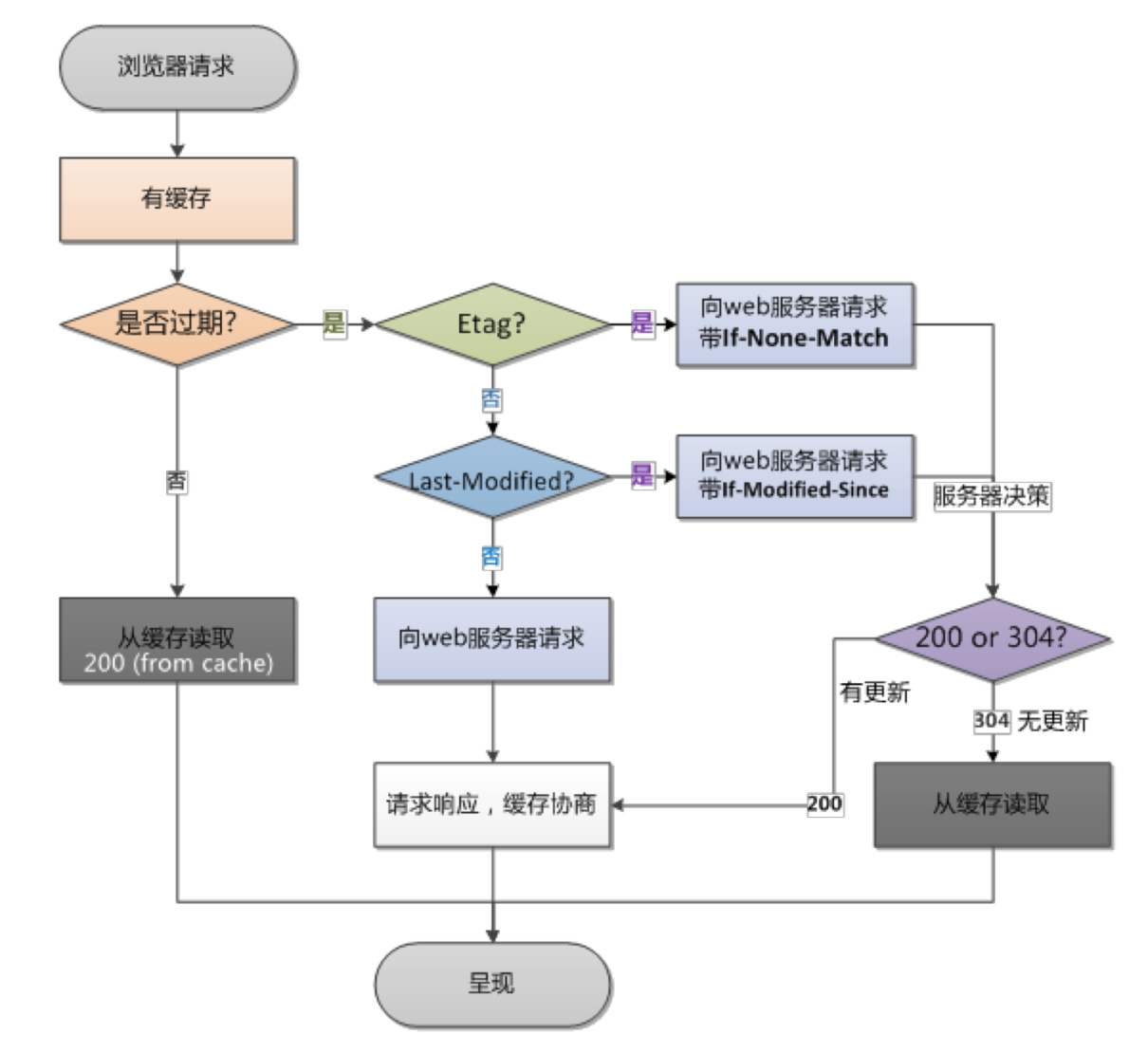
Strong caching and negotiated caching are covered in detail in the browser section; here we mainly record negotiated caching from the server-side perspective.
Nginx ETag configuration:
- etag
- Purpose: control whether the response carries ETag information; the ETag generation rule is
${last_modified_time}-${content_length} - Syntax:
etag on / off; - Default:
etag on; - Context:
http,server,location
- Purpose: control whether the response carries ETag information; the ETag generation rule is
The expires directive controls the expiration time throughout:
- expires
- Purpose: set the caching policy for static resources
- Basic syntax:
expires [modified] ${time};expires epoch | max | off;max: set to the maximum value, generally 10 yearsoff: do not add or modify theExpiresandCache-Controlfieldsepoch: set to no-cache, with the expiration time being the epoch startExpires: Thu, 01 Jan 1970 00:00:01 GMTCache-Control: no-cache
${time}: set a specific time, with units allowed- A time of day can be prefixed with @, e.g. 6:30 PM:
@18h30m
- A time of day can be prefixed with @, e.g. 6:30 PM:
- Positive number: set the Cache-Control time and compute
Expires, e.g.1h - Negative number:
Cache-Control: no-cache, and computeExpires, e.g.-1h
- Default:
expires off; - Context:
http,server,location,ifinlocation
Validating Whether a Resource Is Stale
The validation for browser negotiated caching all lives in the ngx_http_not_modified_module module; if the resource is already 404, the error code is returned directly, without deciding between 200 and 304.
The flow for validating whether a cache is stale:
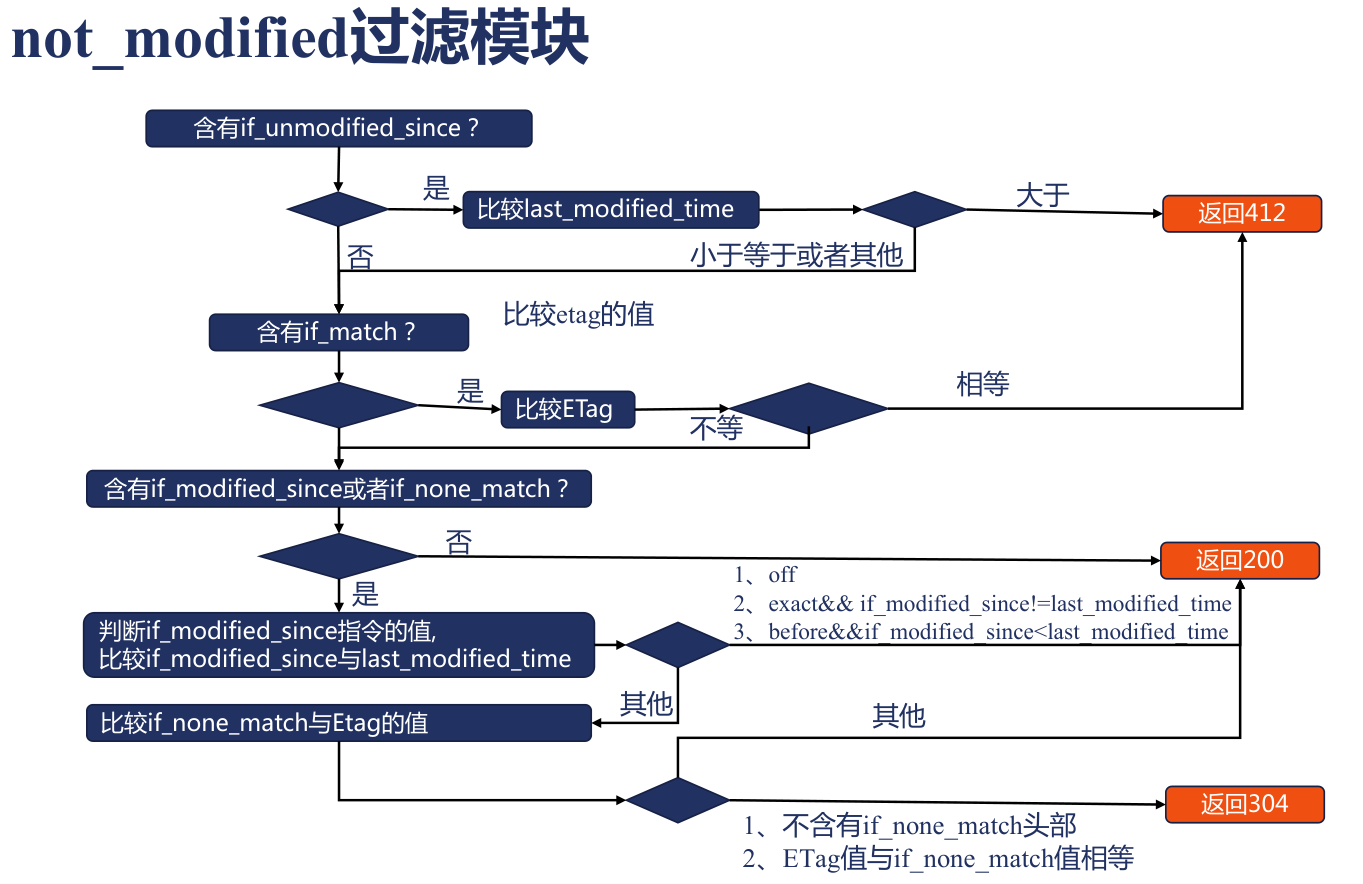
- if_modified_since
- Purpose: declare how to compare expiration times
- Basic syntax:
if_modified_since off | exact | before;off: ignore the if_modified_since header in the requestexact: exactly match the if_modified_since header against the last_modified valuebefore: if if_modified_since is greater than or equal to last_modified, return 304
- Default:
if_modified_since exact; - Context:
http,server,location
Configuring Upstream Service Caching in Nginx
The complete caching flow:
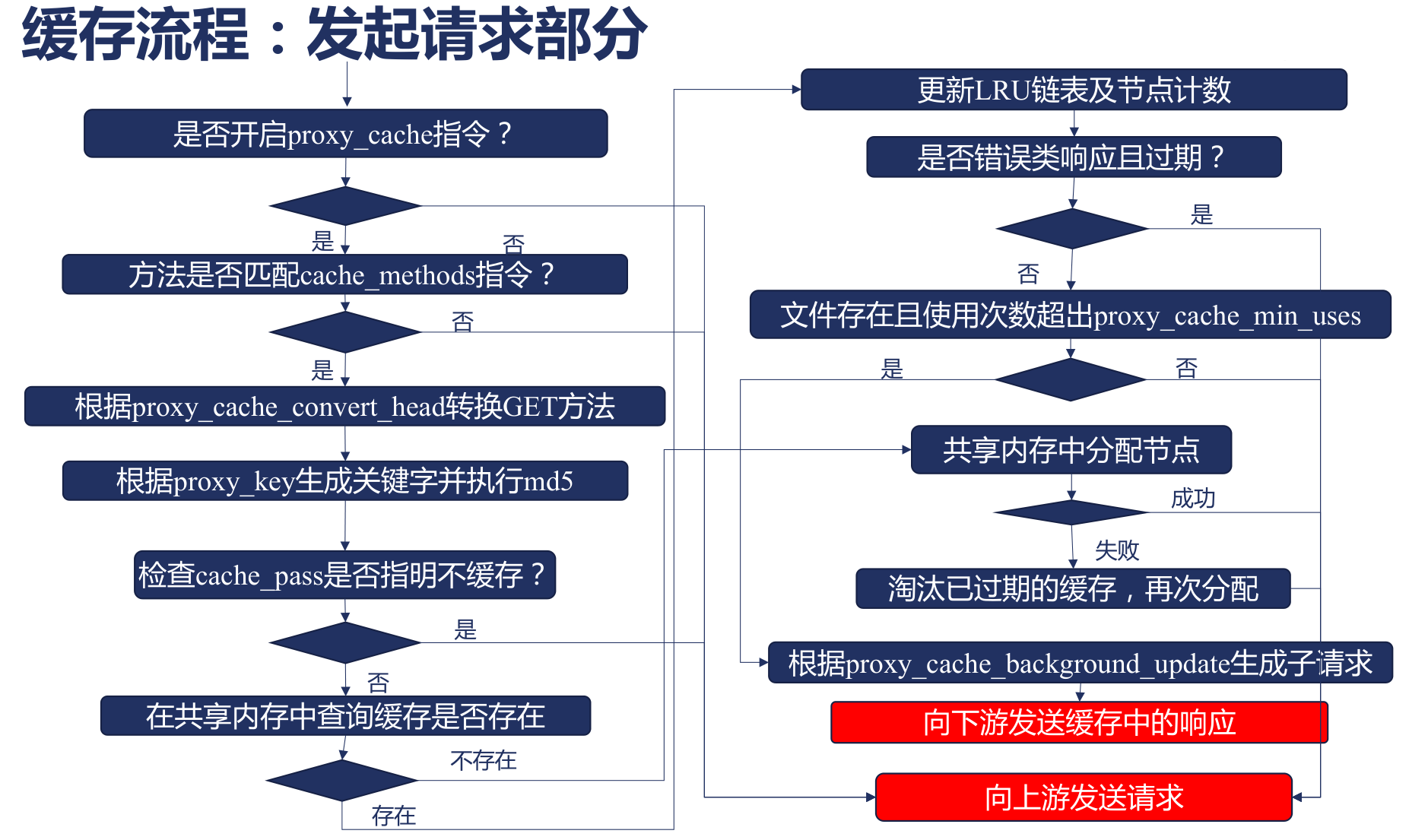
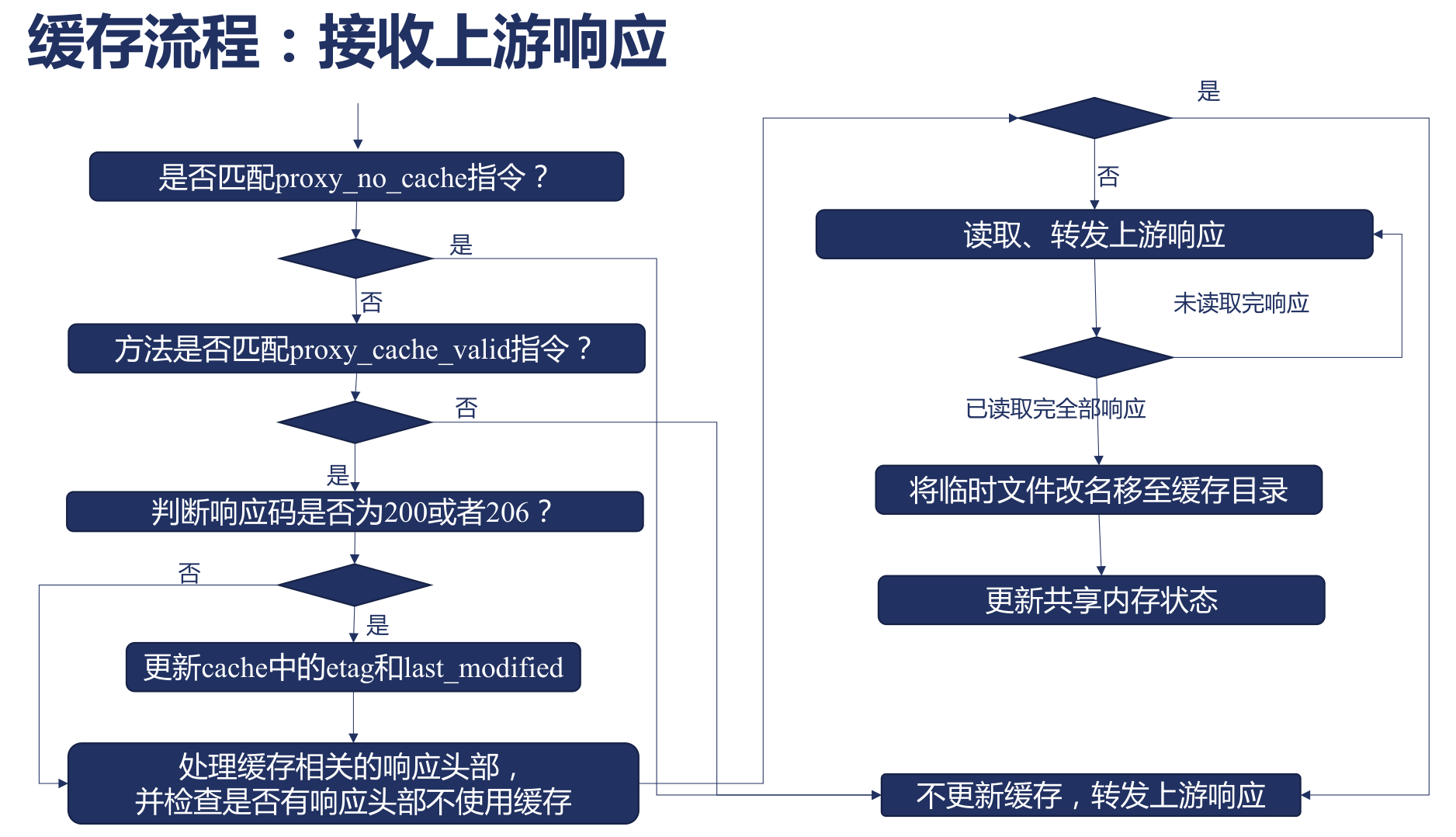
Defining the Cache Carrier
- proxy_cache
- Purpose: define the shared memory space used by the cache
- Basic syntax:
proxy_cache zone | off; - Default:
proxy_cache off; - Context:
http,server,location
- proxy_cache_path
- Purpose: define where on disk the cache is stored
- Basic syntax:
proxy_cache_path ${path}; - Default: none
- Context:
http
Which Values to Cache
- proxy_cache_key
- Purpose: set the key used for caching; for example, static resources can be cached by uri alone, while SSR resources need user fingerprints added to the cache key
- Basic syntax:
proxy_cache_key ${key}; - Default:
proxy_cache_key $scheme$proxy_host$request_uri; - Context:
http,server,location
Which Responses to Cache
- proxy_cache_valid
- Purpose: declare which responses should be cached
- Basic syntax:
proxy_cache_valid [code ...] ${time};- When no status code is configured, requests with 200, 301, 302 are cached by default
X-Accel-Expirescan also control Nginx caching- If the response header contains
Set-CookieorVary: *, it is not cached
- Default: none
- Context:
http,server,location
Which Content Not to Cache
proxy_no_cache
- Purpose: when the specified parameter is truthy, do not cache
- Basic syntax:
proxy_no_cache ${string} ...; - Default: none
- Context:
http,server,location
proxy_cache_bypass
- Purpose: when the specified parameter is truthy, do not use the cache even if one exists
- Basic syntax:
proxy_cache_bypass ${string} ...; - Default: none
- Context:
http,server,location
Cache Back-to-origin
When a cache becomes stale, a new result needs to be fetched from the upstream service — this process is called back-to-origin, and the corresponding upstream service is called the origin.
Frequent back-to-origin raises the load on the origin, and may directly cause the origin to hang.
Nginx provides some capabilities to optimize back-to-origin.
Merging Back-to-origin Requests
At the same moment, merge multiple requests with the same key, sending only one request to the upstream service; other requests wait for the upstream response and then use the cached data.
This mainly addresses back-to-origin for hot file requests; it is basically ineffective for non-hot files.
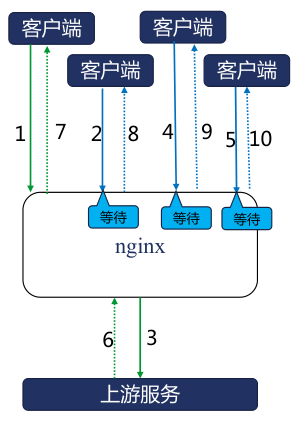
- proxy_cache_lock
- Purpose: at the same moment, only the 1st request goes upstream; other requests wait for the 1st response to return or time out, then respond to clients with the cache
- Basic usage:
proxy_cache_lock on | off; - Default:
proxy_cache_lock off; - Context:
http,server,location
- proxy_cache_lock_timeout
- Purpose: the maximum time other blocked requests wait for the 1st request to return; once reached, they send requests upstream directly, but the responses are not cached
- Basic usage:
proxy_cache_lock_timeout time; - Default:
proxy_cache_lock_timeout 5s; - Context:
http,server,location
- proxy_cache_lock_age
- Purpose: the timeout for the previous request to return; once reached, one more request is let through to the upstream, instead of all blocked requests timing out at once
- Basic usage:
proxy_cache_lock_age ${time}; - Default:
proxy_cache_lock_age 5s; - Context:
http,server,location
Reducing Back-to-origin Requests
When a cache already exists but is stale, the stale cache can be sent to the user first while a cache update is performed.
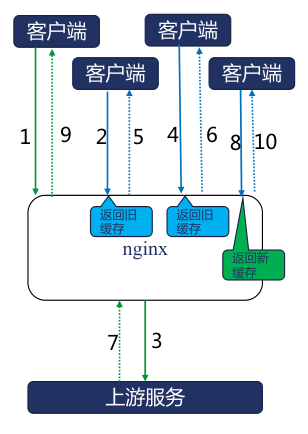
- proxy_cache_use_stale
- Purpose: configure whether to use stale caches
- Basic syntax:
proxy_cache_use_stale error | timeout | invalid_header | updating | http_500 | http_502 | http_503 | http_504 | http_403 | http_404 | http_429 | off ...;updating: when the cached content has expired and one request is accessing the upstream trying to update the cache, other requests are answered directly with the expired content.stale-while-revalidate: configuration in Cache-Control, declaring how long stale caches are tolerated after expiration; during this time stale caches may be used, otherwise the updating setting has no effect. E.g.Cache-Control: max-age=600, stale-while-revalidate=30stale-if-error: configuration in Cache-Control, declaring that after the cache expires, if the upstream service errors during this time, the stale cache continues to be used; otherwise the upstream is requested for new data. E.g.Cache-Control: max-age=600, stale-if-error=1200
error: use the cache when errors occur establishing the connection, sending the request, reading response headers, etc.timeout: use the cache when a timer times out establishing the connection, sending the request, reading response headers, etc.http_(500|502|503|504|403|404|429): cache content with the above error response codes
- Default:
proxy_cache_use_stale off; - Context:
http,server,location
- proxy_cache_background_update
- Purpose: when proxy_cache_use_stale allows expired responses, a subrequest is synchronously generated to update the expired cache by accessing the upstream service
- Basic usage:
proxy_cache_background_update on | off; - Default:
proxy_cache_background_update off; - Context:
http,server,location
- proxy_cache_revalidate
- Purpose: when updating the cache, use If-Modified-Since and If-None-Match as request headers, reducing transmitted content via 304 when the content is expected to be unchanged
- Basic usage:
proxy_cache_revalidate on | off; - Default:
proxy_cache_revalidate off; - Context:
http,server,location
Purging Caches
Open-source Nginx does not have this capability; commercial Nginx provides it, or use the free third-party module ngx_cache_purge.
- proxy_cache_purge
- Purpose: declare under what conditions cache requests are purged, defining matching conditions in the command
- Basic usage:
proxy_cache_purge on | off | ${method} [from all | ${ip} ... ] - Default: none
- Context:
http,server,location
- proxy_cache_purge
- Purpose: as long as the location matches, the cache is purged; only needs to declare which keys in which shared memory to purge — e.g. matching user login/logout
- Basic usage:
proxy_cache_purge ${zone_name} ${key} - Default: none
- Context:
http,server,location
Performance Optimization
Improving hardware utilization from the software layer:
- Increase CPU utilization
- Increase memory utilization
- Increase disk I/O utilization
- Increase network bandwidth utilization
Upgrading hardware specifications:
- NIC: 10-gigabit NICs, e.g. 10G, 25G, 40G
- Disk: solid-state drives, focusing on IOPS and BPS metrics
- CPU: faster clock speed, more cores, larger cache, better architecture
- Memory: faster access speed
Optimizing CPU Utilization
The overall approach:
- Be able to use all CPU resources
- master-worker multi-process architecture
- the number of worker processes should be greater than or equal to the number of CPU cores
- Nginx processes should not do useless work that wastes CPU resources
- A worker process should not voluntarily yield the CPU while busy; there are two cases:
- Worker processes should not dissipate resources through contention
- the number of worker processes should equal the number of CPU cores
- use
worker_cpu_affinity ${cpumask}to bind worker processes to CPUs
- Worker processes should not call APIs that cause them to voluntarily yield the CPU
- reject third-party modules that can block processes
- Worker processes should not dissipate resources through contention
- A worker process should not voluntarily yield the CPU while busy; there are two cases:
- Do not get preempted by other processes
- Raise process priority to occupy the CPU longer
- use
worker_priority -20;to set the highest priority; the default isworker_priority 0;
- use
- Reduce resource-hungry non-Nginx processes on the operating system
- Raise process priority to occupy the CPU longer
Optimizing Network Transmission
- Reduce timeout retry counts to avoid occupying resources
- Limit queue lengths at each stage of the TCP handshake, e.g. SYN_RECV, ACCEPT states
- Set the maximum number of connections per worker (including connections between Nginx and its upstreams and downstreams)
- Limit the number of packet-loss retransmissions
- Compress response sizes
- Upgrade the HTTP protocol