Introduction to Vue3 Hooks
The `hook` concept was first proposed by React. To understand vue3 `hook`s, it is essential to first understand React `hook`s, including their use cases, the motivation behind their evolution, and so on, in order to make better use of vue3 `hook`s.
Updated
Starting with the Separation of Concerns Pattern
In React, one way to achieve separation of concerns is the Container/Presentational pattern. With this pattern, the view can be separated from the application logic. In this pattern, implementing a feature requires two components: a Container that only handles component logic, and a Presentational that is only used for display.
A Presentational component generally has no state, or only UI-related state. The main function of a Container component is data processing and presenting the data through the Presentational. A Container component usually only renders the Presentational components related to its data. Because they render nothing themselves, they usually contain no styles either.
Let's look at an example. Suppose there is a scenario where you need to fetch the addresses of 6 images and display them. Using the separation of concerns pattern, you need to split it into two components: a data-fetching component and an image-display component, as follows:
// DogImages.js
import React from 'react'

export default function DogImages({ dogs }) {
  // Display all images
  return dogs.map((dog, i) => <img src={dog} key={i} alt="Dog" />)
}
// DogImagesContainer.js
import React from 'react'
import DogImages from './DogImages'

export default class DogImagesContainer extends React.Component {
  constructor() {
    super()
    // Define state, the dogs array, as the render parameter of the DogImages component
    this.state = {
      dogs: []
    }
  }

  componentDidMount() {
    // Send the request after mounting to get the data to display
    fetch('https://dog.ceo/api/breed/labrador/images/random/6')
      .then(res => res.json())
      .then(({ message }) => this.setState({ dogs: message }))
  }

  render() {
    return <DogImages dogs={this.state.dogs} />
  }
}
From the code it is not hard to see that a Container essentially contains only logic and only renders Presentational components, so hooks were born: abstracting logic into individual hooks, supporting organizing code by logic, with finer granularity and stronger reusability, while also removing redundant components and avoiding overly deep component nesting.
The logic extracted according to the hook approach is as follows:
// useDogImages.js
export default function useDogImages() {
  const [dogs, setDogs] = useState([])

  useEffect(() => {
    fetch('https://dog.ceo/api/breed/labrador/images/random/6')
      .then(res => res.json())
      .then(({ message }) => setDogs(message))
  }, [])

  return dogs
}
So the original component can be simplified to:
import React from 'react'
import useDogImages from './useDogImages'

export default function DogImages() {
  const dogs = useDogImages()

  return renderImages(dogs)
}

function renderImages(dogs) {
  return dogs.map((dog, i) => <img src={dog} key={i} alt="Dog" />)
}
There is one less component level, and the logic has been split out separately; the presentational component can also be split out separately. By refining the corresponding feature granularity, each part can participate in reuse more flexibly, such as rendering a list of cat images, counting the number of dog images, and so on, each reusing the corresponding hook or Presentational separately.
From the evolution above, it is actually not hard to understand the difference between function and hook:
- function: encapsulates a piece of logic
- hook: encapsulates a piece of stateful logic
Organizing a Page with the Vue3 Mindset
Starting with a Minimal Interaction Draft
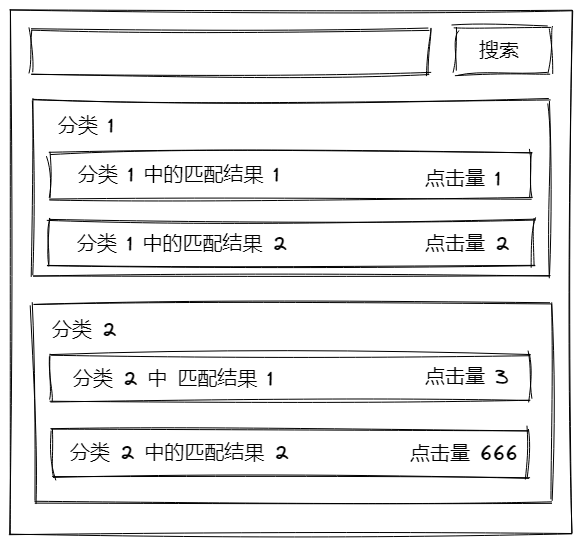
The requirement is fairly simple: a search result page with a search box and search results in multiple categories. First, split the components according to the Container/Presentational pattern above, and you get the following components:
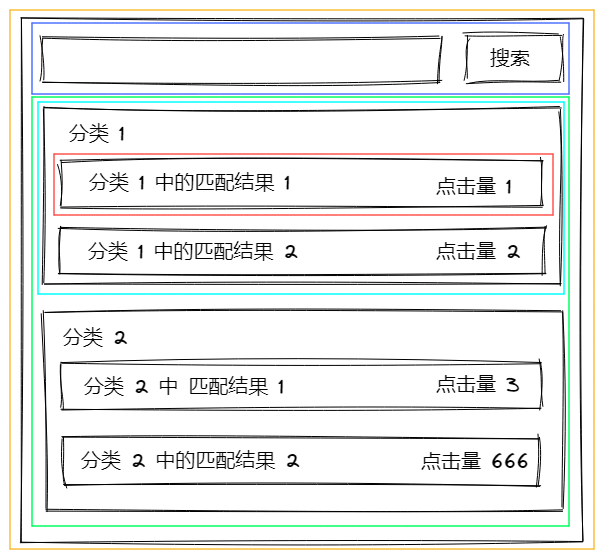
After splitting, the corresponding components are as follows:
- SearchPage
- SearchBar
- SearchList
- SearchResultTitle
- SearchResultContent
Implementation Code
<!-- SearchPage.vue -->
<script lang="ts" setup>
import type { SearchResult } from './types'

import SearchBar from './components/SearchBar.vue'
import SearchList from './components/SearchList.vue'

const { t } = useI18n()

let resultList = $ref<SearchResult[]>([])
function onSearch() {
  resultList = loadDogImages()
}
function loadDogImages() {
  // mock search result
  return [
    {
      id: 1,
      title: t('demo.category', { id: 1 }),
      children: [
        {
          id: 11,
          title: t('demo.searchResult', { id: 1, num: 1 }),
          clickNum: 1,
        },
        {
          id: 12,
          title: t('demo.searchResult', { id: 1, num: 2 }),
          clickNum: 2,
        },
      ],
    },
    {
      id: 2,
      title: t('demo.category', { id: 2 }),
      children: [
        {
          id: 21,
          title: t('demo.searchResult', { id: 2, num: 1 }),
          clickNum: 3,
        },
        {
          id: 22,
          title: t('demo.searchResult', { id: 2, num: 2 }),
          clickNum: 666,
        },
      ],
    },
  ]
}
</script>

<template>
  <SearchBar mb="4" @search="onSearch" />
  <SearchList :list="resultList" />
</template>

<i18n lang="yml">
zh-CN:
  demo:
    category: 分类{id}
    searchResult: 分类{categoryID}中的匹配结果{num}
</i18n>
<!-- SearchBar.vue -->
<script lang="ts" setup>
const emits = defineEmits<{
  (e: 'search', keyword: string): void
}>()
const keyword = $ref('')
function search() {
  emits('search', keyword)
}

const { t } = useI18n()
</script>

<template>
  <div>
    <input
      v-model="keyword" type="text" autocomplete="false" p="x4 y2" w="250px" text="center" mr="4" bg="transparent"
      border="~ rounded gray-200 dark:gray-700" outline="none active:none" @keydown.enter="search"
    >
    <button @click="search">
      {{ t('search') }}
    </button>
  </div>
</template>

<i18n lang="yml">
zh-CN:
  search: 搜索
</i18n>
<!-- SearchList.vue -->
<script lang="ts" setup>
import type { SearchResult } from '../types'
import SearchResultContent from './SearchResultContent.vue'
import SearchResultTitle from './SearchResultTitle.vue'

const { list = [] } = defineProps<{
  list?: SearchResult[]
}>()
</script>

<template>
  <div v-for="result in list" :key="result.id" :result="result" class="border" border-color="zinc-400" px="4" py="2" mb="4">
    <SearchResultTitle :title="result.title" />
    <div v-for="item in result.children" :key="item.id">
      <SearchResultContent :item="item" />
    </div>
  </div>
</template>
<!-- SearchResultTitle.vue -->
<script lang="ts" setup>
const { title } = defineProps<{
  title: string
}>()
</script>

<template>
  <div text="6" mb="2">
    {{ title }}
  </div>
</template>
<!-- SearchResultContent.vue -->
<script lang="ts" setup>
import type { SearchResultItem } from '../types'
import { $ } from 'vue/macros'

const { item } = defineProps<{
  item: SearchResultItem
}>()

const { title, clickNum } = $(item)

const { t } = useI18n()
</script>

<template>
  <div class="flex justify-between border" border-color="zinc-400" px="4" py="2" mb="4">
    <div class="flex-1">
      {{ title }}
    </div>
    <div class="flex-1" text="right">
      {{ t('clickNum', { num: clickNum }) }}
    </div>
  </div>
</template>

<i18n lang="yml">
zh-CN:
  clickNum: 点击数{num}
</i18n>
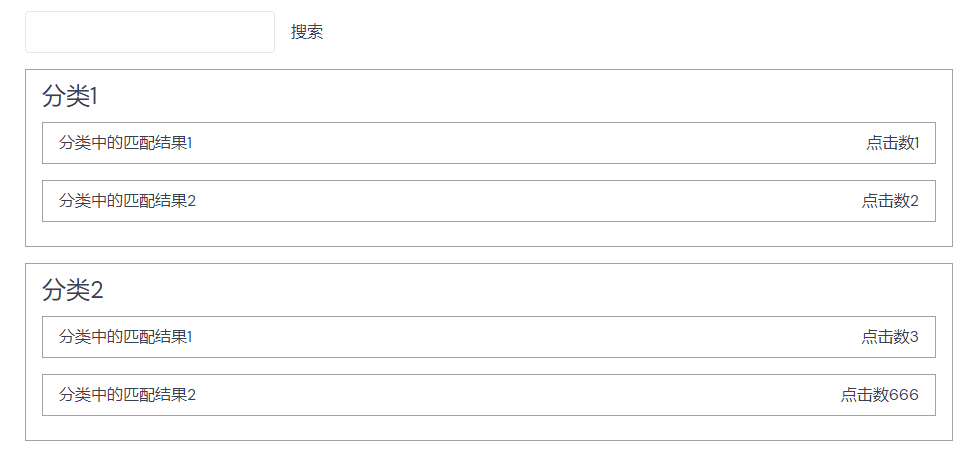
The final display effect is as follows:
hook Encapsulation Example
Starting from a Common Requirement
Common component libraries such as Antd, naive-ui, and so on all provide a mask component Spin, but using it always feels cumbersome. Especially after splitting components the way described above, a page may be split into more than a dozen components, and then masks appear all over the place in various forms, resulting in a poor user experience. If you want to share one mask, you will face the following problems:
- Passing request state across multiple component layers, and from child to parent; the logic is complex, and the parent component or pinia needs redundant data, which hurts understanding and maintainability
- Conditional masks are hard to handle. For example: requests are divided into timed requests and user-triggered requests; timed requests should not show the mask while manual requests should. Passing a single variable makes this hard to control, requiring an additional redundant computed property
So we need a hook: when we useSpin, we register the variable that controls the Spin component's display and its display conditions, encapsulating all the other logic, so we don't have to pass variables, handle conditional masks, or handle mask conflicts every time.
Example Code
<!-- SpinProvider.vue -->
<script lang="ts" setup>
import { createSpinContext } from './useSpinContext'

const { spinning } = createSpinContext()
const cls = computed(() => spinning.value ? ['cursor-wait', 'pointer-events-none'] : [])

const { t } = useI18n()
</script>

<template>
  <!-- This is a hand-written mask; it can be replaced with a mask component provided by another component library -->
  <div h="full" w="full" relative :class="cls" min-h="lg">
    <div
      v-show="spinning" bg="white" top="0" left="0" right="0" bottom="0" w="full" h="full"
      absolute z-10 flex flex-col items="center" justify="center" min-h="100px"
    >
      <div transition="300" rd="50%" border-3 w="8" h="8" border-color="transparent" class="loading-icon" />
      <div>{{ t('loading') }}</div>
    </div>
    <slot />
  </div>
</template>

<style scoped>
.loading-icon {
  animation: circle infinite 0.8s linear;
  border-top-color: #3f3f46;
}

@keyframes circle {
  0% {
    transform: rotate(0);
  }

  100% {
    transform: rotate(360deg);
  }
}
</style>

<i18n lang="yml">
zh-CN:
  loading: 加载中
</i18n>
// useSpinContext.ts
import type { MaybeRef } from '@vueuse/shared'
import type { InjectionKey, Ref } from 'vue'
import { onBeforeRouteLeave } from 'vue-router'

type State = MaybeRef<boolean>
interface StateOption {
  state: State
  dependOn: State[]
}
type SpinState = State | StateOption

export interface SpinContext {
  /** Add a controlled state */
  addSpinState: (state: SpinState) => void
  /** Clear all controlled states */
  clearSpinState: () => void
  /** Whether to temporarily hide the mask; after hiding, the mask only shows again when it is re-enabled or a new mask is registered */
  isHideSpin: Ref<boolean>
}

const spinKey: InjectionKey<SpinContext> = Symbol('spin-key')

export function createSpinContext(key: InjectionKey<SpinContext> = spinKey) {
  /** Whether to hide the mask when requests have not finished */
  const isHideSpin = ref(false)
  /** The set of controlled variables */
  let spinOptionList = $ref<StateOption[]>([])

  /** The computed overall mask state */
  const spinning = computed(() => !isHideSpin.value
    && spinOptionList.some(
      ({ state, dependOn }) => dependOn.every(isNeedSpin => unref(isNeedSpin)) && unref(state)
    ),
  )

  /** The injected context content */
  const context: SpinContext = {
    addSpinState(state: SpinState) {
      // Convert the state type
      const option = $ref(isStateOption(state) ? state : { state, dependOn: [] })

      // Add to controlled states
      spinOptionList.push(option)

      // Automatically re-enable the mask after register
      isHideSpin.value = false
    },
    clearSpinState() {
      spinOptionList = []
    },
    isHideSpin,
  }

  provide(key, context)

  return { spinning }
}

export function useSpinContext(key: InjectionKey<SpinContext> = spinKey) {
  const context = inject(key)
  if (!context) {
    window.console.warn('[SpinProvider]: `useSpinContext` can not get Context! Please check `useSpinContext` run in `<SpinProvider>`')
    return { register: () => {} }
  }

  const { addSpinState, clearSpinState, ...rest } = context

  // Automatically remove controlled variables when the page changes
  onBeforeRouteLeave(() => clearSpinState)

  return {
    register: addSpinState,
    focusClearSpin: clearSpinState,
    ...rest,
  }
}

function isStateOption(val: SpinState): val is StateOption {
  return !isRef(val) && typeof val !== 'boolean'
}
Summary
From react to vue3's composition api, both convey the same development idea: smaller modules.
By constraining the size of modules and components, when making changes you only need to consider the inputs and outputs, which effectively reduces the impact of changes; there is no need to review all the code to check the impact of a modification or whether something was missed. Readability is also stronger, and each module has a single responsibility: what renders is only responsible for rendering; logic processing is handed to function / hook; reuse features when you need features, reuse logic when you need logic.
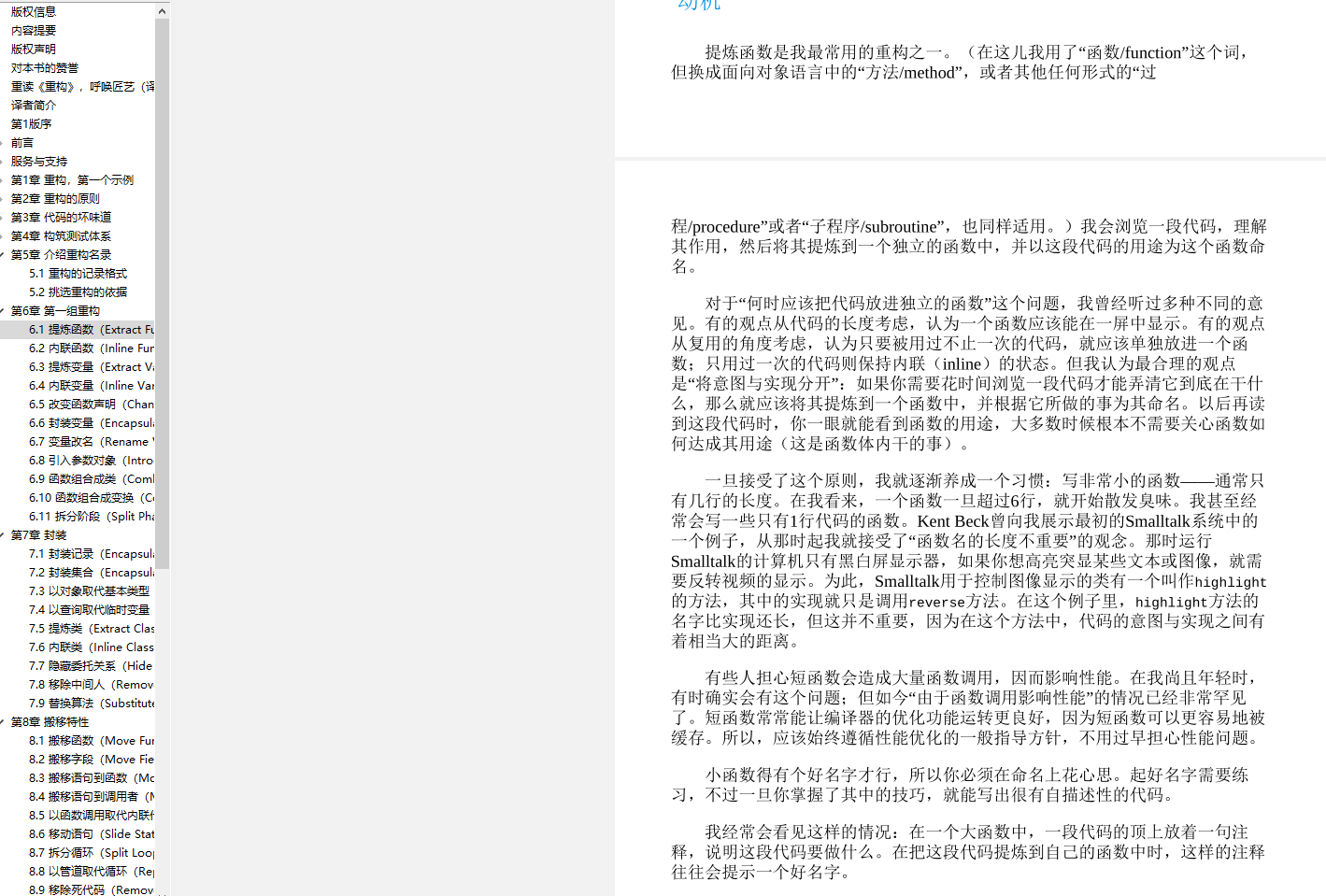
This approach splits components into finer pieces, but to quote the book "Refactoring", if encapsulation can improve readability/maintainability, even a single line of code deserves its own function. Optimizations related to fragmented code can be handled in the build tool, whereas the reverse is much more difficult, and the actual code is also harder to understand.
Screenshots of the part mentioned in the Refactoring book
Additional Notes
hook is not a silver bullet; not everything should be a hook. The original encapsulation methods such as pure functions and classes still apply. hook is more about filling the gaps when reusing pure functions/classes (they cannot reuse side effects, such as automatically releasing resources when a component is destroyed).
The following summarizes the applicable scenarios of each approach:
function: suitable for encapsulating a specific piece of logic; it is the smallest organizational unit, encapsulating an independent feature that has no strong connection with other logic, such as a data-type checking function or a data formatting functionclass: suitable for encapsulating a group of related functions, aggregating features together, such asCacheOperator, which encapsulates concrete caching logic, including where to cache, what the cache format is, cache capacity control, cache eviction, cache expiration, cache encryption, and various other related operation logichook: targets the encapsulation of side effects; it can also be treated as a component without a template. It deals with the reuse of side effects, such asuseEventListenerregistering events while automatically releasing resources under specific conditions;useCachecallingCacheOperatorand sharing the corresponding operation instance with other components to reuse the cache