WebGL Study Notes
An overview of WebGL shaders, primitives, and coordinate systems, plus the basics of vectors, matrices, linear transformations, and determinants.
Updated
Introduction to WebGL
There are two important concepts in WebGL: the vertex shader and the fragment shader.
Shaders are used for GPU drawing: the vertex shader draws the outlines of shapes, and the fragment shader colors them. The basic workflow is as follows:
// Create the WebGL context
const canvas = document.querySelector("#canvas");
const gl = canvas.getContext("webgl");

// Create shaders
const vertex = `
  attribute vec2 position;

  void main() {
    gl_PointSize = 1.0;
    gl_Position = vec4(position, 1.0, 1.0);
  }
`;

const fragment = `
  precision mediump float;

  void main()
  {
    gl_FragColor = vec4(1.0, 0.0, 0.0, 1.0);
  }
`;

// Instantiate the shader objects
const vertexShader = gl.createShader(gl.VERTEX_SHADER);
gl.shaderSource(vertexShader, vertex);
gl.compileShader(vertexShader);

const fragmentShader = gl.createShader(gl.FRAGMENT_SHADER);
gl.shaderSource(fragmentShader, fragment);
gl.compileShader(fragmentShader);

// Attach to a Program
const program = gl.createProgram();
gl.attachShader(program, vertexShader);
gl.attachShader(program, fragmentShader);
gl.linkProgram(program);
gl.useProgram(program);

// Write data into the buffer
const points = new Float32Array([-1, -1, 0, 1, 1, -1]);
const bufferId = gl.createBuffer();
gl.bindBuffer(gl.ARRAY_BUFFER, bufferId);
gl.bufferData(gl.ARRAY_BUFFER, points, gl.STATIC_DRAW);

// The GPU reads the buffer data
const vPosition = gl.getAttribLocation(program, "position"); // Get the address of the position variable in the vertex shader
gl.vertexAttribPointer(vPosition, 2, gl.FLOAT, false, 0, 0); // Set the length and type for the variable
gl.enableVertexAttribArray(vPosition); // Activate this variable

// Start shading and drawing
gl.clear(gl.COLOR_BUFFER_BIT);

// Declare that triangles are being drawn
gl.drawArrays(gl.TRIANGLES, 0, points.length / 2);
The Basic Units of WebGL
The basic unit of WebGL is the primitive, holding a status equivalent to the three primary colors in RGB.
WebGL supports 7 primitive types:
gl.POINTS: pointsgl.LINES: line segmentsgl.LINE_STRIP: line stripsgl.LINE_LOOP: line loopsgl.TRIANGLES: trianglesgl.TRIANGLE_STRIP: triangle stripsgl.TRIANGLE_FAN: triangle fans
Coordinate Systems
Unlike HTML, Canvas, and CSS—where the coordinate origin is the top-left corner, the X axis goes left to right, and the Y axis goes top to bottom—WebGL uses the center point as the coordinate origin, and the Y axis goes bottom to top.
Because the coordinate systems differ, coordinate conversion problems are common when drawing WebGL on a Canvas, and a moment of carelessness easily leads to bugs.
So before development, it is common to unify the coordinate-system origin in advance, transforming the Canvas coordinate system so that its origin is also at the center of the picture:
const canvas = document.querySelector('canvas');
const ctx = canvas.ctx;

const ctxWidth = canvas.width;
const ctxHeight = canvas.height;

// Perform the coordinate-system conversion
// Handle the origin position
ctx.translate(ctxWidth / 2, ctxHeight / 2);
// Reverse the Y-axis direction
ctx.scale(1, -1);
Vectors
A vector is a directed line segment in N-dimensional space. Several questions need to be clarified here:
- A vector can be translated arbitrarily without changing the vector: this means a vector's origin can be changed at will, without affecting the vector or its computation.
- This is generally considered an extension of one-dimensional vectors; for example, 2 + 5 means walking 2 units first, then 5 units.
- When vectors are added, you can view it as connecting the start and end points of the two vectors, ultimately forming the directed line segment from the start point to the end point.
- When a vector is multiplied by a constant, every dimension is scaled by that constant.
- A unit vector is the minimal vector along a certain dimension (direction); its projection length on the other dimensions is 0, that is, a unit vector is perpendicular to all other planes.
- Because unit vectors exist, the coordinate axes (dimensions) of a vector must be mutually perpendicular; otherwise no unit vector would exist.
- A vector is essentially the directed line segment obtained by scaling different unit vectors and adding them together. Its value is influenced by each unit vector: as long as a unit vector changes, the vector's value changes too.
The coordinate-system change above can be viewed as a change of unit vectors: the Y-axis unit vector changes from j to -j.
/**
 * A basic vector class
 */
class Vector {
  private x: number;
  private y: number;

  constructor(x: number, y: number) {
    this.x = x;
    this.y = y;
  }

  /**
   * Vector length
   */
  get length() {
    return Math.hypot(this.x, this.y);
  }

  /**
   * The angle between the vector and the X axis
   */
  get dir() {
    return Math.atan2(this.y, this.x);
  }

  /**
   * Rotate the vector
   */
  rotate(dir: number) {
    const { x, y } = this;

    const cosDir = Math.cos(dir);
    const sinDir = Math.sin(dir);

    this.x = x * cosDir - y * sinDir;
    this.y = x * sinDir + y * cosDir;
  }

  /**
   * Check whether vectors are parallel
   */
  parallel(v: Vector) {
    return this.x * v.y === this.y * v.x;
  }

  /**
   * Check whether vectors are perpendicular
   */
  perpendicular(v: Vector) {
    return this.x * v.x + this.y * v.y === 0;
  }
}

const v = new Vector(3, 4)

// The vector's x can be computed from length and dir
const x = v.length * Math.cos(v.dir);

// The vector's y can be computed from length and dir
const y = v.length * Math.sin(v.dir);
Matrices
Simply put, a matrix usually represents a linear transformation.
const matrix = [
  [1, 1],
  [1, 0],
]
Taking columns as units, it can be split into [ matrix[0][0], matrix[1][0] ] and [ matrix[0][1], matrix[1][1] ]. These are the unit vectors (basis vectors) of the vector after the linear transformation.
A change of basis vectors also transforms the vectors accordingly. For example, for a vector [ x, y ], after applying the matrix transformation, the new vector is:
const v1 = [
  x * matrix[0][0],
  x * matrix[1][0],
]

const v2 = [
  y * matrix[0][1],
  y * matrix[1][1],
]

// v = v1 + v2
const v = [
  x * matrix[0][0] + y * matrix[0][1],
  x * matrix[1][0] + y * matrix[1][1],
]
Similarly, matrix multiplication means applying one linear transformation first, then another, so it is often called a composite transformation.
From a computational perspective, it means applying a linear transformation to a pair of basis vectors.
For example, given the following matrices:
// Shear matrix
const shearMatrix = [
  [1, 1],
  [0, 1],
]
// Rotation matrix
const rotateMatrix = [
  [0, -1],
  [1, 0],
]
The transformation process of shearMatrix * rotateMatrix is as follows:
// Matrices are left-associative, i.e. the rotateMatrix transformation is applied first, then shearMatrix

// Let i denote the X-axis unit vector after the composite transformation
// Let j denote the Y-axis unit vector after the composite transformation

// Compute i first
// const i = shearMatrix * [ rotateMatrix[0][0], rotateMatrix[1][0] ]

const ix = rotateMatrix[0][0]
const iy = rotateMatrix[1][0]

const i1 = [
  // 0 * 1 = 0
  ix * shearMatrix[0][0],
  // 0 * 0 = 0
  ix * shearMatrix[1][0],
]
const i2 = [
  // 1 * 1 = 1
  iy * shearMatrix[0][1],
  // 1 * 1 = 1
  iy * shearMatrix[1][1],
]

// i = i1 + i2
const i = [
  1,
  1,
]

// Then compute j
// const j = shearMatrix * [ rotateMatrix[0][1], rotateMatrix[1][1] ]

const jx = rotateMatrix[0][1]
const jy = rotateMatrix[1][1]

const j1 = [
  // -1 * 1 = -1
  jx * shearMatrix[0][0],
  // -1 * 0 = 0
  jx * shearMatrix[1][0],
]
const j2 = [
  // 0 * 1 = 0
  jy * shearMatrix[0][1],
  // 0 * 1 = 0
  jy * shearMatrix[1][1],
]

// j = j1 + j2
const j = [
  -1,
  0,
]

// The final composite matrix is:
[
  [1, -1],
  [1, 0],
]
As for the determinant: the determinant computes the area of the parallelogram enclosed by i and j. Taking the composite matrix above as an example, it can be viewed as the area enclosed by [1, 1] and [-1, 0]. To make the area easier to compute, [-1, 0] can be translated to [1, 0], so the area enclosed by the vectors is 1 * 1 = 1.
Of course, there is a more academic way to compute it: ad - bc, that is 1 * 0 - -1 * 1 = 0 - -1 = 1. We usually compute with this formula, but it is hard to understand why it works, so in the abstract domain people prefer to state its symbolic meaning rather than how to compute it.
If you want to know how it is computed, refer to the figure below: subtract the areas of the edge triangles and rectangles from the area of the large rectangle, and you get the final formula.
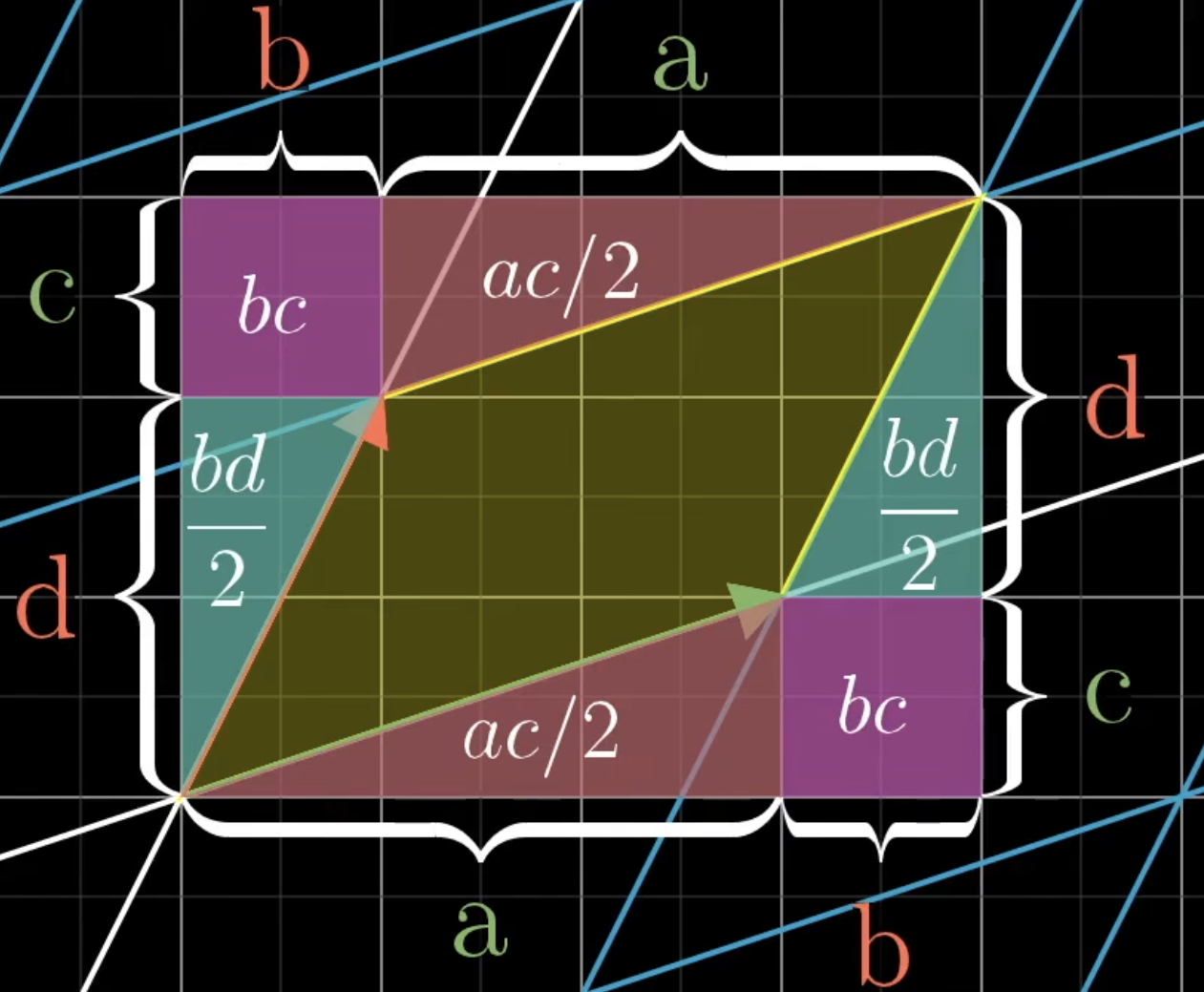
Strictly speaking, the statement that a determinant is the area enclosed by vectors is not accurate, because a determinant can be negative or 0; the negative sign here mainly indicates that X/Y have been flipped.
Take the traditional Cartesian coordinate system as an example: X goes left to right, Y goes bottom to top, and we usually consider X to be on the left of Y (determined by looking at the direction of the smaller angle formed by the positive axes). The sign of the determinant expresses exactly whether this relationship has flipped: when the determinant value is negative, it means X is on the right of Y, and the area is the absolute value of the determinant.
When the determinant is 0, it means the dimensions have collapsed—from N dimensions to N - k dimensions. Exactly how many dimensions collapsed cannot be read directly from the determinant value, because in the multiplication process, as long as one factor is 0, the value is 0.