MongoDB Notes
Organizes MongoDB data operations, modeling, replica sets, transactions and sharding, plus index optimization, monitoring, backup, and version upgrades.
Updated
Basic Commands
Inserting Data
// Insert a document into the home collection
// home is the collection name, used to group similar data documents
db.home.insertOne({ "name": 'He110' })

// Insert multiple documents
db.home.insertMany([
  { "name": 'He110' }
])
Querying Data
// Single-condition query
db.movies.find({
  "year": 1976
})

// Multi-condition AND query
db.movies.find({
  "year": 1967,
  "title": "红色娘子军"
})

// The strictly correct way to write a multi-condition AND query
db.movies.find({
  $and: [
    { "year": 1967 },
    { "title": "红色娘子军" }
  ]
})

// Multi-condition OR query
db.movies.find({
  $or: [
    { "year": 1967 },
    { "title": "红色娘子军" }
  ]
})

// Regex matching
db.movies.find({
  "title": /红色/
})

// Logical comparison
db.movies.find({
  "year": {
    // Not equal to
    $ne: 1,
    // Greater than
    $gt: 1967,
    // Greater than or equal to
    $gte: 1967,
    // Less than
    $lt: 1976,
    // Less than or equal to
    $lte: 1976,
  }
})

// Other conditions
db.movies.find({
  // Find documents where the year field does not exist
  "year": {
    $exists: false
  },
})
db.movies.find({
  "year": {
    // Find year == 1967 or year == 1976
    $in: [1967, 1976],
    // Find year != 1978
    $nin: [1978],
  },
  // Query where the from.country field === "china"
  "from.country": "china",
  // Write the property value separately
  "from": {
    // All defined properties must match
    $elemMatch: {
      "country": "china",
      "city": "beijing",
    }
  }
})

// Only get specified fields
db.movies.find(
  { "year": 1967 },
  // Do not return _id, only return title
  { "_id": false, "title": true }
)
Deleting Data
// Delete all documents with year < 0
db.movies.remove({ "year": { $lt: 0 } })

// Delete all documents
db.movies.remove({})

// Error: arguments are required
db.movies.remove()
Updating Data
// Update the first matching document
db.movies.updateOne(
  // Which documents to find
  {
    "year": 1967
  },
  // How to update this document
  {
    $set: 1976
  }
)

db.movies.updateOne(
  {},
  {
    // Append this data to the end
    $push: { "year": 1976, "title": "太阳" },
    // Append multiple pieces of data to the end
    $pushAll: [{ "year": 1976, "title": "太阳" }],
    // Do nothing if it exists, insert if it does not
    $addToSet: { "year": 1976, "title": "太阳" },
    // Remove data from the specified data: 1 removes the last one, -1 removes the first one
    $pop: { "tags": 1 },
    // Remove by value rather than by index
    $pull: { "tags": "糟粕" },
    // Batch operation of pull
    $pullAll: [{ "tags": "糟粕" }],
  }
)

// Update all matching documents
db.movies.updateMany([
  { "year": 1967 }
])
Dropping a Collection
db.movies.drop()
Aggregation Operations
db.users.aggregate([
  // Query conditions
  { $match: { "gender": "男" } },
  // Which row to start from
  { $skip: 100 },
  // How much data to take
  { $limit: 20 },
  {
    $project: {
      // Rename the first_name field to 名
      "名": "$first_name",
      // Rename the last_name field to 姓
      "姓": "$last_name"
    }
  }
])
The above command is equivalent to the following SQL:
SELECT
  first_name as '名',
  last_name as '姓'
FROM Users
WHERE gender='男'
SKIP 100
LIMIT 20
Unwinding Data
db.students.findOne()
// {
//   name: '张三',
//   score: [
//     { subject: '语文', score: 120 },
//     { subject: '数学', score: 120 },
//     { subject: '英语', score: 120 },
//   ]
// }

db.students.aggregate([
  { $unwind: '$score' }
])

// {
//   name: '张三',
//   score: { subject: '语文', score: 120 }
// }
// {
//   name: '张三',
//   score: { subject: '数学', score: 120 }
// }
// {
//   name: '张三',
//   score: { subject: '英语', score: 120 }
// }
Grouping
db.products.aggregate([
  {
    $bucket: {
      // Group by the price field
      groupBy: "$price",
      // Group intervals are [0, 10), [10, 20), [20, 30), [30, 40)
      boundaries: [0, 10, 20, 30, 40],
      // Those not in the intervals go into Other
      default: "Other",
      // Set the output format to `{ count: total }`
      output: { "count": { $sum: 1 } }
    }
  }
])
// Count the total amount of data grouped by price and by release time at the same time
db.products.aggregate([
  {
    $facet: {
      price: {
        $bucket: {
          // Group by the price field
          groupBy: "$price",
          // Group intervals are [0, 10), [10, 20), [20, 30), [30, 40)
          boundaries: [0, 10, 20, 30, 40],
          // Those not in the intervals go into Other
          default: "Other",
          // Set the output format to `{ count: total }`
          output: { "count": { $sum: 1 } }
        }
      },
      year: {
        $bucket: {
          // Group by the year field
          groupBy: "$year",
          // Group intervals are [2021, 2022), [2022, 2023), [2023, 2024), [2024, 2025)
          boundaries: [2021, 2022, 2023, 2024, 2025],
          // Those not in the intervals go into Other
          default: "Other",
          // Set the output format to `{ count: total }`
          output: { "count": { $sum: 1 } }
        }
      },
    }
  }
])
Data Computation
db.orders.aggregate([
  // Declare the statistical scope of the data
  {
    $match: {
      // Only count completed orders
      status: "completed",
      // Set the statistical time period
      orderDate: {
        // Count the full year of 2024 data
        $gte: ISODate("2024-01-01"),
        $lt: ISODate("2025-01-01"),
      },
    }
  },
  // Aggregate total amount, total shipping fee, total count
  {
    $group: {
      // Aggregate all data together, no grouping
      _id: null,
      // The total field equals the sum of each document's total
      total: { $sum: "$total" },
      // The shippingFee field equals the sum of each document's shippingFee
      shippingFee: { $sum: "$shippingFee" },
      // +1 each time
      count: { $sum: 1 }
    }
  },
  // Declare the output format
  {
    $project: {
      // Calculate the grand total
      grandTotal: {
        // Grand total = total amount - shipping fee
        $add: ["$total", "$shippingFee"]
      },
      // Keep the count field, continue to output it
      count: 1,
      // Discard the _id field, no longer output it
      _id: 0
    }
  },
])
Replica Set
Mechanism
- When data is written, replicate it to other independent nodes
- When the writing node fails, automatically elect a new replacement node
Because of the above mechanisms, MongoDB has the following capabilities:
- Data distribution: off-site data synchronization, reducing read latency in another region
- Read-write separation: different types of operations are executed on different nodes
- Remote disaster recovery: quickly switch to a remote backup data center when a data center fails
Typical Structure
MongoDB generally forms a three-node cluster:
- Primary node: only one; only the primary node can write
- Secondary nodes: two or more; replicate the data from the primary node and provide data read operations
Every node can participate in election voting; besides that, there is the voting node Arbiter, used to break tie votes, but it is no longer recommended.
Data Replication
- Primary node: after writing data, records it in the oplog
- Secondary nodes: fetch the primary node's oplog, replay the primary node's operations locally, and synchronize data updates
Election
Nodes with voting rights send heartbeat packets to each other pairwise; if more than 5 heartbeat packets are lost, the node is judged as disconnected.
If the disconnected node is a secondary, it is ignored.
If the disconnected node is the primary, an election is triggered.
The election is implemented based on the RAFT consensus algorithm; the necessary condition for a successful election is that a majority of voting nodes are alive.
A replica set supports at most 50 nodes, but at most 7 nodes with voting rights.
To be elected as the primary node, the following conditions must be met:
- Able to establish connections with a majority of nodes
- Has a relatively new oplog
- Has a relatively high priority (depends on whether it is configured)
Replica set nodes support the following configurations:
v: whether it has voting rights; if so, it participates in votingpriority: specifies the node priority; nodes with higher priority are more likely to become the primary. A priority of 0 cannot become the primaryhidden: the node can replicate data but is invisible to applications; priority must be 0, and it may have voting rights. Mainly used for backup operations.slaveDelay: manually set the synchronization delay, synchronizing data from N seconds ago, keeping a time difference. Mainly used for rollback after mistaken operations.
Replica Set Configuration
# /data/db/mongod.conf
systemLog:
  destination: file           #  MongoDB's destination for all log output is specified as a file
  path: /data/db/mongod.log   # Log file location
  logAppend: true             # When mongod or a mongo instance restarts, mongod or mongos appends new entries to the end of the existing log file
storage:
  dbPath: /data/db            # Directory where data is stored
net:
  bindIp: 0.0.0.0             # IP to listen on
  port: 28017                 # Port to listen on
replication:                  # Specify replica set mode instead of a single node
  replSetName: rs0            # The unified identifier of the replica set; only MongoDB instances with the same identifier can form a cluster
processManagement:
  fork: true                  # Run as an independent background process instead of in the foreground
# Start MongoDB with the configuration file
mongod -f /data/db/mongod.conf
# Enter the created mongo shell
# mongo 8 changed the command to mongosh; use mongo for older versions
mongosh localhost:28017
// Initialize the cluster and enter cluster state
rs.initiate()

// View cluster status, including which secondary nodes there are
rs.status()

// Add a secondary node
rs.add("localhost:28018")

// Add a secondary node
rs.add("localhost:28018")
By writing through the parent node and reading from secondary nodes, you can verify whether the replica set is working properly. Note that the permissions of secondary nodes change after clustering
// On a secondary node, you cannot read via shell; you need to enable read permission first
rs.slaveOk()

// Now read operations can begin
Common Commands
// On a secondary node, you cannot read via shell; you need to enable read permission first
rs.slaveOk()

// Lock write or sync operations; data will no longer be updated, equivalent to being down
db.fsyncLock()
// Unlock write or sync operations; after recovery, data is synced via oplog replay, so you need to ensure the oplog data is complete, containing all data from lock to unlock
db.fsyncUnlock()
Data Model Design
Elements to consider in model design:
- Entity: describes the main data collection of the business. For example, Person is an abstracted entity.
- Attribute: describes a single piece of information inside an entity. For example, name is an attribute of the Person entity.
- Relationship: describes the data rules between entities. For example, School and the entity have a many-to-many relationship.
The Three SQL Normal Forms
- Ensure all fields are atomic values; data cannot be further divided.
- Every non-key attribute fully depends on the primary key; content that does not depend on the primary key is split out into other tables.
- Every non-key attribute does not depend on other non-key attributes; those depended on by multiple tables are extracted into a separate table, connected via foreign keys and association tables.
MongoDB Data Model
Traditional data modeling goes through "conceptual model" -> "logical model" -> "physical model".
- In the "conceptual model", user requirements are described.
- In the "logical model", user requirements are broken down into implementable logic.
- In the "physical model", SQL design normal forms are considered, and data is modeled according to the normal forms.
MongoDB can skip the "physical model" and directly model the "logical model", because MongoDB allows redundancy, does not require atomicity, and therefore has no additional restrictions.
Correspondingly, when updating fields, redundant fields also need to be considered for updating together.
MongoDB Model Design
Note: a document cannot exceed 16M; if the size exceeds the limit after embedding, it must be split.
Take contact management as an example for modeling.
Building the Base Model
The base model is built according to the following steps:
- Find the entities to be stored: derive the "logical model" from the "conceptual model".
- Clarify the relationships between entities: list the relationships between entities.
- Determine the data embedding approach: MongoDB has no foreign keys or association tables; it handles this through data redundancy instead, so how data is stored needs to be clarified.
Applied to contact management:
- Objects:
Contacts,Groups,Address,Avatars - Relationships:
Contacts-Avatars: one-to-one; each user has one avatar.Contacts-Address: one-to-many; each user may have multiple addresses.Contacts-Groups: many-to-many; each user can belong to multiple groups, and each group can have multiple users.
- Embedding approach:
Avatars: one-to-one, embed the entire object directly as a sub-field into theContactsdata structure.Address: one-to-many, also embedded directly into the object as an array.Groups: embedded into the object as an array, implementing many-to-many with data redundancy.
Business Scenario Refinement
Clarify the following requirements and adjust the model:
- The most frequent data query patterns
- The most commonly used query parameters
- The most frequent data write patterns
- The read-write operation ratio
- The data size
After clarifying the business requirements, use references to avoid performance bottlenecks, and use redundancy to optimize access performance.
Association Tables
Requirements:
- Contact management is used for marketing
- There are tens of millions of contact records
- Groups are frequently modified, including: adding groups, changing group names, changing group descriptions, changing marketing status
- A group may have millions of contacts
Analysis:
According to the previous model, embedding Group into Contacts would cause data redundancy, which would affect the performance of write operations.
When a group name is modified, it would be a million-level update: all data belonging to the same group needs to be updated.
Group can be split into a separate collection, associated via group_ids, and queried using $lookup across multiple collections
Query example:
db.contacts.aggregate([
  {
    $lookup: {
      // Declare the name of the associated collection
      from: "groups",
      // Which field in this collection is used to match the associated collection
      localField: "group_ids",
      // Which field of the associated collection is used to match this collection
      foreignField: "group_id",
      // Which key name is used to store the matched group data
      as: "groups"
    }
  }
])
Reference Pattern
Requirements:
- Users upload high-fidelity images, 5-10MB in size
- An uploaded avatar cannot be changed within one month
- The ratio of queries without avatars to queries with avatars is about 9:1
Analysis:
Since the avatar itself is not read frequently and its content is large, it can be extracted into a separate table and associated by reference, so that every query gets a considerable performance boost.
Query example:
db.contacts.aggregate([
  {
    $lookup: {
      // Declare the name of the associated collection
      from: "avatars",
      // Which field in this collection is used to match the associated collection
      localField: "avatar_id",
      // Which field of the associated collection is used to match this collection
      foreignField: "_id",
      // Which key name is used to store the matched group data
      as: "avatar"
    }
  }
])
Summary
Cases that need to be split out and stored separately:
- The field stores large data, at the MB level or exceeding 16MB
- The embedded object or array is frequently modified
- The embedded array keeps growing without a limit
Notes on using $lookup:
- MongoDB does not perform primary-foreign key checks on the lookup collection
- Only
left outer joinis supported fromcannot be a sharded collection
Model Design Patterns
Bucket Design
- Scenario: recording time-series data, such as IoT, smart cities, smart transportation
- Pain point: data points are collected frequently and the data volume is large
- Solution: merge fragmented data into one entity through embedded documents, reducing index size and redundant data usage
Requirement:
For an IoT scenario with massive drone monitoring data: 100k drones, one year of data, one record per minute.
{
  _id: '20160101050000:CA2790',
  icao: 'CA2790',
  callsign: 'CA2790',
  date: ISODate("2024-01-01T00:00:00.000+0000"),
  event: {
    a: 31428,
    b: 173,
    p: [115, 134],
    s: 91,
    v: 80
  }
}
Number of documents recorded: 100000 * 365 * 24 * 60 = 52560000000 ( 52.56 billion ) Index size: 52560000000 * 130 = 6832800000000 ( 6832.8 billion bytes, about 6364 GB ) Data size: 52560000000 * 92 = 4835520000000 ( 4835.52 billion bytes, about 4503 GB )
In other words, about 52 billion records per year, 10TB in size
The idea of bucket design is to aggregate the data: aggregate per-minute data into per-hour data, i.e., the following data structure:
{
  _id: '20160101050000:CA2790',
  icao: 'CA2790',
  callsign: 'CA2790',
  events: [
    {
      a: 31428,
      b: 173,
      p: [115, 134],
      s: 91,
      v: 80,
      date: ISODate("2024-01-01T00:00:00.000+0000")
    },
    {
      a: 11111,
      b: 222,
      p: [-115, -134],
      s: 91,
      v: 80,
      date: ISODate("2024-01-01T00:01:00.000+0000")
    }
  ]
}
Number of documents recorded after modification: 100000 * 365 * 24 = 876000000 ( 876 million ) Index size after modification: 876000000 * 130 = 113880000000 ( 113.88 billion bytes, about 106 GB ) Data size after modification: 876000000 * 92 = 80592000000 ( 80.592 billion bytes, about 618 GB )
The total volume is reduced from 10TB to 724GB.
Since per-minute data is rarely read individually in most cases, reading a full day's data actually benefits more ( 1440 reads reduced to 24 )
Transposing Columns to Rows
- Scenario: many fields, each of which needs to be indexed
- Pain point: the index size is very large
- Solution: merge related fields into an array for display, so the number of indexes is greatly reduced
The source data structure is as follows:
{
  title: 'Dunkirk',
  release_USA: '2017/07/23',
  release_UK: '2017/08/01',
  release_France: '2017/08/01',
}
After transposing columns to rows:
{
  title: 'Dunkirk',
  release: [
    // Convert the column name into a key value
    {
      country: 'USA',
      date: '2017/07/23'
    },
    {
      country: 'UK',
      date: '2017/08/01',
    },
    {
      country: 'France',
      date: '2017/08/01',
    }
  ]
}
Version Field
- Scenario: the data structure iterates frequently and multiple data structures coexist
- Pain point: data of different versions stored together is hard to maintain
- Solution: add a version number as the data structure identifier and adapt for different data versions
Approximate Computation
- Scenario: statistics on site visit data and click data, with writes far exceeding reads
- Pain point: frequent writes, unfriendly to MongoDB's read-write separation model; all pressure is on the master
- Solution: approximate computation, e.g., take a random number (0, 9) each time, and update only when it equals 0, adding + 10 to the data per update; even if the data is inaccurate it doesn't matter much, since the need for performance is far higher than for accuracy
Pre-Aggregated Fields
- Scenario: precise statistics such as performance rankings, game rankings, product statistics
- Pain point: high resource consumption and long aggregation computation time
- Solution: store statistical data additionally; on each update, besides updating the data itself, also update the statistical data
{
  product: 'milk',
  sku: 'xxx-yyy-zzz-123456',
  quantity: 12345,
  // Counted daily sales
  daily_sales: 40,
  // Counted weekly sales
  weekly_sales: 40,
  // Counted monthly sales
  monthly_sales: 40,
}
Update as follows when a sale occurs:
db.inventory.update(
  { _id: '123' },
  {
    $inc: {
      // Inventory -1
      quantity: -1,
      // Statistical fields + 1
      daily_sales: 1,
      weekly_sales: 1,
      monthly_sales: 1
    }
  }
)
Transactions
Write Operation Transactions
writeConcern
writeConcern determines how many nodes must be written for a write to be considered successful; the program initiating the write operation is blocked until the write succeeds.
0: the write is initiated, and writing to master counts as success1-max node count: how many copies must be replicated for the write to count as successfulmajority: replicated to more than half of the nodes for the write to count as successfulall: written to all nodes for the write to count as successful
When configured as 0, data may be lost; it is only used in scenarios requiring high performance and low reliability. The data loss chain is as follows:
- Write to master, return success.
- Master hangs, and none of the remaining nodes have replicated this write operation.
When configured as 1-max node count, since MongoDB may dynamically scale or nodes may crash.
Hard-coding the node count is not a good choice: the write may never succeed because a node hangs, or data may be lost because a majority of nodes have not synced after scaling. It is generally not recommended.
Configuring majority ensures a majority of nodes have written the data, but the corresponding program's write operation time becomes longer.
Configuring all absolutely ensures no data loss, but the corresponding program's write operation time becomes longer and may become a response bottleneck.
This needs to be considered together with slaveDelay, to avoid extended write operation time caused by manually limited delay
journal
MongoDB's write operations are divided into two parts:
- Writing to memory
- Writing to disk
To avoid frequent disk I/O, write operations are first saved to memory, and only written to disk for persistent storage after reaching a certain quantity or a timeout. Once persistently stored, data will not be lost even if the machine goes down.
journal can be configured for when a write operation is confirmed as complete:
true: only counts as complete after writing to disk.false: counts as complete after writing to memory.
Notes
- Generally, configuring
majorityis enough, balancing performance and consistency. - Try to avoid hard-coding the node count; even when configuring, do not configure all nodes, to avoid a single node hanging causing all write operations to fail.
writeConcernonly increases the program's write operation time, without increasingMongoDB's write operation load- For ordinary data,
{ w: 1 }is enough; important data needs{ w: 'majority' }
Read Operation Transactions
Due to MongoDB's distributed nature, reading data faces the following problems:
- Which node to read from?
- What data can be read?
Correspondingly, the following configurations can be used to solve them:
readPreferencereadConcern
readPreference
readPreference determines which node is used for read operations. Optional values are as follows:
primary: only select the primary node, suitable for operations with extremely high real-time requirements, accepting only the latest dataprimaryPreference: prefer the primary node; if the primary node is unavailable, read from a secondary node. Suitable for operations with relatively high real-time requirements, preferring the latest datasecondary: only select secondary nodes, suitable for operations with average real-time requirements, able to accept non-latest datasecondaryPreference: prefer secondary nodes; if secondary nodes are unavailable, read from the primary node. Suitable for operations with average real-time requirements, able to accept non-latest datanearest: select the nearest node, considered for distributed cross-region clusters.${tag}: select nodes by nodeTag. Operation separation can be achieved by tagging nodes: operations that need to read large amounts of data are distributed to nodes with better performance, while ordinary operations can directly use lower-tier nodes, or be separated by business to avoid businesses affecting each other.
readPreference supports different configuration methods such as configuration at initialization and configuration before reading:
- Via MongoDB connection string parameters:
mongodb://host1:27107,host2:27107,host3:27017/?replicaSet=rs&readPreference=secondary - Via MongoDB driver API:
MongoCollection.withReadPreference(ReadPreference readPref) - Mongo Shell:
db.collection.find(0).readPref("secondary") // Regardless of the current node, always read from a secondary node
Notes:
- Try to use
primaryPreferenceinstead ofprimary, to avoid having no node to read from when the primary node hangs and an election is still in progress. - When using
Tag, high availability needs to be considered; try to configure multiple nodes for eachTag Tagneeds to be considered together with voting rights and priority; generally aTagwith a specific function is not expected to become the primary node, so its priority is set to 0
readConcern
After readPreference selects the specified node, readConcern determines which data on this node is readable, similar to the isolation level of relational databases. Optional values include:
available: read all available datalocal: read all available data belonging to the current shardmajority: read data that has been committed on a majority of nodeslinearizable: read documents linearizablysnapshot: read data from the most recent snapshot
available and local
In a replica set, there is no difference between available and local; the difference only exists in a sharded cluster, i.e., historical data migrated to be stored in other MongoDB instances.
Sharded clusters have the concept of data ownership, i.e., which MongoDB the current data belongs to. available does not consider the ownership issue, while local requires the ownership to be itself.
In the scenario of data migration between shards, the ownership does not change during the migration, so available and local behave inconsistently.
Notes:
locallooks more reliable, but every read requires filtering the data; in some less important scenarios, consider switching toavailable- MongoDB <= 3.6 does not support configuring secondary nodes as
local - When reading from the primary node, the default is
local; when reading from secondary nodes, for forward compatibility, the default isavailable
majority
Only when a majority of nodes have replicated this piece of data; here the majority is determined according to the majority perceived by the node.
A write operation is unsafe before it reaches a majority of nodes: once the primary node crashes while the secondary nodes have not yet replicated the operation, the just-completed write is lost. Treating a write operation as a transaction, from a transaction perspective, the transaction can be considered rolled back.
The majority configuration avoids the dirty read problem, equivalent to Read Committed in SQL.
The majority judgment logic is as follows:
- If the own node has written, but a majority of nodes have not written, return historical data
- If the own node has written and a majority of nodes have written, but the own node has not received the write completion messages from other nodes, return historical data
- If the own node has written and has received write messages from a majority of nodes, return the new data
MongoDB maintains multiple versions of data snapshots, implementing this mechanism through the MVCC mechanism
Enabling majority needs to be turned on when configuring the node:
replication:
  replSetName: rs0
  enableMajorityReadConcern: true
linearizable
The primary node loses contact, a new primary node is elected, the new primary node accepts writes, and at this point reading the old primary node still returns the old data because the communication is disconnected — i.e., dirty data. majority cannot avoid this situation.
In this case, linearizable is needed: when reading, it confirms data validity with a majority of nodes, and only returns the new data after they all acknowledge the data is valid.
This configuration reduces read efficiency; it is recommended to set a timeout with maxTimeMS to avoid long blocking.
snapshot
The highest level of consistency: before the operation completes, new data cannot be read. It can achieve Repeatable Read in SQL
db.tx.insertMany([
  { x: 1 },
  { x: 2 },
])
var session = db.getMongo().startSession()
session.startTransaction({
  // Set the read operation isolation to the highest level
  readConcern: { level: 'snapshot' },
  // Set the write operation isolation to majority write
  writeConcern: { w: 'majority' },
})
var coll = session.getDatabase('test').getCollection('tx')
// View data inside the transaction
coll.find({ x: 1 }) // { x: 1 }
// Update data outside the transaction
db.tx.updateOne({ x: 1 }, { $set: { y: 1 } })
// View data outside the transaction
db.tx.find({ x: 1 }) // { x: 1, y: 1 }
// View data inside the transaction
coll.find({ x: 1 }) // { x: 1 }
// Roll back the data
session.abortTransaction()
Transaction Development
Support Status
| Transaction property | Support level |
|---|---|
| Atomicity | Single-table documents: supported in 1.x Multi-table multi-row in replica sets: supported in 4.0 Multi-table multi-row in sharded clusters: supported in 4.2 |
| Consistency | writeConcern, readConcern supported in 3.2 |
| Isolation | readConcern supported in 3.2 |
| Durability | Journal and Replication |
Usage
db.tx.insertMany([
  { x: 1 },
  { x: 2 },
])
var session = db.getMongo().startSession()
session.startTransaction()
var coll = session.getDatabase('test').getCollection('tx')
// Update data inside the transaction
coll.updateOne({ x: 1 }, { $set: { y: 1 } })
// View data inside the transaction
coll.find({ x: 1 }) // { x: 1, y: 1 }
// View data outside the transaction
db.tx.find({ x: 1 }) // { x: 1 }
// Roll back the data
session.abortTransaction()
Transaction Write Mechanism
When a transaction has started, if the document the transaction wants to modify has been modified outside the transaction, the transaction triggers an Abort error when modifying this document, because the modification conflicts at this point.
In this case, the transaction needs to be aborted to update the timeline, and then the transaction restarted.
If a transaction has already started modifying a document, attempts to modify the same document outside the transaction will wait for the transaction to complete before continuing.
Notes
- Ensure the MongoDB version is greater than 4.2 to have complete transaction capability.
- Transactions have a default 60s timeout; timed-out transactions are automatically cancelled.
- Shards involved in transactions cannot use arbiter nodes.
- Transactions have extra performance overhead and affect chunk migration efficiency; chunk migration may also cause transactions to fail.
- In multi-document transactions, the primary node must be used for reads.
readConcernshould only be set at the transaction level, not on each individual read/write operation.
MongoDB Best Practices
Connecting to MongoDB
Provide as many node addresses as possible in the connection string — it is recommended to list them all — so nodes can be discovered more effectively to complete the cluster. Prefer domain names over IPs
- Connecting to a replica set:
mongodb://node1,node2/database?[options] - Connecting to a sharded cluster:
mongodb://mongos1,mongos2/database?[options]
Common connection options parameters:
maxPoolSize: connection pool sizemaxWaitTime: the maximum wait time for an operation; operations exceeding the time are killedwriteConcern: recommended to bemajorityto ensure data safetyreadConcern: used when data consistency requirements are high.
Load Balancing
It is not recommended to implement load balancing in front of MongoDB; MongoDB itself has load balancing capability.
If load balancing is done in advance, the following problems may occur:
- The driver cannot detect node liveness and cannot automatically recover from failures
- The driver cannot determine on which node a cursor was created, leading to cursor traversal errors.
Cursors
If a cursor has been fully traversed, it closes automatically; if it has not been fully traversed, the close() method needs to be called manually, otherwise the cursor will be released after a 10-minute timeout (default value) on the server, causing unnecessary resource waste.
However, if a cursor cannot be fully traversed, it usually means the query condition is too broad, and the issue that deserves more consideration is how to tighten the condition.
Queries and Indexes
MongoDB has no resource isolation; if one operation is slow, it affects all operations.
- Every query must have a corresponding index
- Use Covered Indexes as much as possible
- Use projection to reduce the content of documents returned to the client
Writes
- Only include the fields that need updating in update statements
- Use bulk inserts as much as possible to improve write performance
- Use TTL to automatically expire log-type data
Document Structure
- Prevent field names from being too long, which occupies storage space
- Prevent nesting from being too deep; more than 2 levels becomes fairly difficult to operate
- Do not use Chinese, punctuation marks, or other non-Latin letters as field names.
Paginated Queries
- Avoid using
countto query the total number of pages;counttraverses all data and slows down queries - When the data volume is large, query efficiency can be improved by filtering with the
idof the last element:db.posts.find({ _id: { $gt: 'the last _id of the previous page' } }).sort({ _id: 1 }).limit(20)
Transactions
- Avoid them if possible; transactions themselves have extra overhead. Try to avoid transactions through model design
- Do not use overly large transactions to avoid timeouts
- When they must be used, try to keep the documents on the same shard
Sharded Cluster
Cluster Architecture
The sharding architecture divides data into different chunks, and each chunk is managed by a replica set. This can effectively separate read and write pressure, reduce load, and also allow horizontal scaling.
The architecture of a sharded cluster is as follows:
graph TB
  subgraph Business[Business Layer]
    App[Application]
    Driver[MongoDB Driver]

    App --> Driver
  end

  subgraph MongoS
    MongoS1[Primary MongoS]
    MongoS2[Backup MongoS 1]
    MongoS3[Backup MongoS 2]
  end

  subgraph Config
    Config1[Primary Config]
    Config2[Secondary Config 1]
    Config3[Secondary Config 2]
  end

  Driver --> MongoS
  Config --> MongoS
  MongoS --> Config

  subgraph Mongo1[Shard 1]
    Mongo1-master[Primary Node]
    Mongo1-slave1[Secondary Node 1]
    Mongo1-slave2[Secondary Node 2]
  end

  subgraph Mongo2[Shard 2]
    Mongo2-master[Primary Node]
    Mongo2-slave1[Secondary Node 1]
    Mongo2-slave2[Secondary Node 2]
  end

  subgraph Mongo3[Shard 3]
    Mongo3-master[Primary Node]
    Mongo3-slave1[Secondary Node 1]
    Mongo3-slave2[Secondary Node 2]
  end

  MongoS --> Mongo1
  MongoS --> Mongo2
  MongoS --> Mongo3
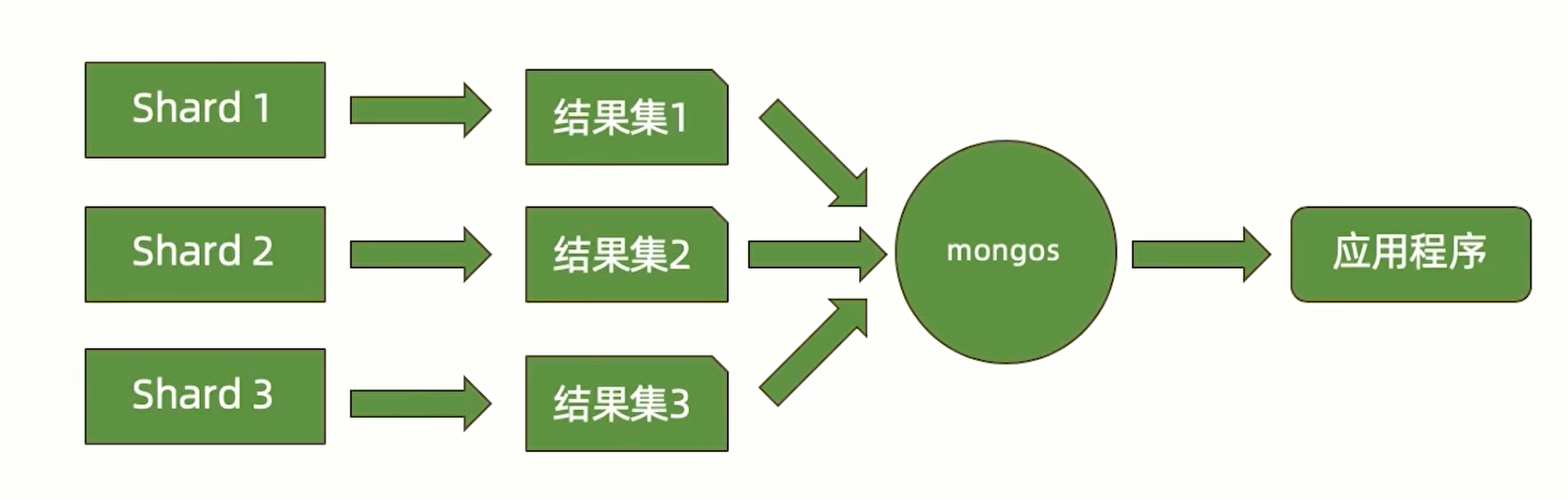
MongoS is the routing node, providing a unified entry to the cluster, distributing business layer requests to appropriate data nodes for operation, and merging the response results of each data node.
Since it is the entry point, to prevent cluster collapse, generally at least one backup MongoS is prepared
Config is the configuration node, providing metadata storage, mapping of shard data distribution, etc., such as data storage paths and which ranges of data different shards manage. Generally, a replica set architecture is enough.
Shards are data nodes, organized in replica set units, and can scale horizontally. There are at most 1024 data nodes, and data is not duplicated between any data nodes.
Sharding Methods
MongoDB provides three data distribution methods:
- Range-based
- Hash-based
- Zone / tag-based
Range-Based
Select some fields and shard according to the field values
- Advantages:
- Good query performance
- Nearby data is basically on the same node, so it is fast — for example, sharding by time and querying by time period.
- Disadvantages:
- Uneven data distribution
- Prone to hotspots (one shard is frequently read and written while other shards are idle)
Hash-Based
Select some fields, hash the field values, and shard according to the hash results
- Advantages:
- Even data distribution
- Write data can be spread across multiple shards, with high efficiency
- Disadvantages:
- Lower range query efficiency
Zone / Tag-Based
Shard according to node region and node tags
Summary
The sharding architecture can effectively solve performance problems and scaling problems, but has a large amount of extra resource overhead and is complex to manage, so do not use it unless necessary ( according to MongoDB official statistics, about 10% use sharded clusters ).
Sharding Architecture Design
Basic sharding standards:
- The data volume should not exceed 3TB; try to keep it at 2TB per shard
- Indexes must fit into memory
Sharding estimation:
- Storage: total storage volume / single-server load capacity
- Memory: working set size / (single-server memory capacity * 0.6)
- Concurrency: total concurrency / (single-server concurrency * 0.7)
Take the maximum of the three as the number of shards
Sharding Concepts
Concepts from small to large:
- Shard key: a field in the document, used to determine which shard the data is stored in
- Document (doc): a row of data containing the shard key
- Chunk: contains n documents;
- Shard: contains n chunks
- Cluster: contains n shards
Main Factors Affecting Sharding Performance
Sharding fields:
- A large value range for the sharding field: too small causes data concentration and makes scaling difficult
- Evenly distributed values of the sharding field: try to make the data of different shards evenly distributed, avoiding excessive pressure on individual shards
- Use the shard key as a query condition: helps MongoS quickly locate which shard's data needs to be queried; otherwise MongoS needs to query every shard's data
Summary: it is generally difficult for a single shard key to satisfy all three conditions above, so a compound shard key is chosen, such as user_id + time as the sharding fields
Reads and writes:
- Scatter writes, concentrate reads: writes should be spread across different shards as much as possible to avoid overloading the replica set master; reads should stay within the same shard as much as possible, reducing the overhead of data reading and data merging
Resources:
- mongos and config can use lower configurations, but Shards need higher configurations
- Since scaling also takes time, such as data migration and re-sharding, it is best to start scaling when resource load reaches 60%, to avoid affecting the business
Sharding Commands
Creating a Sharded Replica Set
Needs to be executed once on every device in the same shard
# IP to listen on
mongod --bind_ip 0.0.0.0 \
  # Shard set name
  --replSet shard1 \
  # Shard set data storage path
  --dbpath /data/shard1 \
  # Shard set log storage path
  --logpath /data/shard1/mongod.log \
  # Port to listen on
  --port 27010 \
  # Run in the background
  --fork \
  # Indicate it is a shard set node
  --shardsvr \
  # Specify the MongoDB cache size, configure as needed
  --wiredTigerCacheSizeGB 1
Initializing the Replica Set in the Shard Set
Connect to any node of the replica set via mongosh and execute the initialization; an election will automatically take place after initialization
rs.initiate({
  _id: 'shard1',
  members: [
    {
      _id: 0,
      host: 'member.he110.site:4395'
    },
    {
      _id: 1,
      host: 'member.he110.site:4396'
    },
    {
      _id: 2,
      host: 'member.he110.site:4397'
    },
  ]
})
Creating Config
Needs to be executed once on every device in the same shard
# IP to listen on
mongod --bind_ip 0.0.0.0 \
  # Shard set name
  --replSet config \
  # Shard set data storage path
  --dbpath /data/config \
  # Shard set log storage path
  --logpath /data/config/mongod.log \
  # Port to listen on
  --port 27019 \
  # Run in the background
  --fork \
  # Indicate it is a shard set config node
  configsvr \
  # Specify the MongoDB cache size, configure as needed
  --wiredTigerCacheSizeGB 1
Initializing the Replica Set in Config
Connect to any Config node via mongosh and execute the initialization; an election will automatically take place after initialization
rs.initiate({
  _id: 'config',
  members: [
    {
      _id: 0,
      host: 'config.he110.site:4395'
    },
    {
      _id: 1,
      host: 'config.he110.site:4396'
    },
    {
      _id: 2,
      host: 'config.he110.site:4397'
    },
  ]
})
Creating MongoS
Needs to be executed once on every device in the same MongoS cluster
# IP to listen on
mongos --bind_ip 0.0.0.0 \
  # Shard set log storage path
  --logpath /data/shard1/mongod.log \
  # Port to listen on
  --port 27010 \
  # Run in the background
  --fork \
  # Specify the config nodes
  --configdb config/config.he110.site:4395,config.he110.site:4396,config.he110.site:4397
Adding a Shard
Connect to the MongoS primary node via mongosh and execute the following command
sh.addShard("shard1/member.he110.site:4395,member.he110.site:4396,member.he110.site:4397")
Creating a Sharded Collection
Connect to the MongoS primary node via mongosh and execute the following commands
// Enable the sharding feature
sh.enableSharding('${db}')
// Create the sharded collection
sh.shardCollection(
  // Which collection needs sharding enabled
  '${db}.${collection}',
  // Create the shard key, supporting multiple fields
  {
    // Use id as the shard key, with hash as the sharding method
    _id: 'hashed',
  },
)
Scaling Out
Creating shards is the same as before; there is no need to create Config and MongoS again
After creation, connect to MongoS and add shard 2 via sh.addShard; MongoS will automatically complete the data migration
Operations
Performance Monitoring
Monitoring Tools
Common tools for performance monitoring include:
- MongoDB Ops Manager: official monitoring, paid in the Enterprise edition
- Percona
- General-purpose server monitoring platforms
- Program scripts
Monitoring Data Sources
db.serverStatus(): cumulative data since startup, the main monitoring data sourcedb.isMaster(): secondary data sourcemongostat: a command-line tool that can only query part of the information
serverStatus() mainly focuses on the following information:
connections: connection count informationlocks: lock usagenetwork: network I/O statusopcounters: statistics on the number of CRUD executionsrepl: replica set configuration informationwiredTiger: contains WiredTiger execution informationblock-manager: read/write status of WT data blockssession: number of sessions usedconcurrentTransactions: Ticket usage
mem: memory usagemetrics: performance metric statistics
Alert Metrics
| Metric | Meaning | How to Obtain |
|---|---|---|
opcounters(operation counters) |
Counts the number of commands such as query, update, insert, delete, getmore |
db.serverStatus().opcounters |
tickets |
The number of read/write tickets of the WiredTiger storage engine, representing the number of concurrent operations that can enter the storage engine | db.serverStatus().wiredTiger.concurrentTransactions |
replication lag |
The minimum time required for a write operation to reach secondary nodes. Excessive lag reduces the value of secondary nodes and is unfavorable for operations configured with write concern ( w > 1 ) | db.adminCommand({'replSetGetStatus': 1}) |
oplog window |
Represents the time range of write operations the oplog can hold; the maximum duration for a secondary node to catch up with the primary after going offline (recommended to keep above 24 hours) | db.oplog.rs.find().sort({$natural:-1}).limit(1).next().ts - db.oplog.rs.find().sort({$natural:1}).limit(1).next().ts |
connections |
Monitor the number of database connections; each connection consumes resources, so count connections during off-peak/peak periods and set alert thresholds | db.serverStatus().connections |
Query targeting |
Computes the ratio of index keys/documents scanned per second to documents returned; a high value indicates low query efficiency (possibly missing or improper indexes) | var status = db.serverStatus()status.metrics.queryExecutor.scanned / status.metrics.document.returnedstatus.metrics.queryExecutor.scannedObjects / status.metrics.document.returned |
Scan and Order |
The average ratio of in-memory sort operations per second; in-memory sorting may consume a lot of resources and can be avoided through indexes | var status = db.serverStatus();status.metrics.queryExecutor.scanAndOrder / status.opcounters.query |
| Node status | Monitor the status of each node ( PRIMARY / SECONDARY / ARBITER ); alert on abnormal status or command execution failure |
db.runCommand("isMaster") or db.isMaster() |
dataSize |
Total data size of the instance (original size before compression) | Execute per database: db.stats().dataSize |
StorageSize |
The percentage of used disk space relative to total space; storage pressure needs monitoring | Compute via file system tools, or estimate using db.stats().storageSize combined with total disk capacity |
Backup and Recovery
The Purpose of Backup
- Prevent data loss caused by hardware failure
- Prevent data deletion by human error
- Time travel
- Regulatory requirements
Backup Mechanisms
- Delayed node backup: set
slaveDelayon a child node and exclude it from elections, using the node as a backup node - Full backup + oplog increment: the initial data is fully backed up; data operations can be replayed through the oplog to restore data at any point in time. To prevent the oplog from becoming too large, the initial data can be periodically updated to a newer state, trimming expired oplog
Full Backup Methods
- Copying data files
- The node must be shut down before copying, otherwise the copied files are invalid
- The node can be locked for backup via
db.fsyncLock()and unlocked viadb.fsyncUnlock() - Complete the backup on a secondary node
- Note that after a node is locked, the total number of voting nodes needs to remain odd
- File system snapshots
- MongoDB supports using snapshots to obtain an image of a certain moment
- The snapshot process does not require downtime
- Data files and journal need to be on the same volume
- Copy and delete snapshots as soon as possible to avoid filling up the disk
- mongodump
- The slowest backup speed
- Can only back up data of a certain time period
- The oplog needs to be recorded from the start of the backup to handle dirty data problems caused by non-stop backups (data modified during the backup process)
The mongodump Command
# Start the backup and record the oplog
mongodump --host localhost:27017 --oplog

# Restore the data, and replay the oplog to ensure data consistency
mongorestore --host localhost:27017 --oplogReplay
The directory structure of a mongodump backup
- dump: backup file directory
- db: the backed-up database
- collection.bson: the backed-up collection data
- collection.metadata.bson: the backed-up collection metadata
- oplog.bson: the oplog during the backup period
- db: the backed-up database
Security Architecture
Authentication
User authentication:
| Authentication method | Description | Notes |
|---|---|---|
| Username + password | The default authentication method, using the SCRAM-SHA-1 hash algorithm; user information is stored in MongoDB's local database | None |
| Certificate-based | Based on the X.509 standard: the server needs to provide a certificate file at startup, the client needs a certificate file to connect, and certificates issued by internal or external CAs are supported | None |
| LDAP external authentication | Connect to an external LDAP server for authentication | Enterprise feature |
| Kerberos external authentication | Connect to an external Kerberos server for authentication | Enterprise feature |
Cluster node authentication:
- Keyfile: copy the same Keyfile to different nodes
- X.509: certificate-based authentication; different certificates for different nodes are recommended
Creating an administrator account:
// Switch to the admin collection
use admin;

// Create the user admin with password 123456, with permissions to manage all users, databases, and read-write
db.createUser({
  user: "admin",
  pwd: "123456",
  roles: [
    { role: "userAdminAnyDatabase", db: "admin" },
    { role: "dbAdminAnyDatabase", db: "admin" },
    { role: "readWriteAnyDatabase", db: "admin" }
  ]
})
Logging in with the account
mongosh \
  # Username, can be abbreviated as -u
  --username admin \
  # Password, can be abbreviated as -p
  --password 123456 \
  # The database to operate on
  --authenticationDatabase admin
Authorization
Role-based access control: get role information via db.getRole('role name'), and get role and privilege information via db.getRole('role name', { showPrivileges: true }); privileges are stored in the privileges.actions field
graph TD
  classDef app fill:#ffd6e7,stroke:#ff69b4
  classDef db fill:#e6f4ff,stroke:#1890ff
  classDef backup fill:#b3e0ff,stroke:#096dd9
  classDef root fill:#f0f0f0,stroke:#666

  %% Permission relationship diagram
  root("root<br>(superuser role)")

  subgraph Global Administration
    readAnyDB["readAnyDatabase"]
    writeAnyDB["readWriteAnyDatabase"]
    adminAnyDB["dbAdminAnyDatabase"]
    userAnyDB["userAdminAnyDatabase"]
  end

  root --> readAnyDB["readAnyDatabase"]
  root --> writeAnyDB["readWriteAnyDatabase"]
  root --> adminAnyDB["dbAdminAnyDatabase"]
  root --> userAnyDB["userAdminAnyDatabase"]

  subgraph Backup & Restore
    backup
    restore
  end
  root --> restore

  subgraph Database Administration
    dbOwner --> dbAdmin
    dbOwner --> userAdmin
  end

  subgraph Cluster Administration
    ClusterAdmin --> hostManager
    ClusterAdmin --> clusterManager
    ClusterAdmin --> clusterMonitor
  end
  root --> ClusterAdmin

  subgraph Application User
    readWrite --> read
  end

  %% Permission inheritance relationships
  readAnyDB --> read
  writeAnyDB --> readWrite
  adminAnyDB --> dbAdmin
  userAnyDB --> userAdmin

  %% Style bindings
  class root root
  class GlobalAdmin,readAnyDB,writeAnyDB,adminAnyDB,userAnyDB db
  class BackupRestore,backup,restore backup
  class DBAdmin,dbAdmin,userAdmin,dbOwner db
  class ClusterAdmin,hostManager,clusterManager,clusterMonitor db
  class AppUser,read,readWrite app
Creating a role:
db.createRole({
  role: 'sampleRole',
  // Declare the privileges the role has
  privileges: [
    {
      // Allow operating on test.sample
      resource: {
        db: 'test',
        collection: 'sample'
      },
      // Allow updates
      actions: ['update']
    },
  ],
  // Inherit privileges from other roles
  roles: [
    // Inherit the read privilege of the read role, allowing reads on the test database
    {
      role: 'read',
      db: 'test',
    },
  ],
})
Encryption
- Communication encryption: MongoDB allows encrypting all network transmission via TLS/SSL, including between client and server, and within replica sets
- Storage encryption: Enterprise MongoDB supports encrypting data when persisting to disk; the specific process is as follows
- Generate a master key, used to generate the key for each database
- The key of each database is used to encrypt the database
- Based on the generated database key, encrypt the data in the database
- For management, you only need to focus on the master key; the database keys are stored inside the database
- Field encryption: individual fields can be encrypted with their own keys; only ciphertext can be seen in the database, and the whole process is operated automatically by MongoDB. The specific process is as follows
- Request the MongoDB driver to encrypt the field
- The MongoDB driver queries the key manager
- The key manager returns the key
- The MongoDB driver queries the database
- The database returns the encrypted data
- Decrypt the data with the key and return it to the user
Auditing
The auditing feature can record specific behaviors; it requires purchasing the Enterprise edition
- Format: json
- Storage: local file or syslog
- Content:
- Schema change ( DDL )
- CRUD (DML)
- User authentication
# IP to listen on
mongod --bind_ip 0.0.0.0 \
  # Shard set data storage path
  --dbpath /data/config \
  # Shard set log storage path
  --logpath /data/config/mongod.log \
  # Port to listen on
  --port 27019 \
  # Run in the background
  --fork \
  # Audit log recorded to syslog; another optional value is file
  --auditDestination syslog \
  # The format of the stored audit file; not needed when configured as syslog
  --auditFormat JSON \
  # Configure the storage path of the audit file; not needed when configured as syslog
  --auditPath /data/audit \
  # The content of the audit file; here auditing collection creation and deletion
  --auditFilter '{ atype: { $in: [ "createCollection", "dropCollection" ] } }'
Best Practices
By default, MongoDB has no security settings and no authorization; users need to be created manually and access closed off
- Enable authentication
- Strict permission control
- Encrypted transmission, encrypted data, activity auditing
- Deploy servers on the intranet, deploy firewalls, disable http access, disable restful access, bind IPs, replace default ports, etc.
- Follow local compliance requirements
Index Mechanism
Glossary
Index: usually a field of a record.
Key: key name. All fields of each record are key names.
Data Page: where records are stored.
Covered Query: means all queried fields are in the index, and no data needs to be loaded from data pages.
FETCH: fetching. Refers to querying the corresponding record in the data pages according to the index.
IXSCAN: index scan. Scanning the index.
COLLSCAN: collection scan. Scanning the data pages.
Query Shape: the data structure of the query conditions. Different query conditions also affect query performance.
Index Prefix: when multiple key names are indexed, all query prefixes are indexed without needing additional indexes. For example,
{ a: 1, b: 1, c: 1 }automatically adds the indexes{ a: 1, b: 1 }and{ a: 1 }Selectivity: preferentially use conditions that can filter out the vast majority of data for queries.
Index Storage Structure
Index storage uses B- trees; generally a B tree is a binary tree, while a B- tree can be a multi-way tree
Index Execution
When query conditions hit multiple indexes, a few records are queried via multiple threads and whichever is faster is used, so a slow index may be used (an index corresponding to more data)
graph TB
  classDef orange fill:#FFA500,stroke:#FF4500,color:white
  classDef green fill:#98FB98,stroke:#32CD32
  classDef diamond fill:#FFD700,stroke:#DAA520

  %% Flow nodes
  start[("Query statement")]:::orange --> match{Match plan cache}

  %% Match-success branch
  match -- Y --> evaluate{Evaluate plan performance}:::diamond
  evaluate -- Y --> execute["Execute according to the execution plan"]:::green
  execute --> result["Return results"]:::green

  %% Evaluation-failure branch
  evaluate -- N --> evict1["Evict the plan cache"]:::green
  evict1 --> generate1["Generate candidate plans"]:::green
  generate1 --> assess1["Evaluate candidate plans"]:::green
  assess1 --> select1["Select the optimal plan"]:::green
  select1 --> create1["Create the plan cache"]:::green
  create1 --> execute

  %% Match-failure branch
  match -- N --> generate2["Generate candidate plans"]:::green
  generate2 --> assess2["Evaluate candidate plans"]:::green
  assess2 --> select2["Select the optimal plan"]:::green
  select2 --> create2["Create the plan cache"]:::green
  create2 --> execute
Viewing the Execution Process
You can append explain after the query statement to request viewing the retrieval process: db.col.find({ name: '张三' }).explain(true)
Focus on:
executionStages.stage: whether it is COLLSCAN or IXSCAN, i.e., whether an index is usedtotalDocsExaminedandnReturned: how many documents were examined to returnnReturnedresultstotalKeysExamined: how many keys were examinedexecutionTimeMillis: how many milliseconds it took to execute
Query conditions should follow the ESR principle, arranging index fields in the order: exact match > sort condition > range match; if a field has no index, put it at the very end
Index Types
- Single-key index
- Compound index
- Multi-key index
- Geospatial index
- Full-text index
- TTL index
- Partial index
- Hash index
Read/Write Performance
Driver Layer
The overall driver workflow diagram is as follows:
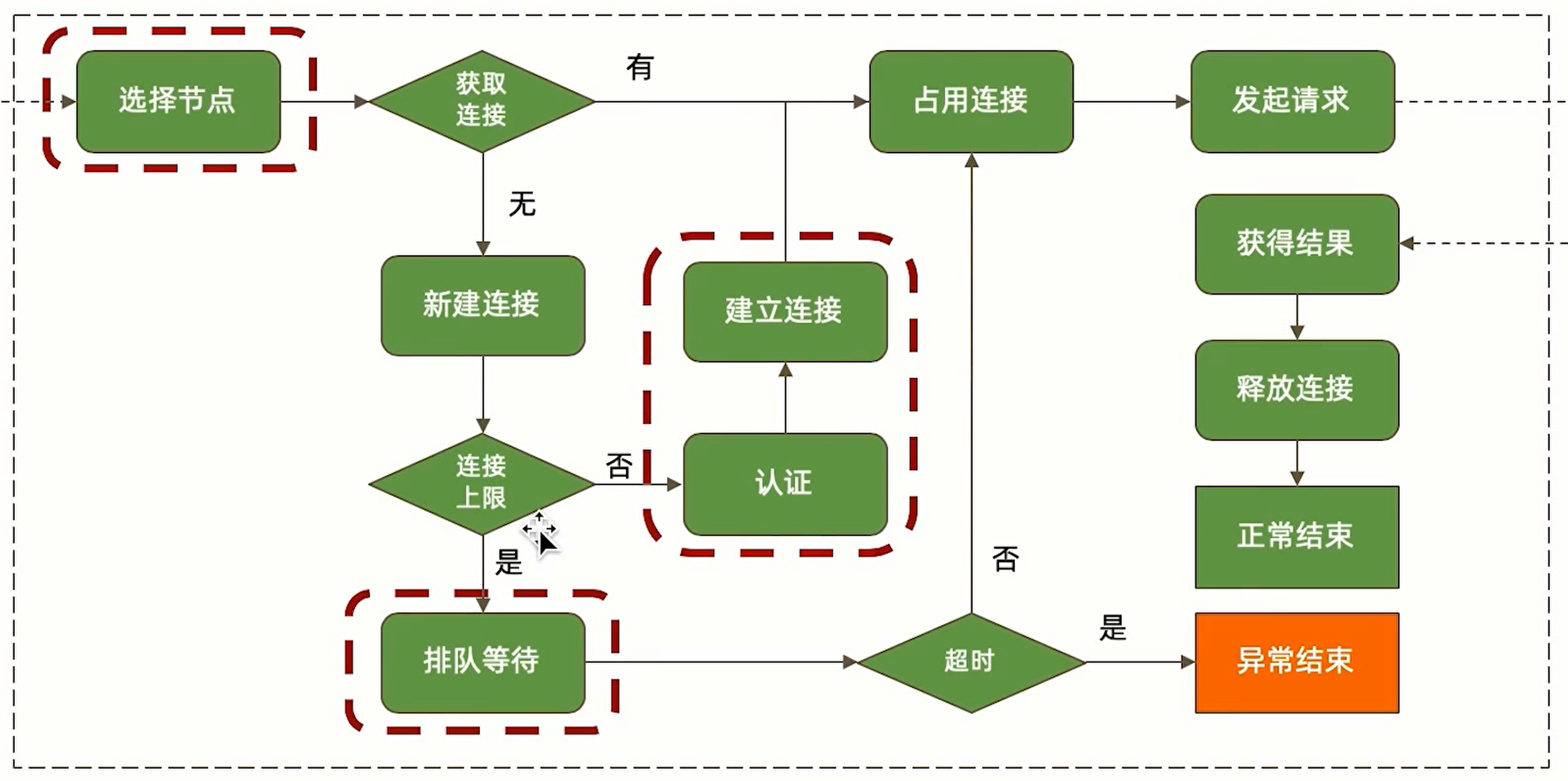
Selecting Nodes
For replica set read operations, which nodes are selected is determined by readPreference. If you do not want distant nodes to be selected, you should do one of the following:
- Set them as hidden nodes
- Control candidate nodes via Tags
- Use nearest to select nearby nodes
Queuing and Waiting
When the total number of connections exceeds the maximum number of connections ( maxPoolSize ), queuing and waiting occurs, i.e., blocking.
The following approaches can be used to solve it:
- Increase the maximum number of connections (limited by server performance, may not always help)
- Optimize operation performance and shorten operation time
Connection and Authentication
Authentication consumes somewhat more time than no authentication, but authentication ensures security. To optimize connection speed, the following approaches can be used:
- Set the minimum number of connections ( minPoolSize ), keeping a certain number of idle connections in the connection pool that can be reused directly without extra creation
- During business processing, avoid sudden large bursts of requests
Database Layer
The overall database layer workflow diagram is as follows:
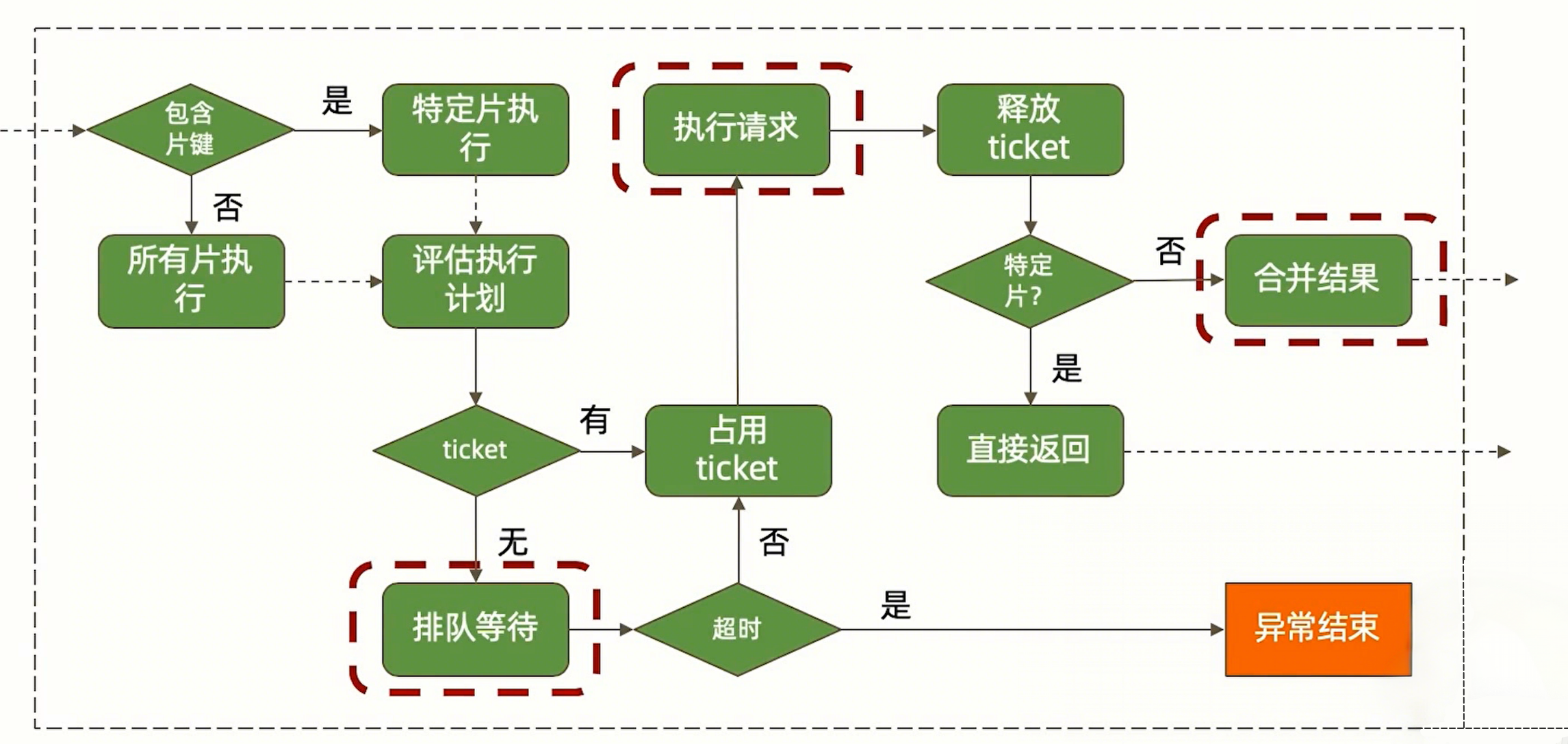
Queuing and Waiting
Insufficient tickets cause database queries to queue, which is generally a problem of other operations being slow. Solutions are as follows:
- Use performance monitoring to find slow commands, use
explainto troubleshoot problems, and optimize operation performance - zlib compression itself also takes time; performance slowness may be caused by compression being enabled
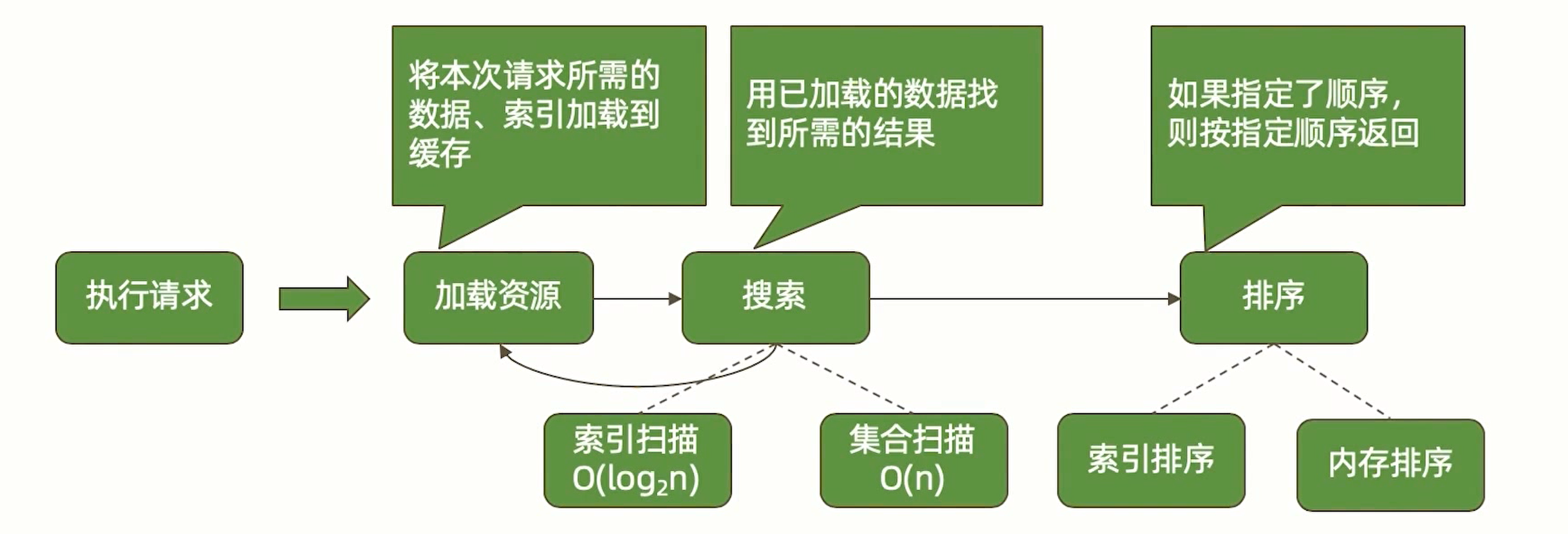
Read Requests
The main reason for slow read requests is indexes. You can refer to the index working process mentioned in the Index Execution section, troubleshoot problems with explain, and optimize indexes.
Write Operations
Write operations also need to use indexes to find the location to modify. If write operations are slow, you can also locate the problem with explain to see whether it is caused by index problems.
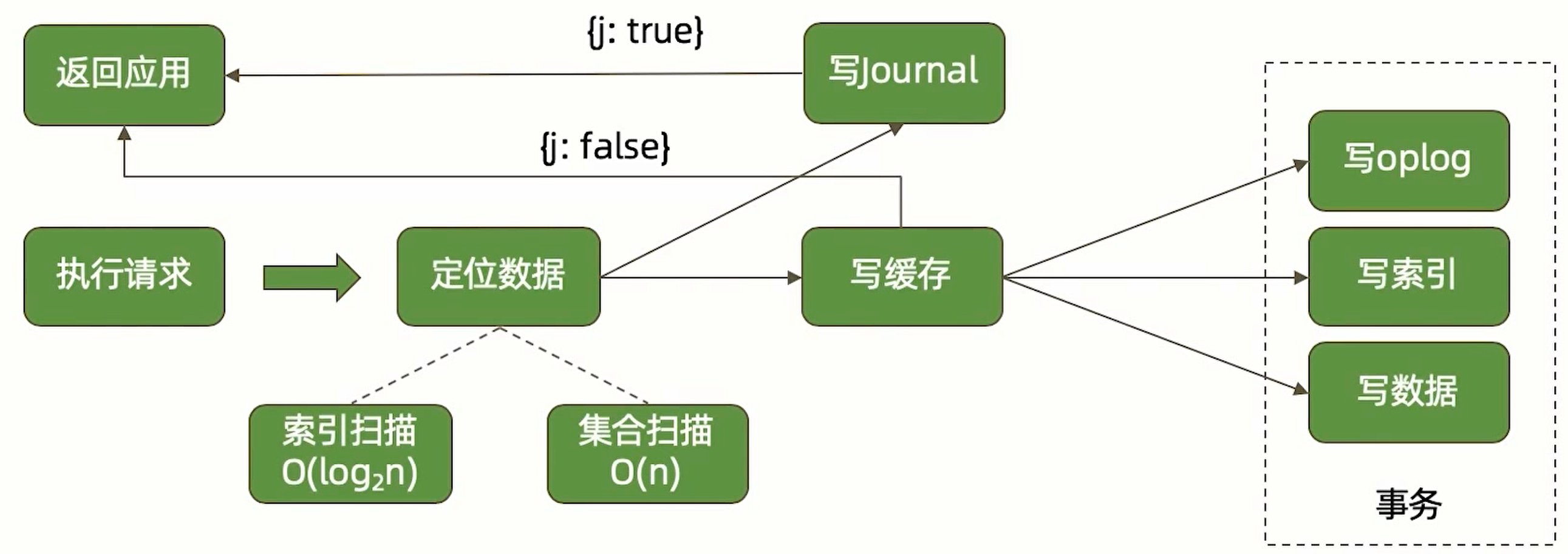
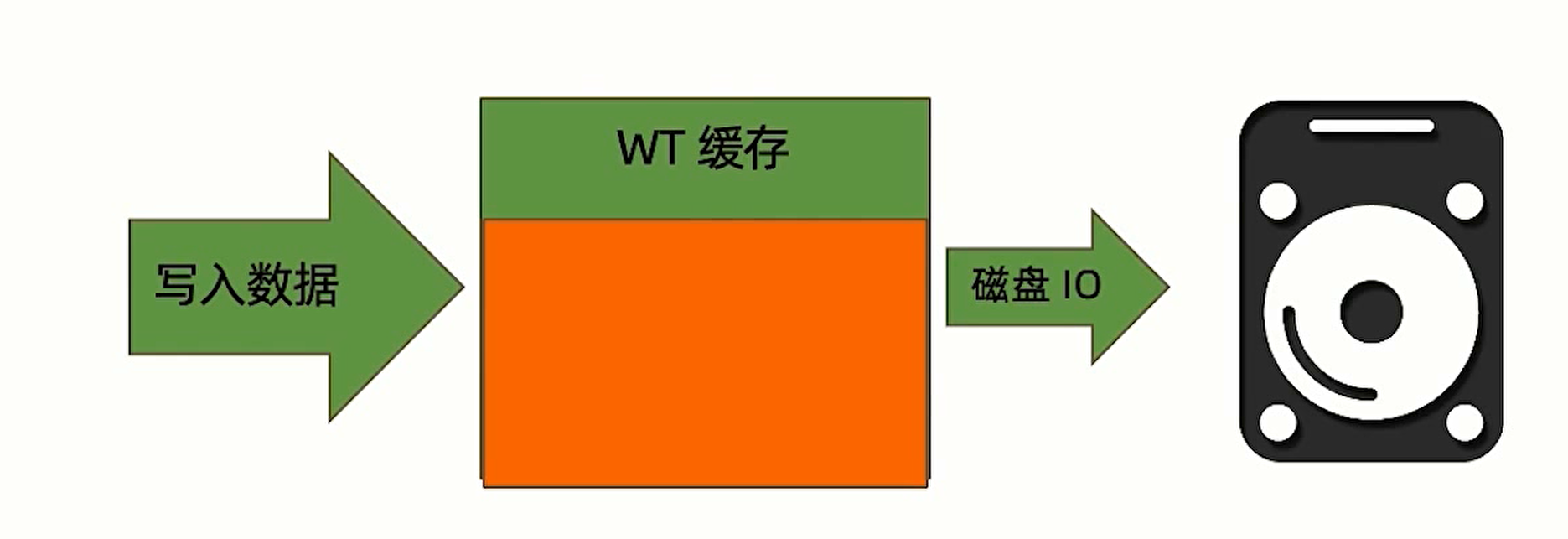
Writing data needs to use the WT cache, which becomes invalid after being written to disk. If disk I/O performance is low and the cache cannot be consumed in time, write operations will also be slowed down.
Merging Sharded Results
- Avoid sorting operations in MongoDB to reduce database query time
- Use query conditions with the shard key as much as possible, specifying which shard to query instead of querying them all
Network Transmission
- Network latency
- Enabling TLS/SSL between clusters also affects transmission performance
Performance Diagnosis
mongostat
Counts which operations are happening at the same time; focus on the following fields:
dirty: the proportion of data that has been updated in memory but not persisted. Below 5% is normal; above 5% MongoDB accelerates writes, and above 20% new requests are blocked so it can write to disk at full power.used: how much of the memory allocated to MongoDB is used. Below 80% is normal; above 80% MongoDB accelerates memory cleanup, and above 95% new requests are blocked so it can free up memory space at full power.qrw/arw: queued requests.conn: the number of connections.
mongotop
A tool for understanding the pressure status of collections.
It can query the total time / read time / write time of each collection.
mongod Logs
mongod logs record queries that take more than 100ms to execute, along with the query plan.
mtools
An open-source Python tool, installed via pip install mtools. Common commands are as follows:
mplotqueries ${mongod log file}: visualizes all slow queries in charts.mloginfo --queries ${mongod log file}: summarizes the patterns, occurrence counts, and time consumption of all slow queries.
Common Database Cluster Design Solutions
Two-Site Three-Center Cluster Design
Disaster Recovery Levels
| Level | Disaster recovery strategy | RPO (Recovery Point Objective) | RTO (Recovery Time Objective) | Implementation and notes |
|---|---|---|---|---|
| L0 | No backup center | 24 hours | 4 hours | Local data backup only, no disaster recovery capability |
| L1 | Local backup + off-site storage | 24 hours | 8 hours | Back up critical data locally and then send it off-site for storage; systems and data must be restored according to predetermined procedures |
| L2 | Dual-center primary-backup mode | Seconds | Minutes to half an hour | Set up a hot backup site off-site and back up data over the network; the backup site takes over the primary site's business in a disaster |
| L3 | Dual-center active-active | Seconds | Seconds | Set up mutually backing-up data centers in two locations; when either center fails, the other takes over the work |
| L4 | Dual-center active-active + remote hot backup (two sites, three centers) | Seconds | Minutes | Same-city active-active centers + remote hot backup; when both same-city centers are unavailable at the same time, quickly switch to the remote center |
Conventional Two-Site Three-Center Solution
Network Layer Design
The DNS server needs to use GSLB global load balancing (with DNS functionality and health check functionality); after a center goes down, GSLB automatically switches to another center.
Application Layer Design
- Use load balancing and virtual IPs
- Use the same Session
- Use the same set of designs
Database Design
Mainly consider cross-center synchronization problems
- DBMS adopts a log-based synchronization solution
- The file system adopts a storage-mirroring-based synchronization solution
MongoDB Two-Site Three-Center Solution
The three centers are: two same-city centers + one remote center
Both same-city centers need dual nodes, and the remote center has a single node — that is, at least 5 nodes.
The primary data center has the highest priority, followed by the same-city backup center, and then the cross-city center.
writeConcern needs to use majority.
The two same-city centers need to use a low-latency dedicated line to reduce data synchronization latency and avoid data loss.
The complete setup steps are as follows:
- Configure domain name resolution
- Install MongoDB
- Configure the replica set
- Configure priorities
// Get the replica set configuration
cfg = rs.conf()
// Modify the priority of the first node; the default is 1
cfg.members[0].priority = 10
// Let the replica set update the configuration information
rs.reconfig(cfg)
Global Multi-Write Cluster ( global cluster )
Business requirement: multinational enterprises experience high read/write latency across regions, with latency approaching the second level
The solution is as follows:
Use multiple sharded clusters. In each sharded cluster, the local center has two replica set nodes, and each remote center has one replica set node.
Local data is read and written in the local center; remote data can only be read, and writes need to go through the remote data center.
The complete setup steps are as follows:
- For the data collections to be sharded, add a region-distinguishing field; anything that can distinguish the data works
- Tag each shard of the cluster with a region label
- Specify the shard chunk range belonging to each region
// Tag the shard shard0
sh.addShardTag('shard0', 'Asia')

// Specify the data range for the shard
sh.addTagRange(
  // database.collection
  'crm.orders',
  // The shard range
  { locationCode: 'CN', order_id: 'min' },
  { locationCode: 'CN', order_id: 'max' },
  // Which tag to add to the data
  'Asia'
)
Tags help MongoS quickly select shards, reducing cross-center reads and writes.
Go-Live Preparation
Before Go-Live
- Performance testing: stress-test various metrics such as CRUD counts, connection counts, etc., set up monitoring ranges, and adjust hardware resources
- Environment check: MongoDB provides a pre-go-live environment check checklist, which you can follow for inspection
After Go-Live
- Performance monitoring
- Regular inspections
Version Upgrades
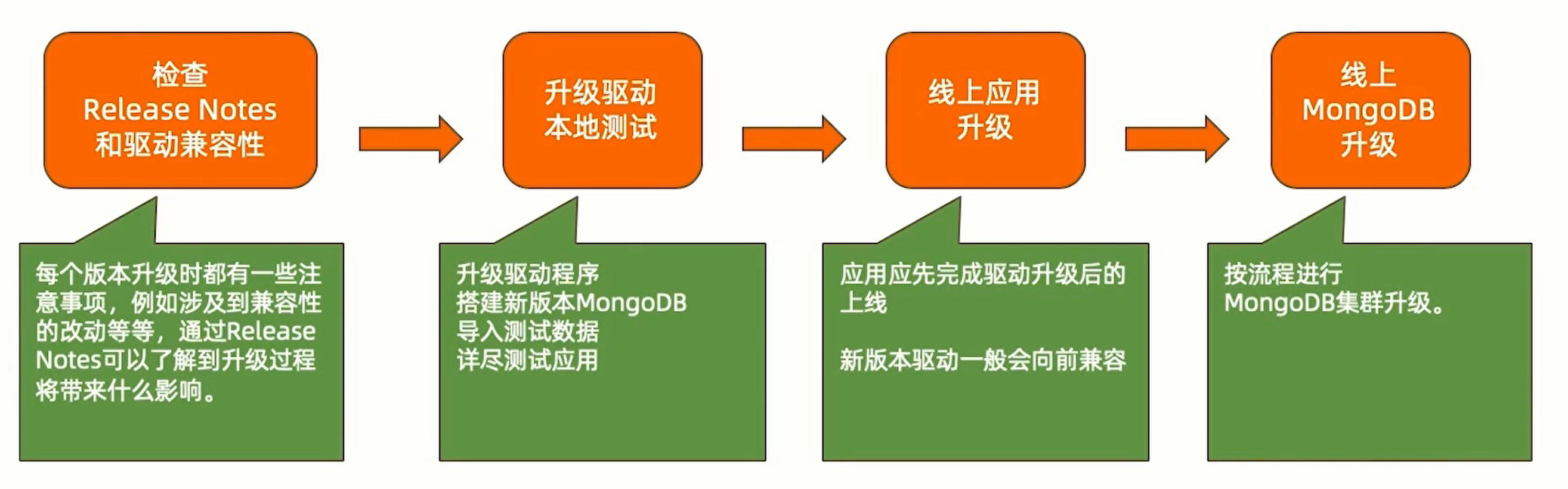
Single-Machine Upgrade
The complete single-machine upgrade process is as follows:
Replica Set Upgrade
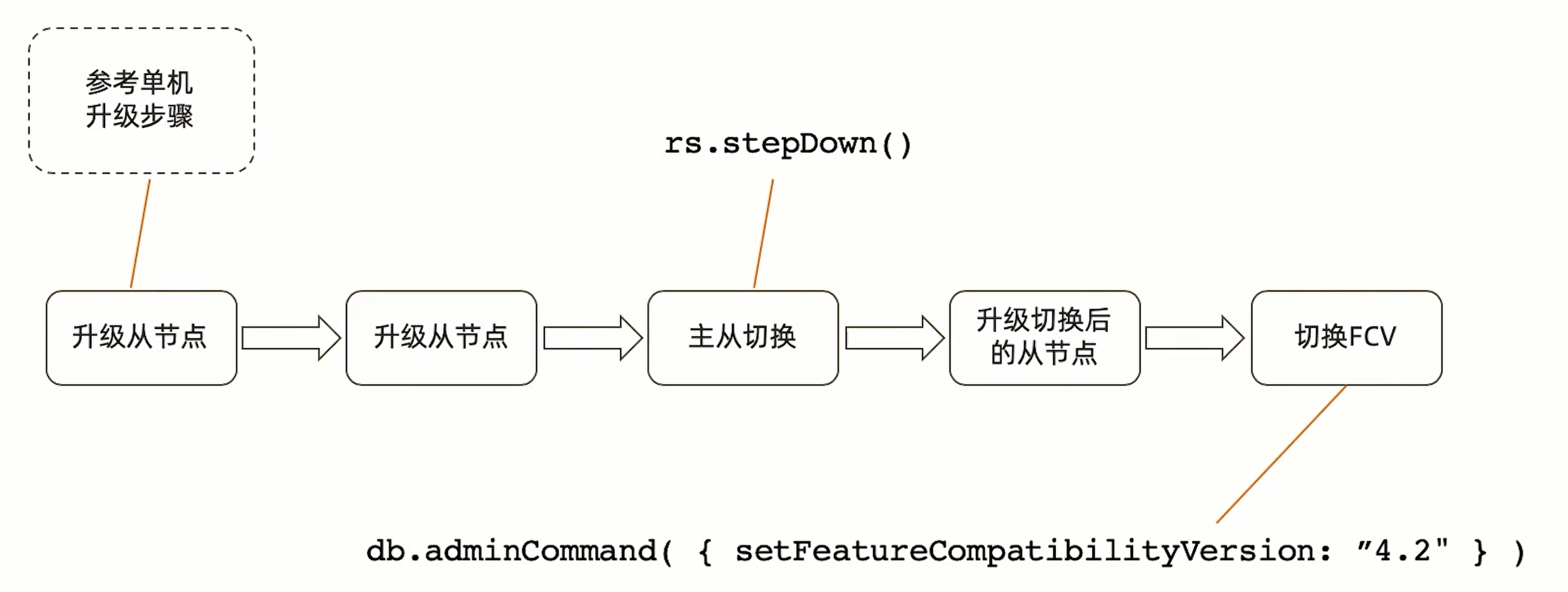
A replica set upgrade generally upgrades nodes one by one; the node being upgraded can be regarded as down, but the replica set can continue working. Reference upgrade steps are as follows:
Downgrade
If the upgrade fails for any reason, you need to downgrade to the original old version. During the downgrade process:
- During a rolling downgrade, the cluster can stay online; only a certain amount of non-writable time occurs when switching nodes
- Before downgrading, new-version features that have been used should be removed first. For example, if NumberDecimal is used, all documents using NumberDecimal should have that field removed first
- Setting the FCV ( Feature Compatibility Version ) can make it functionally compatible with the old version
- After the FCV is set, roll-replace with the old version