Web Protocols
Study notes on Web protocols
Updated
Communication Models
The OSI Seven-Layer Model
- Application layer: provides network services for user applications. Common application-layer protocols include HTTP (Hypertext Transfer Protocol), FTP (File Transfer Protocol), SMTP (Simple Mail Transfer Protocol), DNS (Domain Name System), etc. The network applications users directly use (such as browsers and email clients) all run at the application layer.
- Presentation layer: handles data representation and conversion, ensuring that different systems can correctly understand and process data. It includes data encryption, decryption, compression, decompression, and data format conversion (such as between ASCII and EBCDIC).
- Session layer: responsible for establishing, managing, and terminating sessions. It allows applications on different hosts to hold sessions and provides session synchronization and recovery mechanisms.
- Transport layer: provides end-to-end reliable or unreliable communication services. There are two main protocols: Transmission Control Protocol (TCP) and User Datagram Protocol (UDP).
- Network layer: responsible for transmitting packets from the source node to the destination node, handling routing and addressing in the network. It uses IP addresses to identify devices on the network and forwards packets between different networks through routers. Common network-layer protocols are IPv4 and IPv6.
- Data link layer: encapsulates the bit stream received from the physical layer into frames, handling frame transmission and error detection. It is divided into the Logical Link Control (LLC) sublayer and the Media Access Control (MAC) sublayer. The MAC sublayer controls access to the physical medium and identifies devices on the network via MAC addresses; the LLC sublayer provides error control and flow control.
- Physical layer: responsible for transmitting the bit stream; defines the electrical, mechanical, and functional characteristics of physical media (such as cables, optical fibers, wireless), including voltage, signal encoding, connector specifications, etc.
The Data Transmission Process
- The application-layer message is passed to the transport layer
- In the simplest case, the transport layer takes the message and appends additional information; this header is used by the receiver's transport layer
- The application-layer message together with the transport-layer header forms the transport-layer segment. The additional information may include: information allowing the receiver's transport layer to deliver the message up to the appropriate application, and error-detection bits that let the receiver determine whether the message's bits were altered in transit
- The transport layer passes the segment to the network layer, which adds network-layer header information such as the source and destination system addresses, producing a network-layer datagram
- The network-layer datagram is then passed to the link layer, where the sender's MAC address and the receiver's MAC address are added and the packet is encapsulated into a data frame
- At the physical layer, the data frame is converted into a bit stream and transmitted to the peer over the transmission medium
- The peer then unwraps the encapsulation step by step to obtain the transmitted data
The TCP/IP Five-Layer Model
The TCP/IP five-layer protocol is a simplification of the OSI seven-layer model for practical use; it merges the OSI session and presentation layers into the application layer, forming a five-layer structure
- Application layer: combines the functions of the OSI application, presentation, and session layers; provides network interfaces for user applications and supports various network applications.
- Transport layer: provides end-to-end communication services, including the TCP and UDP protocols, ensuring reliable or fast data transmission.
- Network layer: its main function is packet routing and addressing, using the IP protocol for communication between different networks.
- Data link layer: like the OSI data link layer, it encapsulates the bit stream into frames, handles frame transmission and error detection, and controls access to the physical medium.
- Physical layer: same function as the OSI physical layer — transmitting the bit stream and handling physical media and signal transmission.
The TCP/IP Four-Layer Model
The TCP/IP four-layer protocol is another simplified network model; based on the five-layer model, it merges the physical layer and the data link layer into the network interface layer, forming a four-layer structure
- Application Layer: provides network services for user applications; contains various application-layer protocols such as HTTP, FTP, SMTP, etc., supporting various network applications.
- Transport Layer: provides end-to-end communication services, achieving reliable or unreliable data transmission via TCP or UDP, ensuring data transfer between applications.
- Internet Layer: its main function is packet routing and addressing, using the IP protocol for communication between different networks and ensuring packets can travel from the source host to the destination host.
- Network Interface Layer: responsible for encapsulating IP packets into frames suitable for transmission over the physical network and transmitting them over the physical medium. It covers the functions of the OSI physical and data link layers, handling different types of network interfaces and physical media.
Differences
- OSI seven-layer model: mainly used for theoretical research and teaching, providing a standard reference model for the design and analysis of network protocols, but it is rarely used directly in real networks due to its complexity.
- TCP/IP five-layer model: widely used in real network development and teaching; it retains the OSI model's layering ideas while simplifying them, making it easier to understand and implement.
- TCP/IP four-layer model: the network model actually used by the internet; it focuses more on practicality and efficiency, and is widely applied in various network devices and operating systems.
The DNS (Domain Name System) Protocol
DNS maps domain names to IP addresses. Domain names are generally divided into the root domain ., top-level domains com, cn, second-level domains cctv.com, and so on
Recursive Query
- The local DNS asks the root name server
- The root name server asks the top-level domain name server
- The top-level domain name server asks the authoritative name server
- The authoritative name server sends the IP address for the domain to the top-level domain name server
- The top-level domain name server returns it to the root server
- The root server returns it to the local DNS
Iterative Query
Similar to a recursive query, but the root name server and top-level domain name server only return the address of the next-stage server — for example, the root name server returns the top-level domain name server's address, and the local DNS then queries the top-level domain name server itself for the authoritative name server's address
Domain Name Caching
- Browser cache: for performance, the browser caches DNS itself — no need to query the operating system every time
- Operating system cache: the OS keeps a domain/IP mapping table internally — no need to re-query DNS every time
The Domain Resolution Process in the Browser
- Check whether the browser's cached DNS holds the corresponding IP; if so, return it directly
- Request the local DNS; the local DNS checks whether it has cached the corresponding IP; if so, return it to the browser
- Perform an iterative DNS query
- Cache the query result in the operating system and also send it to the browser
- The browser receives the resolution result from the local DNS and caches it in the browser's DNS resolution table
Web Architecture
Key Properties for Evaluating Web Architecture
- Performance: a key factor affecting high availability
- Network Performance
- Throughput: less than or equal to the bandwidth
- Overhead: initial overhead, per-request overhead
- User-perceived Performance
- Latency: the time from issuing a request to receiving the response
- Completion: the time spent completing an application action
- Network Efficiency
- Reusing caches
- Reducing the number of interactions
- Shorter data transfer distances
- COD (Code on Demand)
- Network Performance
- Scalability: supporting the deployment of large numbers of components that can interact with each other
- Simplicity: easy to understand, implement, and verify
- Visibility: the ability to monitor or arbitrate interactions between two components — e.g. caching, layered design
- Portability: the ability to run in different environments
- Reliability: the degree to which partial failures affect the whole
- Modifiability: how easy it is to modify the system, composed of evolvability, customizability, extensibility, configurability, and reusability
- Evolvability: a component can be upgraded independently without affecting other components
- Extensibility: adding functionality to the system without affecting its other parts
- Customizability: temporarily and customizably changing an element to provide a service without affecting regular customers
- Configurability: after deployment, new features can be provided by modifying configuration
- Reusability: components can be used in other applications without modification
REST Architecture
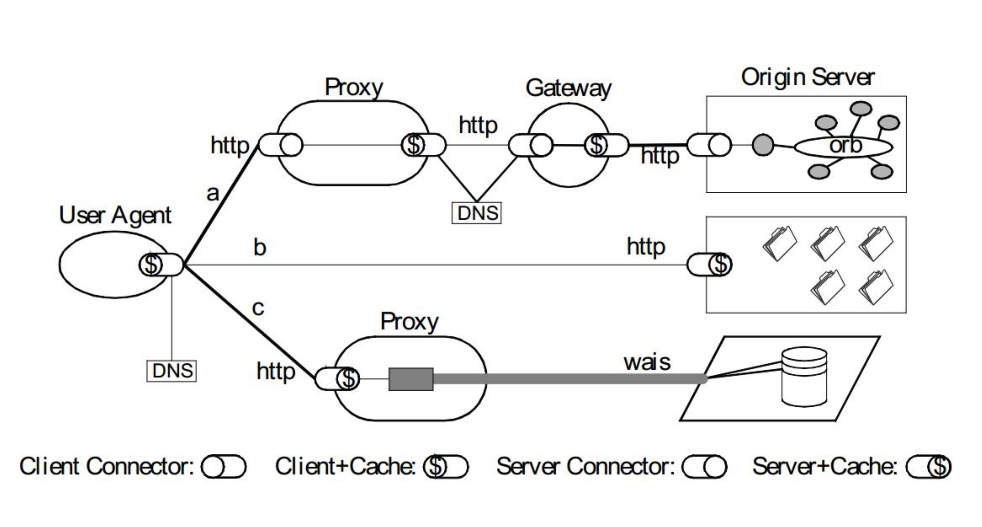
Terminology
URL, URI, URN
- URL: Uniform Resource Locator
- Standard: RFC1738 (1994.12)
- Function: represents the location of a resource; intended to provide a way to find resources
- URN: Uniform Resource Name
- Standard: RFC2141 (1997.05)
- Function: intended to provide a persistent, location-independent way to identify resources, and to allow multiple namespaces to be easily mapped into a single URN namespace
- Example: a magnet link
magnet:?xt=urn:sha1:YNCKHTQC5C
- URI: Uniform Resource Identifier
- Standards: RFC1630 (1994.6), RFC3986 (2005.1, superseding RFC2396 and RFC2732)
- Function: used to distinguish resources; a superset of URL and URN, intended to replace the URL and URN concepts
- Components: schema, user information, host, port, path, query, fragment
- schema: the protocol used, e.g.
ssh,magnet,https - user information: user info, e.g.
username:password@, mainly used for authentication — rarely seen in HTTP - host: domain name or IP
- port: the port
- path: the requested resource path
- query: request parameters
- fragment: the Hash part in JS, e.g.
#anchor
- schema: the protocol used, e.g.
Response Status Codes
- 1xx: the request has been received and further processing is needed to complete it; not supported in HTTP/1.0
- 100 Continue: used before uploading large files; triggered by the client sending a request with the
Expect: 100-continueheader - 101 Switch Protocols: used for protocol upgrades; triggered by the client sending a request with the
Upgrade:header, e.g. upgrading to websocket or HTTP/2.0 - 102 Processing: a WebDAV request may contain many sub-requests involving file operations that take a long time to complete. This code indicates that the server has received and is processing the request, but no response is available yet. This prevents the client from timing out and assuming the request was lost
- 100 Continue: used before uploading large files; triggered by the client sending a request with the
- 2xx: the request was processed successfully
- 200 OK: the response was returned successfully.
- 201 Created: a new resource was successfully created on the server.
- 202 Accepted: the server accepted and began processing the request, but processing is not complete. This vague concept is deliberately designed to cover more scenarios, such as asynchronous or long-running tasks.
- 203 Non-Authoritative Information: when a proxy server modifies the origin server's original response body (for example, changing element values in HTML), the proxy can change 200 to 203 to inform the client of this fact, so the client can handle it accordingly. 203 responses can be cached.
- 204 No Content: the request was executed successfully with no response body, implying the client does not need to update the current page view.
- 205 Reset Content: the request was executed successfully with no response body, and the client is instructed to update the current page view.
- 206 Partial Content: the status code returned when partial response content is sent using the range protocol
- 207 Multi-Status: RFC4918; in the WEBDAV protocol, returns the status of multiple resources as XML.
- 208 Already Reported: RFC5842; to avoid repeatedly reporting resources of the same collection under a 207 response, 208 allows using the parent collection's status code.
- 3xx: redirect to the resource pointed to by Location or to a cached resource. RFC2068 specifies that a client should not redirect more than 5 times, to prevent infinite loops.
- 300 Multiple Choices: the resource has multiple representations; a 300 response lets the client choose which representation to access. Due to a lack of clear details, 300 is rarely used.
- 301 Moved Permanently: the resource is permanently redirected to another URI.
- 302 Found: the resource is temporarily redirected to another URI.
- 303 See Other: redirect to another resource; often used in responses to POST/PUT and similar methods.
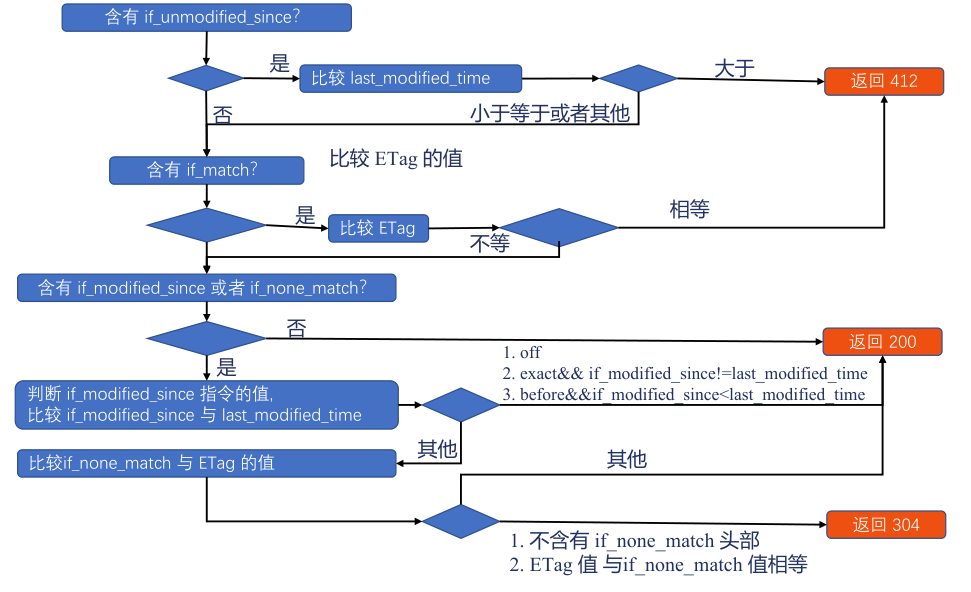
- 304 Not Modified: when the client holds a possibly stale cache, it asks the server whether the cache can still be reused, carrying identifiers such as etag and timestamps; 304 tells the client the cache can be reused.
- 307 Temporary Redirect: like 302, but explicitly requires the redirected request to keep the original method unchanged.
- 308 Permanent Redirect: like 301, but explicitly requires the redirected request to keep the original method unchanged.
- 4xx: client errors
- 400 Bad Request: used when the server believes the client made an error but cannot clearly identify which of the following errors applies. For example, a malformed HTTP request.
- 401 Unauthorized: the user's authentication information is missing or incorrect, so the server cannot process the request.
- 407 Proxy Authentication Required: for requests that go through a proxy, the authentication information did not pass the proxy server's validation
- 403 Forbidden: the server understands the request but is not permitted to execute it
- 404 Not Found: the server did not find the corresponding resource
- 410 Gone: the server did not find the corresponding resource and explicitly knows the resource is permanently unavailable at this location
- 405 Method Not Allowed: the server does not support the method in the request line
- 406 Not Acceptable: the resource representation specified by the client does not exist (e.g. requirements on language or encoding); the server returns a list of representations for the client to choose from.
- 408 Request Timeout: the server timed out receiving the request
- 409 Conflict: resource conflict — for example, when uploading a file, a newer version of the resource already exists at the target location
- 411 Length Required: if the request has a body but no Content-Length header, and it is not a chunked request, 411 is returned
- 412 Precondition Failed: the If-Unmodified-Since or If-None-Match header sent when reusing a cache is not satisfied
- 413 Payload Too Large/Request Entity Too Large: the request body exceeds the maximum length the server can handle
- 414 URI Too Long: the request URI exceeds the maximum length the server accepts
- 415 Unsupported Media Type: the uploaded file type is not supported by the server
- 416 Range Not Satisfiable: the part of the body specified in the Range request cannot be provided
- 417 Expectation Failed: the status code when the expectation in the Expect request header cannot be met
- 421 Misdirected Request: the server believes this request should not have been sent to it, because it cannot handle it.
- 426 Upgrade Required: the server refuses to provide service over the current HTTP protocol and tells the client via the Upgrade header that it must upgrade the protocol to continue.
- 428 Precondition Required: the user's request is missing a conditional header, such as If-Match
- 429 Too Many Requests: the client is sending requests too fast
- 431 Request Header Fields Too Large: the request's header size exceeds the limit
- 451 Unavailable For Legal Reasons: RFC7725; the resource is inaccessible for legal reasons
- 5xx: server errors
- 500 Internal Server Error: an internal server error that does not fall into the following categories
- 501 Not Implemented: the server does not support the functionality required to fulfill the request
- 502 Bad Gateway: the proxy server could not obtain a valid response
- 503 Service Unavailable: the server's resources are not yet ready to handle the current request
- 504 Gateway Timeout: the proxy server could not get a response from upstream in time
- 505 HTTP Version Not Supported: the HTTP protocol version used by the request is not supported
- 507 Insufficient Storage: the server does not have enough space to handle the request
- 508 Loop Detected: a loop was detected while accessing the resource
- 511 Network Authentication Required: the proxy server found that the client needs to authenticate to gain network access
ABNF
ABNF is a language for describing formats; HTTP protocol formats are generally described in ABNF
- Whitespace: separates elements in a definition, e.g.
method SP request-target SP HTTP-version CRLF - Alternation
/: indicates multiple alternative rules, e.g.start-line = request-line / status-line - Value range
%c##-##: indicates a range of values, e.g.OCTAL = "0" / "1" / "2" / "3" / "4" / "5" / "6" / "7"is equivalent toOCTAL = %x30-37 - Sequence group
(): groups rules together, treating them as a single element - Variable repetition
m*n:*element means zero or more elements, e.g.*( header-field CRLF )1*element means one or more elements;2*4element means two to four elements
- Optional sequence
[]: e.g.[ message-body ] - ALPHA: uppercase and lowercase ASCII letters (A-Z, a-z), e.g. %x41-5A / %x61-7A
- DIGIT: digits (0-9), e.g. %x30-39
- HEXDIG: hexadecimal digits (0-9, A-F, a-f), e.g. DIGIT / "A" / "B" / "C" / "D" / "E" / "F"
- DQUOTE: double quote, e.g. %x22
- SP: space, e.g. %x20
- HTAB: horizontal tab, e.g. %x09
- WSP: space or horizontal tab, e.g. SP / HTAB
- OWS: optional whitespace, e.g. *( SP / HTAB )
- LWSP: linear whitespace (past end of line), e.g. *(WSP / CRLF WSP)
- VCHAR: visible (printing) characters, e.g. %x21-7E
- CHAR: any 7-bit US-ASCII character, excluding NUL (%x00), e.g. %x01-7F
- OCTET: 8 bits of data, e.g. %x00-FF
- CTL: control characters, e.g. %x00-1F / %x7F
- CR: carriage return, e.g. %x0D
- LF: line feed, e.g. %x0A
- CRLF: Internet standard newline, e.g. CR LF
- BIT: binary digit, e.g. "0" / "1"
Header
Request Header
Host: the format isHost: uri-host [ ":" port ]; used to find the virtual host — the Host is matched against the domain. The spec requires returning 400 if Host is missing, there is more than one Host, or the Host value is invalidMax-Forwards: can only be used with OPTIONS and TRACE requests; limits the maximum number of times a Proxy can forward — that is, limits the number of IPs recorded inX-Forwarded-For; format:Max-Forwards: 1 DIGITVia: the names and versions of the proxy servers passed through; format:Via: received-protocol RWS received-by [ RWS comment ]X-Real-IP: carries the user's IPX-Forwarded-For: carries the IPs passed through along the chainUser-Agent: the format is${token} ["/" ${version} [( ${product} or ${comment} )]], e.g.Mozilla/5.0 (Windows NT 10.0; WOW64; rv:66.0) Gecko/20100101 Firefox/66.0Referer: filled in automatically by the browser; records which page the current page came from. On the server side it is often used for statistics, cache optimization, hotlink protection, etc. There are two cases where Referer is not added:- The source page uses the file protocol or a data URI
- The current page is http while the source page is https
From: mainly used by web crawlers; tells the server how to contact the person responsible for the crawler by email, e.g.From: me@he110.site
Response Header
Server: identifies the software used by the server, helping the client locate problems or gather statistics; the format mirrorsUser-AgentAllow: tells the client which methods are allowed on the resource at this URI, e.g.Allow: GET, HEAD, PUTAccept-Ranges: tells the client whether the resource supports range requests, e.g.Accept-Ranges: bytes,Accept-Ranges: noneContent-Disposition: declares a file resource to be downloaded; the format is"inline" | "attachment" | disp-ext-type- inline: specifies that the body is displayed inline, as part of the page
- attachment: tells the browser to download the body as an attachment, e.g.
Content-Disposition: attachment; filename="filename.jpg"—filenamemay be omitted. - In multipart/form-data responses, it can be used for sub-message parts, e.g.
Content-Disposition: form-data; name="fieldName"; filename="filename.jpg"
HTTP
Composition
HTTP messages generally consist of three parts:
start-line
Differs between requests and responses
request-line
The request line; the format is method SP request-target SP HTTP-version CRLF
- method indicates the purpose — usually a verb. The methods and their semantics are as follows:
- GET: the main method for fetching information; much performance optimization targets this method; idempotent
- HEAD: like GET, but the server does not send a BODY; used to fetch HEAD metadata; idempotent
- POST: often used to submit HTML FORM forms, create resources, etc.
- PUT: updates resources; idempotent when conditional
- DELETE: deletes resources; idempotent
- CONNECT: establishes a tunnel
- OPTIONS: shows which methods the server supports on the resource; idempotent
- TRACE: echoes the request received by the server, used for troubleshooting. Has security risks
- PROPFIND: a WEBDAV method for document management; retrieves properties stored in XML format from web resources. It is also overloaded to allow retrieving a remote system's collection structure (also called a directory hierarchy)
- PROPPATCH: a WEBDAV method for document management; changes and deletes multiple properties of a resource in a single atomic action
- MKCOL: a WEBDAV method for document management; creates collections or directories
- COPY: a WEBDAV method for document management; copies a resource from one URI to another
- MOVE: a WEBDAV method for document management; moves a resource from one URI to another
- LOCK: a WEBDAV method for document management; locks a resource. WebDAV supports shared locks and exclusive locks.
- UNLOCK: a WEBDAV method for document management; removes a resource's lock
- request-target is the request target, supporting
origin-form/absolute-form/authority-form/asterisk-form origin-form: path + parameters; the format isabsolute-path [ "?" query ]; if the path is empty, use/absolute-form: only used when making requests to a forward proxy; needs to carry domain information such as protocol, host, and portauthority-form:: only used with the CONNECT method, e.g.CONNECT www.example.com:80 HTTP/1.1asterisk-form: only used with the OPTIONS method; usually*, meaning any URI is acceptable- HTTP-version: see the history of HTTP; supports HTTP/0.9, HTTP/1.0, HTTP/1.1, HTTP/2, HTTP/3
status-line
The status line; the format is HTTP-version SP status-code SP reason-phrase CRLF
- HTTP-version: see the history of HTTP; supports HTTP/0.9, HTTP/1.0, HTTP/1.1, HTTP/2, HTTP/3
- status-code: see the response status code table; the format is
3 DIGIT
header-field
The format is field-name ":" OWS field-value OWS
message-body
The format is *OCTET
Persistent Connections
HTTP's Network Transmission Process
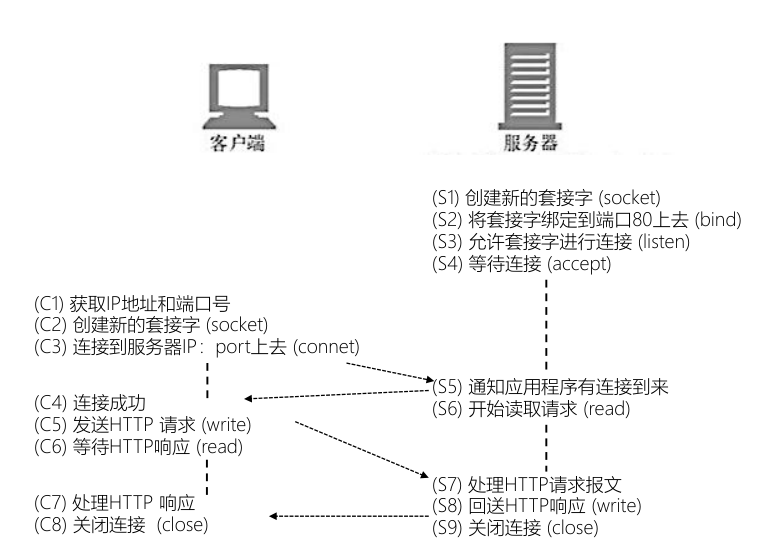
The Problem Persistent Connections Solve
HTTP/1.0 and HTTP/1.1 are TCP-based and do not support multiplexing, which means every resource request requires establishing a TCP connection that is closed after the response is received.
Because resources are fragmented, multiple requests may be issued at the same time, resulting in a large amount of TCP handshaking that can overwhelm the operating system's SYN_RECV and ACCEPT queues — effectively DDoS-ing itself.
So browsers limit the number of TCP connections per origin; the common limit in Chrome, for example, is at most 6 TCP connections.
To reduce repeated TCP connection creation and teardown, HTTP/1.1 introduced the concept of persistent connections: after a TCP connection receives its response, it is not closed immediately; if other same-origin HTTP requests arrive, they can reuse this connection directly.
How to Enable a Persistent Connection
Observe the Connection field:
- If the request header has no
Connection, or sendsConnection: Close, a short connection is used. - If the request header has
Connection: Keep-Alivebut the response header has noConnectionor returnsConnection: Close, it means the client wants a persistent connection but the server does not support it — a short connection is still used - If both the request and response headers have
Connection: Keep-Alive, a persistent connection is used.
HTTP/1.1 supports persistent connections by default without needing Connection: Keep-Alive, but the feature can still be turned off with Connection: Close.
Request Blocking
- A higher-priority request is being processed first
- The origin already has 6 TCP connections open, reaching the threshold — only happens with HTTP/1.0 and HTTP/1.1
- The browser is briefly allocating space in the disk cache
Proxy
Much of HTTP describes end-to-end information; when a proxy is present, special handling is often needed, such as stripping headers or modifying proxy behavior.
Connection
The Connection header only describes the connection between the two communicating ends; when forwarding, Connection should not be forwarded — the header should be stripped.
Otherwise, if the proxy server itself does not support persistent connections but forwards the client and server's Connection: Keep-Alive, the proxy would establish persistent connections with both ends while actually using short connections itself, causing abnormal communication.
If such a proxy server exists in the communication chain, Connection needs to be replaced with Proxy-Connect, so that:
- Outdated proxy servers don't recognize the header: they degrade to short connections
- Newer proxy servers understand the header:
- They establish a persistent connection with the client
- They use Connection instead of the Proxy-Connect header with the server
Content Negotiation
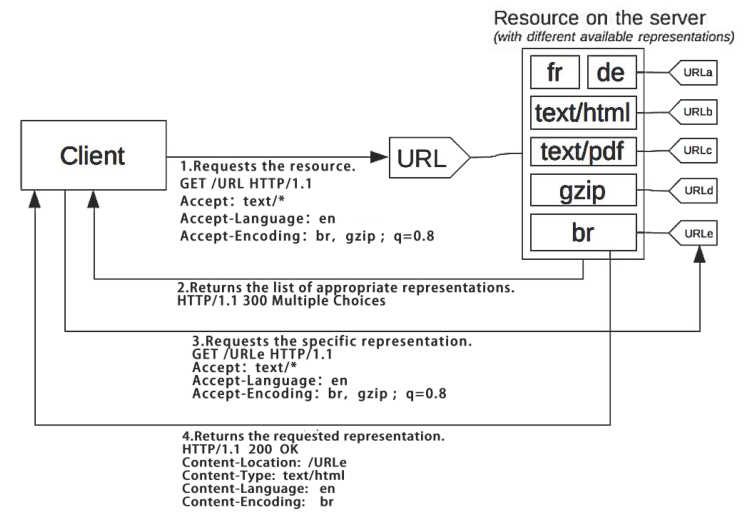
The same URI may represent different content depending on the country/region, user device, network conditions, and so on. The process of obtaining this content is content negotiation.
Depending on whether the client or the server decides, it is divided into proactive content negotiation and reactive content negotiation.
Proactive Content Negotiation
The client first states the representations it wants in the request headers, and the server provides a specific representation based on those headers.
This is the more common form.
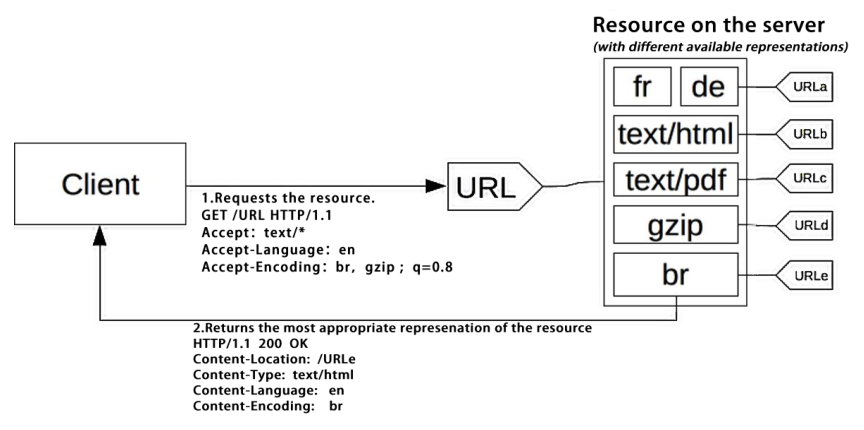
During negotiation, the client needs to send the following:
- q: the quality factor — the quality, priority, etc. of the content.
- It has no dedicated request header; it is configured within related request headers.
- Quality refers to things like image quality; priority indicates which formats the content leans toward.
- Accept: the MIME types of acceptable media resources and their quality factors. For example:
Accept: text/html,application/xhtml+xml,application/xml;q=0.9,*/*;q=0.8Accept: text/html,application/xhtml+xml,application/xml;q=0.9,image/webp,image/apng,*/*;q=0.8,application/signed-exchange;v=b3
- Accept-Charset: character encoding. Since UTF-8 is widely used, Accept-Charset has been deprecated
- Accept-Encoding: content encoding — mainly compression algorithms, e.g.
Accept-Encoding: gzip, deflate, br - Accept-Language: the preferred languages. For example:
Accept-Language: zh-CN,zh;q=0.9,en-US;q=0.8,en;q=0.7Accept-Language: zh-CN,zh;q=0.8,zh-TW;q=0.7,zh-HK;q=0.5,en-US;q=0.3,en;q=0.2
When the server describes a resource, the common response headers are:
- Content-Type: the MIME type and encoding, e.g.
Content-Type: text/html; charset=utf-8 - Content-Encoding: the content encoding, e.g.
Content-Encoding: gzip - Content-Language: the language, e.g.
Content-Language: de-DE, en-CA
Reactive Content Negotiation
The server returns 300 Multiple Choices or 406 Not Acceptable, and the client chooses one representation URI to use.
This is rarely used — on one hand browser support is poor, and on the other it requires an extra request round-trip, costing more performance.
Response
body Transmission
Transmitting with a Known Body Length
When the full length of the body is already known before sending the HTTP message, the Content-Length header explicitly states the body length and must match the actual transmitted body length.
- If Content-Length > the body's actual length, the request errors out directly
- If Content-Length < the body's actual length, the body's content is truncated
Advantage: simple processing on the receiving end.
Disadvantage: when compressing a large body, the response cannot be sent until compression finishes, so the client receives it relatively late.
Transmitting with an Unknown Body Length
When the full length of the body cannot be determined before sending the HTTP message, the Transfer-Encoding header specifies chunked transfer; once the Transfer-Encoding header is present, the Content-Length header should be ignored
Advantages:
- Continuously pushing dynamic content over a persistent connection
- When compressing a large body, you don't have to finish compressing (computing the header) before sending — you can compress while sending
- Carrying Trailer headers that can only be computed after the body has been fully transmitted
Disadvantages:
- Complicated processing on the receiving end
- No formal RFC; support depends on browser implementations
HTTP Range
The HTTP Range specification (RFC7233) allows a server to send only part of the response body to the client based on the client's request, and the client automatically assembles multiple body fragments into a complete, larger body
Range enables:
- Resumable downloads
- Multi-threaded downloads
- Video playback starting immediately from a specified position
The server indicates whether it supports Range requests via the Accept-Range header.
Accept-Ranges: bytes: supportedAccept-Ranges: none: not supported
The client passes the requested range via the Range request header, e.g. Range: bytes=0-499
Byte-based; suppose the total body length is 10000
- The 1st 500 bytes: bytes=0-499
- The 2nd 500 bytes: bytes=500-999
- Segments are supported: bytes=500-600,601-999
- The last 500 bytes: bytes=-500 or bytes=9500-
- Only the 1st and last bytes: bytes=0-0,-1
Range can also be combined with caching — for example, the first 100 bytes of a request hit the cache while the last 100 bytes need to be re-requested. There are two options:
- Use If-Unmodified-Since or If-Match
- Use If-Range directly: ETag / Last-Modified
There are three possible responses:
- 206 Partial Content: part of it hit the negotiated cache and the rest was re-downloaded;
Content-Rangeindicates where the current fragment sits within the complete body- For example:
Content-Range: bytes 42-1233/1234means bytes42-1233were returned out of a total of1234bytes
- For example:
- 200 OK: when the server does not support Range requests, it returns the complete response body with 200
- 416 Range Not Satisfiable: the requested range does not fit the actual resource size, e.g.
Content-Range: bytes */1234
If the requested fragments are discontinuous, the response uses multipart, e.g. Content-Type: multipart/byteranges; boundary=…
CORS
The Same-Origin Policy
It restricts how documents or scripts loaded from one origin can interact with resources from another origin, preventing site B's scripts from freely modifying site A's DOM structure
The same-origin policy was designed to balance usability and security:
Usability: website creators can decide whether cross-origin requests are safe for their site
- Tags with src attributes — script, img, iframe, link, video, audio, etc. — can access cross-origin
- Cross-origin writes are allowed: for example, form submissions or redirect requests.
- The reason is that forms are usually configured by the site's own developers, who know a cross-origin write is happening and understand the security risk — and also for compatibility with legacy code.
- CSRF security issues
Security: the browser needs to prevent site A's scripts from performing dangerous actions against site B
- Cookie, LocalStorage, and IndexedDB cannot be read
- The DOM cannot be obtained (preventing cross-origin scripts from tampering with the DOM structure)
- AJAX requests cannot be sent: AJAX can be injected through CDN scripts and the like — not necessarily written by the developer — so it is blocked by default.
The CORS Process
If site A allows site B's scripts to access its resources, it must explicitly tell the browser in the HTTP response that site B is allowed
- For requests to site A, the browser should declare that the request comes from site B
- Site A's response should state explicitly which cross-origin requests are allowed
Considering security, performance, and compatibility, CORS divides requests into simple requests and non-simple requests, whose CORS flows differ.
- Security: non-simple requests often modify the system or perform sensitive operations
- Performance: simple requests are usually the same as form submissions; skipping the preflight reduces server pressure
- Compatibility: backward compatible with requests sent by form submissions
Simple Requests
A simple request must meet the following conditions:
- One of the GET/HEAD/POST methods
- Only CORS-safe headers may be used: Accept, Accept-Language, Content-Language, Content-Type
- The Content-Type value must be one of: text/plain, multipart/form-data, application/x-www-form-urlencoded
The basic flow of a simple request:
- The request carries the Origin header stating which origin it comes from
- The response carries the Access-Control-Allow-Origin header stating which origins are allowed
- The browser lets it through
Non-simple Requests
Anything that is not a simple request is a non-simple request, and non-simple requests require a preflight.
Preflight request headers
- Access-Control-Request-Method
- Access-Control-Request-Headers
Preflight response headers
- Access-Control-Allow-Methods
- Access-Control-Allow-Headers
- Access-Control-Max-Age
sequenceDiagram
  participant Client
  participant Server

  rect rgb(255, 255, 255)
  Note over Client, Server: Preflight request
  Client->>Server: OPTIONS /doc HTTP/1.1
  Note right of Client: "Origin: Server-b.com<br/>Access-Control-Request-Method: POST<br/>Access-Control-Request-Headers: X-PINGOTHER, Content-Type"

  Server-->>Client: HTTP/1.1 200 OK
  Note left of Server: "Access-Control-Allow-Origin: http://foo.example<br/>Access-Control-Allow-Headers: X-PINGOTHER, Content-Type<br/>Access-Control-Max-Age: 86400"
  end

  rect rgb(255, 255, 255)
  Note over Client, Server: Actual request
  Client->>Server: POST /doc HTTP/1.1
  Note right of Client: "X-PINGOTHER: pingpong<br/>Content-Type: text/xml charset=UTF-8<br/>Origin: Server-b.com"

  Server-->>Client: HTTP/1.1 200 OK
  Note left of Server: Access-Control-Allow-Origin: http://foo.example
  end
CORS Headers
Request headers:
- Origin (RFC6454): a page's resources may come from multiple domains; in sub-requests such as AJAX, it identifies which domain's script the request originates from, so it can pass the server's security checks
- origin: the format is
"Origin:" OWS origin-list-or-null OWS - origin-list-or-null: the format is
%x6E %x75 %x6C %x6C / origin-list - origin-list: the format is
serialized-origin *( SP serialized-origin ) - serialized-origin: the format is
scheme "://" host [ ":" port ]
- origin: the format is
- Access-Control-Request-Method: in the preflight request (OPTIONS), tells the server which methods the upcoming request will use
- Access-Control-Request-Headers: in the preflight request (OPTIONS), tells the server which headers the upcoming request will carry
Response headers
- Access-Control-Allow-Methods: in the preflight response, tells the client which methods subsequent requests may use
- Access-Control-Allow-Headers: in the preflight response, tells the client which headers subsequent requests may carry
- Access-Control-Max-Age: in the preflight response, tells the client how long the response's information can be cached
- Access-Control-Expose-Headers: tells the browser which response headers are exposed to the client; by default only Cache-Control, Content-Language, Content-Type, Expires, Last-Modified, and Pragma are available
- Access-Control-Allow-Origin: tells the browser which origins may access the current resource;
*means all origins are allowed. To avoid cache mix-ups, the response should carryVary: Origin - Access-Control-Allow-Credentials: tells the browser whether Credentials may be exposed to the client; Credentials include cookies, authorization-type headers, TLS certificates, etc.
Conditional Requests
The client carries condition information, and the server returns the resource's representation only after a pre-executed validation succeeds. Common use cases:
- Negotiated caching, SWR, etc.
- Validating previously downloaded content when resuming a transfer
- Preventing one client's update from being incorrectly discarded when multiple clients modify the same resource in parallel
In conditional requests, the server uses validators to validate the resource and determine whether it is usable. There are generally two kinds:
- Strong validator: any change to the resource's representation on the server (such as a version update or metadata update) means access with the old validation header will definitely fail validation
- Weak validator: when the resource changes on the server, validation may still pass to some extent (for example, the cache remains valid for a short period)
Validators inform the client of the validity of the currently requested resource via ETag and Last-Modified
ETag: the ETag contains a tag for the corresponding resource representation, returned by the backend — generally${last_modified_time}-${content_length}ETag: "tag": uses a strong validatorETag: W/"tag": uses a weak validator
Last-Modified: indicates when the corresponding resource representation was last modifiedDateis also a time, but Date is when the response body was generated;Last-Modifiedcannot be later thanDate
For race operations, sometimes you need not only matching but also non-matching (resumable downloads). HTTP provides the following conditional request headers:
If-Match: checks whether the resource's ETag fully matches the ETag of the server's current resource; the format isIf-Match "*" / 1#entity-tagIf-None-Match: checks whether the resource's ETag does not match the ETag of the server's current resource; the format isIf-None-Match "*" / 1#entity-tagIf-Modified-Since: checks whether the resource has been modified after the specified time; the format isIf-Modified-Since HTTP-dateIf-Unmodified-Since: checks whether the resource has not been modified after the specified time; the format isIf-Unmodified-Since HTTP-dateIf-Range: works with Range chunked downloads; the format isIf-Range entity-tag / HTTP-date
For the specific decision flow, see: